Service Support — Content Writing
Refreshing 50 Old Posts vs Writing 50 New Ones
Content refresh vs new content: how to decide which of 50 old posts to refresh and which topics deserve a brand-new article instead.

If you have to choose between refreshing 50 old posts and writing 50 new ones, the decision isn’t a coin toss — it’s a page-by-page audit question. Refresh a post if it already ranks somewhere on page 1-3 for a keyword you want, gets some impressions in Search Console, but is thin, outdated, or was written before you knew what actually mattered to that audience. Write new if the topic has no page on your site at all, or the existing page targets a genuinely different intent than the one you now want to rank for. Most batches of 50 end up being a mix of both — rarely a clean 50/0 split either way.
Key takeaway
- Refresh pages that already have rankings, impressions, or backlinks — you’re improving an asset that already carries some authority.
- Write new for topics with no existing page, or where the existing page targets a different search intent than the one you actually want.
- A batch of 50 is almost never all-refresh or all-new — audit each URL individually before deciding the split.
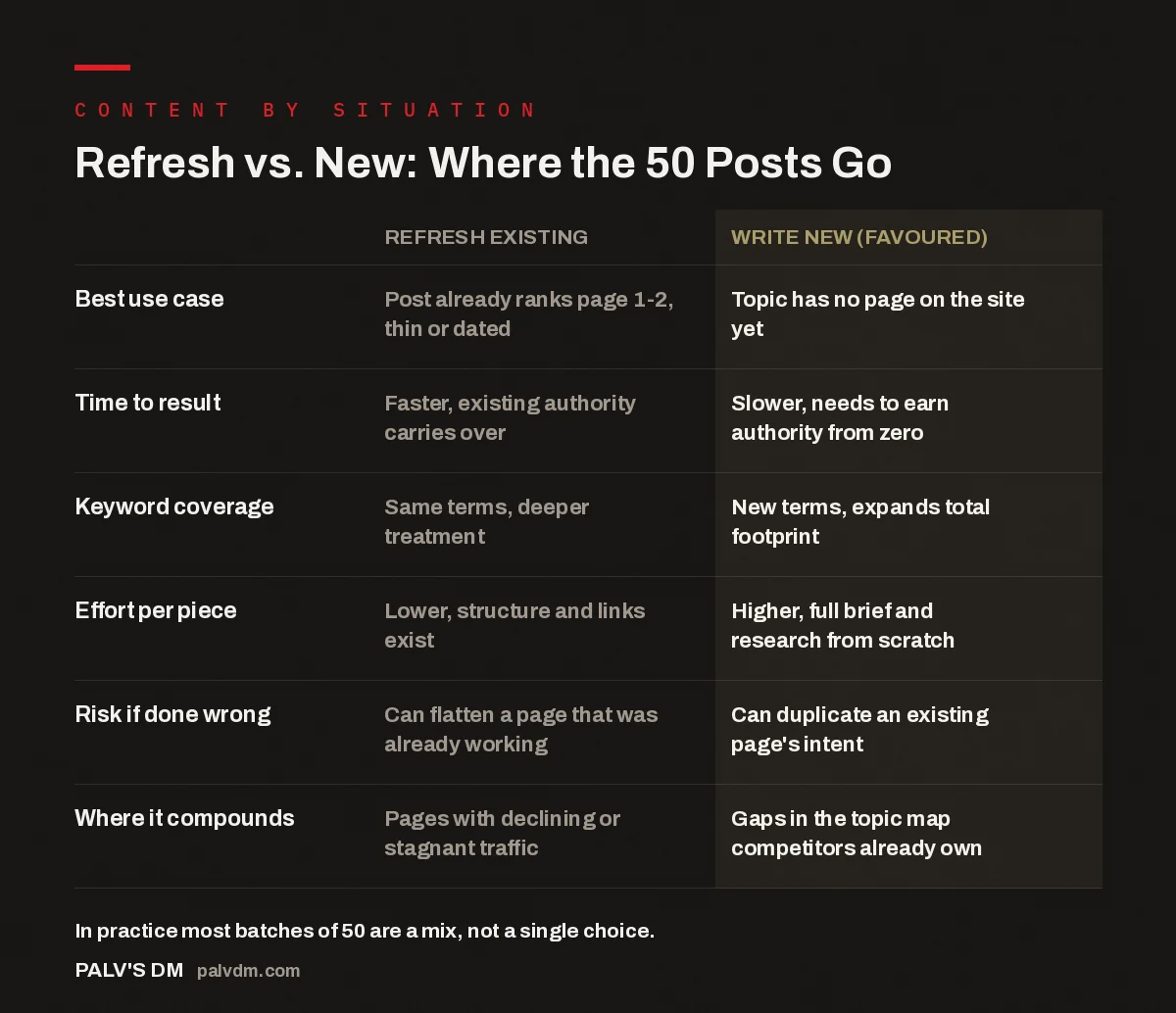
Refresh vs. New: Where the 50 Posts Go
| Refresh existing | Write new (favoured) | |
|---|---|---|
| Best use case | Post already ranks page 1-2, thin or dated | Topic has no page on the site yet |
| Time to result | Faster, existing authority carries over | Slower, needs to earn authority from zero |
| Keyword coverage | Same terms, deeper treatment | New terms, expands total footprint |
| Effort per piece | Lower, structure and links exist | Higher, full brief and research from scratch |
| Risk if done wrong | Can flatten a page that was already working | Can duplicate an existing page’s intent |
| Where it compounds | Pages with declining or stagnant traffic | Gaps in the topic map competitors already own |
How do you decide which of the 50 to refresh?
Pull every URL into one sheet with three columns: current ranking position, impressions over the last 90 days, and word count or publish date. Anything ranking positions 4-20 with real impressions is a refresh candidate — it’s already telling Google and users that it’s relevant, it just isn’t good enough yet. Anything with zero impressions and no backlinks is a different problem: either the topic itself has no demand, or the page was never indexed properly, or it’s competing against a much stronger page you already have on the same subject. That last case is common on older sites — two posts quietly targeting the same query, splitting authority between them instead of combining it.
The posts that look “old” but are actually fine to leave alone are the ones sitting at position 1-3 with stable traffic. Refreshing a page that’s already winning is where teams do the most damage — a rewrite changes the URL’s internal structure, sometimes its title tag, sometimes the exact phrasing that happened to match a featured snippet. If a page works, the safer move is a light edit: add one missing subtopic, update a date reference, fix a broken link. Save the full refresh for pages that are visibly underperforming their potential.
What does a refresh actually involve?
A real refresh is not a find-and-replace of the publish date. It starts with re-reading the page against what currently ranks for that keyword — not what ranked when the post was first written. If the top-ranking pages now cover three subtopics your post skips, those get added. If your post has a section that no longer matches how the audience searches (old terminology, a deprecated tool, pricing that’s since changed), that section gets rewritten, not patched. The internal links get checked too — old posts often link to pages that have since been merged, redirected, or deleted, and a refresh is the natural point to fix that.
Structure matters as much as content on a refresh. Posts written a few years ago were often built around long, unbroken paragraphs with no clear answer near the top. Restructuring an old post to answer the core question in the first few sentences, then breaking the rest into scannable, question-style sections, tends to be one of the highest-leverage changes you can make — often more impactful than adding new paragraphs of content.
When does writing new outperform refreshing?
New content wins when there’s genuinely no page to work with — a competitor question you’ve never addressed, a new service line, a subtopic that’s grown large enough to deserve its own page instead of a paragraph inside a bigger post. It also wins when the existing page’s intent doesn’t match what you now want to rank for. A page written as a broad definitional guide can’t easily be turned into a comparison page or a pricing page just by editing it — the structure, the queries it’s meant to answer, and the internal linking around it are all built for a different job. Trying to force one intent into a page built for another usually produces a page that serves neither well.
New content is also the right call when you’re trying to build topical coverage a competitor already owns. Refreshing existing posts improves what you already rank for; it does very little to close a gap in topics you haven’t touched at all. If an audit shows entire subtopics with no page on your site — while a competitor has five — refreshing your existing 50 posts won’t close that gap, no matter how well it’s done.
Refreshing fixes pages that are close but not good enough. Writing new fixes pages that don’t exist. Confusing the two is the most common way a content budget gets wasted.
Palash, Founder, PalV’s DM
What if the audit doesn’t give you a clean answer?
Some URLs will sit in a grey zone — mid-page-2 rankings, decent impressions, but a topic that’s arguably better served as two separate pages than one refreshed one. In the accounts we work on, the pattern that shows up repeatedly is that these grey-zone posts are usually old posts trying to cover too much ground at once. The fix there is neither a pure refresh nor a pure new post — it’s a split. The original page gets trimmed down and refreshed around its strongest subtopic, and the material that doesn’t fit becomes a new, narrower page of its own, interlinked back to the original.
Don’t try to resolve every grey-zone case with a rule. A spreadsheet with rankings and impressions gets you 80% of the way to a clean refresh-or-new decision; the remaining 20% needs someone to actually read the page and the pages currently outranking it, side by side, and make a judgment call. That step is slower, but skipping it is exactly how a 50-post batch ends up with a dozen refreshes that didn’t move anything, because the underlying problem was never the content quality — it was that the page was answering the wrong question.
Budget and timeline are the other real variable. A refresh is typically faster to produce than a new article because the research, structure, and internal links are already partly in place — you’re editing, not starting from a blank brief. If you have limited capacity and a large batch to work through, front-loading refreshes on your best-performing near-misses usually shows movement sooner, which then frees up budget to fund the slower, from-scratch new pages that close bigger topical gaps.
Key takeaway
- Audit rankings, impressions, and intent per URL before deciding — don’t apply one rule to all 50 posts.
- Refresh near-misses first for faster wins; use the freed-up budget to fund new pages for topic gaps.
- If you can’t tell which a post needs, that’s usually a sign it should be split into a refresh plus a new, narrower page.
Get an audit of which posts to refresh and which to write from scratch
FAQ
Is refreshing content always cheaper than writing new?
Usually, but not always. A light refresh of a mostly-good post is cheaper than a new article. A refresh that requires a full restructure, new research, and a rewritten intro can end up taking nearly as long as writing new — the savings come from not starting the keyword and competitor research from zero, not from the writing itself being shorter.
How do I know if an old post is beyond refreshing?
If the post has no impressions in Search Console after 90+ days live, no backlinks, and the topic itself no longer matches what people search for, refreshing it is unlikely to help. That’s a signal to either retire the page with a redirect to a more relevant one, or treat the topic as a new-page opportunity rather than an edit.
Should I update the publish date when I refresh a post?
Only if the content actually changed meaningfully. Updating the date on a post with no real edits is the kind of thing that’s easy to spot and does more harm than good — both for readers who notice, and because it signals a refresh that isn’t one. Update the date when you’ve genuinely rewritten a section, not as a routine step.
Can I refresh and expand a post into multiple pages at once?
Yes, and it’s often the right move for posts that try to cover too many subtopics at once. Trim the original down to its strongest subtopic and refresh that, then spin off the remaining subtopics into their own new, narrower pages, linked back to the original. This usually outperforms leaving one long post trying to rank for everything.
What’s the fastest way to triage 50 posts before deciding?
Export current rankings and 90-day impressions for all 50 URLs into one sheet, sort by position, and flag anything ranking 4-20 with real impressions as a refresh candidate. Anything with near-zero impressions needs a second look at intent and competition before you decide whether it’s worth a refresh or better replaced by a new page.
Related reading
If you’re weighing the cost side of this decision, see how cheap content compares to researched content over a 12-month period — it applies whether you’re refreshing or writing new. If most of your 50 posts turn out to be gaps rather than near-misses, it’s worth checking how many articles you typically need before traffic actually moves. For budgeting either path, what SEO content should cost per article in India breaks down pricing for both refresh and new-page work. And if you’re unsure whether you need someone doing the writing or someone deciding what to refresh versus write in the first place, the difference between a writer and a content strategist is worth reading before you start the batch.
Short version: Refresh posts that already rank and get impressions but underdeliver on structure or depth. Write new for topics with no existing page or a mismatched intent. Audit each URL individually — rankings, impressions, and intent — rather than applying one rule to all 50, and expect the split to be a mix rather than all-one-or-the-other.