Trends & Industry Developments
AI Crawler Naming Keeps Changing: Keeping Your robots.txt Current
AI crawler user agent changes happen often. Heres how to audit logs, sort bot types by job, and keep robots.txt accurate so new crawlers dont go unblocked.
AI crawler user agent changes happen more often than most robots.txt files get updated — which is why a file that blocked the right bots six months ago can quietly be doing nothing today. OpenAI, Anthropic, Google, Perplexity and others have each split, renamed or added crawler tokens as their products evolved, and a robots.txt rule only works if it matches the exact token a crawler is currently sending. The fix isn’t a bigger blocklist. It’s treating robots.txt as a file you review on a schedule, backed by your own server logs, not a file you set once and forget.
Key takeaway
- robots.txt matches exact user-agent tokens — a renamed or newly split crawler is not automatically covered by your old rule, and it defaults to allowed unless you add a new line for it.
- The same company often ships multiple bots for different jobs: a training crawler, an answer-engine indexer, and a live fetcher triggered by a user’s own request. They need different policies, not one blanket rule.
- Server logs, not a public “list of AI bots,” are the most reliable way to catch a new or renamed crawler before it’s been hitting your site unblocked for weeks.
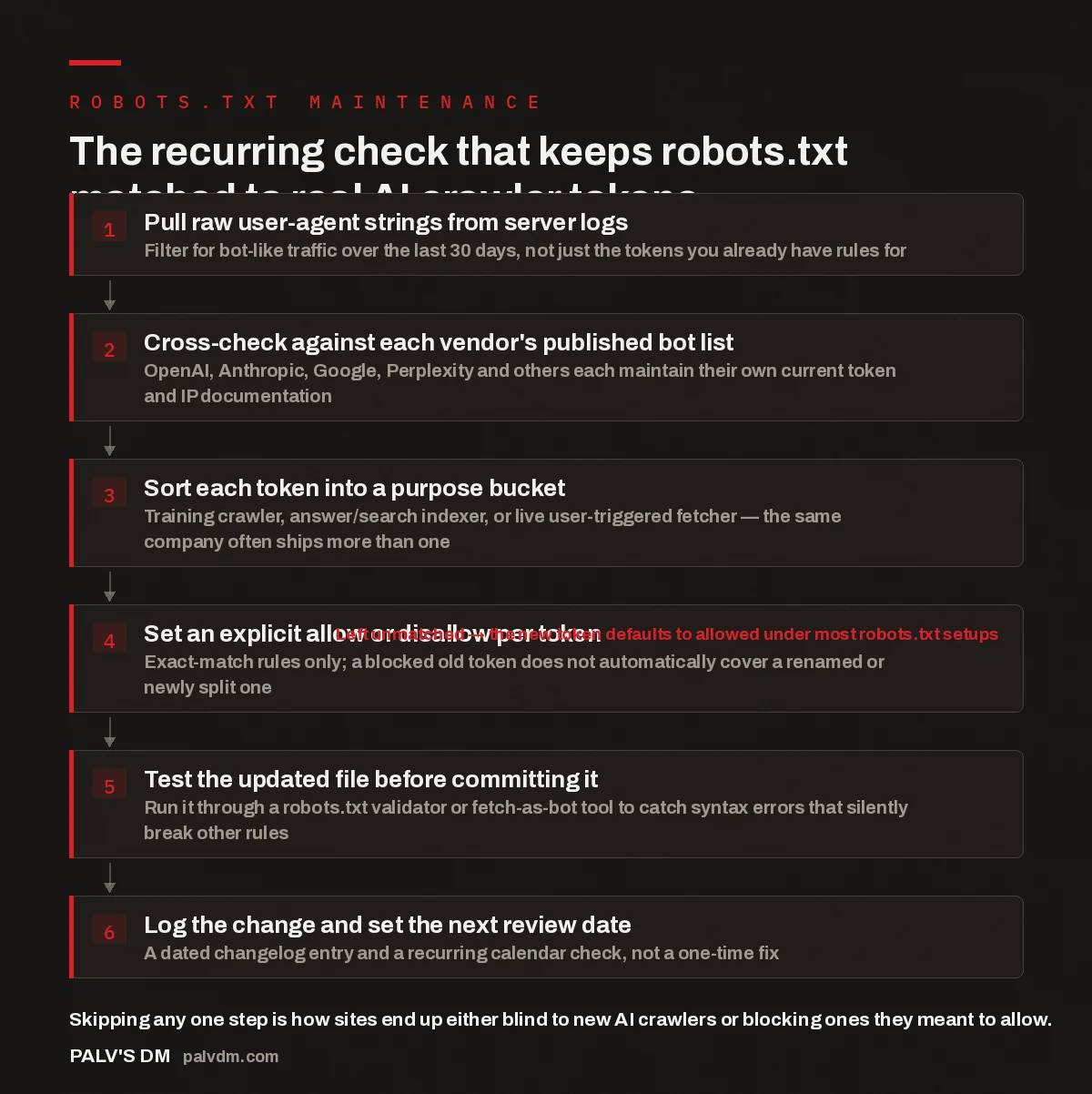
The recurring check that keeps robots.txt matched to real AI crawler tokens
- Pull raw user-agent strings from server logs. Filter for bot-like traffic over the last 30 days, not just the tokens you already have rules for.
- Cross-check against each vendor’s published bot list. OpenAI, Anthropic, Google, Perplexity and others each maintain their own current token and IP documentation.
- Sort each token into a purpose bucket. Training crawler, answer/search indexer, or live user-triggered fetcher — the same company often ships more than one.
- Set an explicit allow or disallow per token. Exact-match rules only; a blocked old token does not automatically cover a renamed or newly split one. Left unmatched → the new token defaults to allowed under most robots.txt setups
- Test the updated file before committing it. Run it through a robots.txt validator or fetch-as-bot tool to catch syntax errors that silently break other rules.
- Log the change and set the next review date. A dated changelog entry and a recurring calendar check, not a one-time fix.
Why does AI crawler naming keep changing?
Because the crawlers aren’t one thing. Every major AI platform that touches the open web now runs more than one bot, and the split has been getting finer, not coarser. OpenAI’s GPTBot gathers training data; OAI-SearchBot indexes pages for ChatGPT’s search features; ChatGPT-User fires when a person inside a ChatGPT conversation asks it to fetch a specific page right now. Anthropic runs a comparable split for Claude. Google separates ordinary Googlebot crawling for search from Google-Extended, the token governing whether content can be used for Gemini and other AI training. Perplexity runs both a standing crawler and a user-triggered fetcher under different names.
Each of those tokens exists because “AI crawler” isn’t a single use case — training, indexing for citation, and answering a live user request are three different jobs with three different implications for a publisher, and the vendors have moved toward naming each job separately rather than lumping them under one bot. That trend is why a robots.txt file written against a single “block the AI bot” mental model keeps falling out of date: there was never one bot to block.
What actually breaks when a robots.txt file goes stale?
Two failure modes, and they pull in opposite directions. The first: a vendor renames or splits a token, your old Disallow line references the retired name, and the new crawler walks straight through unblocked — because robots.txt rules are exact-match, not fuzzy. A site that deliberately blocked a training crawler months ago can end up feeding that same company’s model again simply because the token changed and the rule didn’t. The second failure mode is the reverse — a broad wildcard rule, written to catch “anything with Bot in the name,” ends up blocking a live user-triggered fetcher like ChatGPT-User or Perplexity-User. That means someone asks an AI assistant to pull up your page and the assistant can’t reach it, even though you never intended to block that traffic.
Both failures are invisible unless you’re actually watching for them. No typical analytics dashboard flags “this crawler used to be blocked and now isn’t,” or “a user just tried to reach this page through an AI assistant and got refused.” Log review is what surfaces both.
How do you find AI crawler user agent changes before they cause a problem?
Server logs first, published lists second. Public roundups of “AI bot user agents” are useful for cross-referencing, but they’re always slightly behind — someone has to notice a new token, document it, and publish it, and that lag is exactly the window where your robots.txt is out of sync. Your own access logs show what’s actually hitting your site right now, including tokens nobody has written about yet.
- Pull a sample of raw user-agent strings from the last 30 days of server or CDN logs, filtered to requests that look automated (no session cookies, high request rate, no referrer).
- List every distinct token you don’t already have an explicit rule for.
- Check each unfamiliar token against the crawling documentation the vendor itself publishes — OpenAI, Anthropic, Google, Perplexity, Meta and others each keep a current page listing their bot names and IP ranges.
- Decide a policy per token based on what it does, not on how alarming the name sounds.
If you’re on Cloudflare or a similar edge network, this gets easier — content-signal controls let you set policy by category (search indexing, AI training, AI input) instead of maintaining a token-by-token list yourself, with the platform keeping its own bot classifications current on your behalf. We cover that approach in our piece on Cloudflare content signals and AI crawler control, worth reading alongside this one if your infrastructure sits behind Cloudflare.
How should you decide which AI crawlers to allow or block?
By what the token is used for, not by a blanket “AI equals block” instinct. Three buckets cover most decisions:
- Training crawlers (tokens whose stated purpose is gathering data to train a model) — block these if you don’t want your content used as training data and you’re not relying on that same company’s model to cite you back. This is the clearest “your call” bucket; there’s no visibility trade-off either way for most sites.
- Answer-engine indexers (tokens that crawl to power citations inside an AI assistant’s answers) — blocking these directly removes you from that assistant’s ability to cite you at all. If AI visibility is part of your strategy, this is usually the bucket you leave open, the same logic that applies to allowing Googlebot for organic search.
- Live user-triggered fetchers (tokens that fire when a person explicitly asks an assistant to open a specific page) — blocking these breaks a real person’s request in real time. There’s rarely a good reason to block this bucket wholesale; if a specific page shouldn’t be fetched this way, handle it at the page level, not by blocking the token site-wide.
Sorting tokens into these three buckets before writing any Disallow lines is what prevents the accidental over-blocking that shows up so often when robots.txt gets edited in a hurry after a headline about AI scraping.
Most robots.txt files we audit weren’t written wrong — they were written correctly for the crawlers that existed on the day someone last touched the file. The mistake is treating that as a finished task instead of a maintenance job with a recurring date on the calendar.
Palash, Founder, PalV’s DM
How does this connect to crawl budget and Google’s own crawler documentation?
The same discipline applies beyond AI-specific bots. Google has been updating its crawling documentation and crawl budget guidance, and the pattern is identical — guidance built around one set of crawler behaviours gets revised as the underlying systems change, and a site’s setup that matched the old guidance quietly stops matching the new one. When reviewing robots.txt for AI crawler tokens, it’s efficient to fold in a check of Google’s current crawl budget guidance and what’s changed in Google’s documentation this quarter, since both live in the same file and the same review cadence covers all of it.
There’s also a forward-looking reason to keep this current beyond blocking or allowing crawlers: if agentic tools are going to fetch structured data from your pages on a user’s behalf, the crawler needs to reach the page before the structure even matters. We go into that side of the problem in preparing product and service data for AI agents — access is the first gate, and it’s the one this article is about.
What does a sane review cadence actually look like?
Quarterly at minimum, with a log check as the trigger rather than a fixed date alone. A calendar reminder every three months is a reasonable floor, but the more useful trigger is watching your logs for unrecognised user-agent strings and treating a new one as a signal to run the review early. Pair that with a lightweight changelog — even a single line noting which token was added or removed and why — so the next person to touch the file isn’t reverse-engineering intent from a diff. For a site with an active AI visibility strategy, this belongs in the same recurring process as any other technical SEO health check, not a one-off project each time a headline about AI scraping makes it feel urgent.
Get this checked properly
If you’re not sure which AI crawlers are currently reaching your site, or which ones your robots.txt is actually blocking versus which ones it just used to block, that’s a quick technical check — and it’s the kind of gap that undermines an AI visibility strategy before it starts.
FAQ
How do I know if a new AI crawler is hitting my site before someone publishes a list naming it?
Check your own server or CDN logs for user-agent strings that look automated but don’t match any rule already in your robots.txt. Public lists of AI bot names are always somewhat behind, since a new token has to be noticed and documented before it appears in one — your logs show it the moment it starts crawling.
What happens if I don’t update robots.txt when a crawler’s user agent changes?
Nothing breaks visibly, which is the risk. robots.txt rules match exact tokens, so a renamed or newly split crawler simply isn’t covered by your old Disallow line and defaults to allowed under most configurations. You end up either newly exposed to a crawler you meant to block, or still blocking a token that no longer represents current traffic.
Should I just block all AI crawlers to be safe?
Only if you’re comfortable also being invisible to AI-generated answers and unreachable when someone asks an assistant to fetch your page directly. A blanket block treats training crawlers, answer-engine indexers and live user-triggered fetchers as one thing, when they serve different purposes and carry different trade-offs for a publisher.
Is Google-Extended the same crawler as Googlebot?
No. Googlebot crawls for standard search indexing, while Google-Extended is the separate token that governs whether your content can be used for Gemini and other Google AI training. Blocking one has no effect on the other — they’re independent rules and need to be set separately in robots.txt.
How often should I review robots.txt for AI crawler changes?
Quarterly as a baseline, triggered earlier any time your log review turns up an unrecognised user-agent string. Pair the review with a short changelog noting what was added, removed, or changed and why, so the reasoning behind each rule doesn’t have to be reconstructed from scratch each time.
Short version: AI crawler user agent changes are routine, not exceptional — vendors keep splitting and renaming tokens as their products separate training, indexing and live-fetch functions. robots.txt only works against exact token matches, so treat it as a file with a standing quarterly review, sourced from your own server logs first and vendor documentation second, with a deliberate allow/block decision per crawler purpose rather than one blanket rule for anything that looks like a bot.