Trends & Industry Developments
Google Crawl Budget Guidance Changed: What the New Doc Says
This guide covers what changed in Google crawl budget documentation, who the guidance applies to, and how to audit crawl efficiency regardless of wording.

Google’s crawl budget documentation gets revised periodically, and each time it does, a wave of “is this a big deal?” posts follows. It usually isn’t. When Google touches its Crawl Budget Management for Large Sites page, the changes are almost always definitional tightening, updated examples, or a clearer statement of who the guidance is for — not a new ranking lever. If you’re searching “google crawl budget documentation” because you noticed a revision date change, the honest answer is: check what specifically moved, confirm whether your site is in the audience the guidance targets, and don’t let a documentation edit trigger a site-wide crawl panic.
Key takeaway
- Google revises its crawl budget documentation from time to time — usually clarifying definitions and examples, not introducing a new ranking signal.
- The guidance has always been aimed at very large sites or sites that change fast, not the average small-to-mid-size business site.
- Whatever the current wording says, the underlying audit doesn’t change: server health, wasted URLs, and sitemap hygiene are what actually move crawl efficiency.
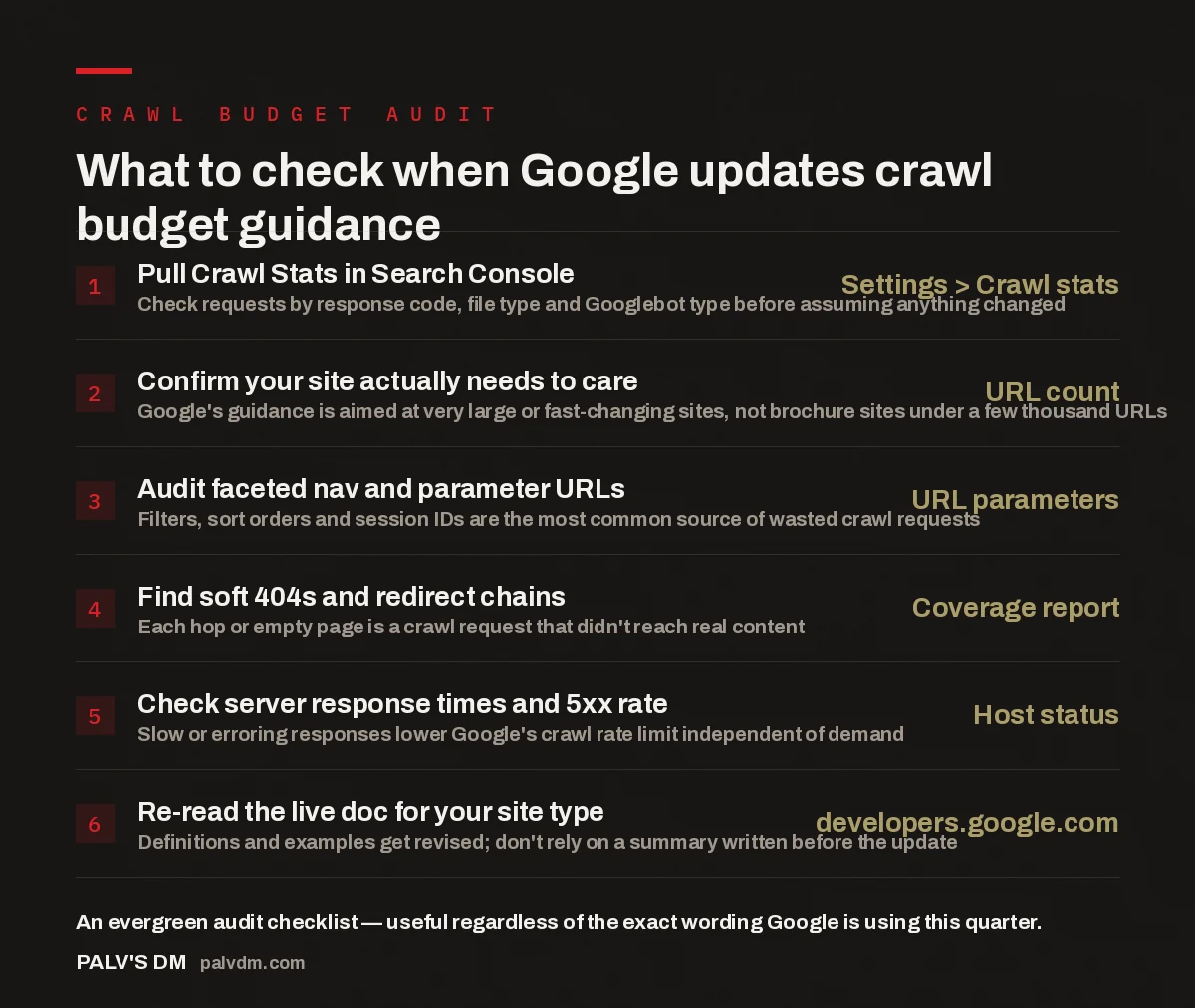
What to check when Google updates crawl budget guidance
- Pull Crawl Stats in Search Console — Settings > Crawl stats. Check requests by response code, file type and Googlebot type before assuming anything changed.
- Confirm your site actually needs to care — URL count. Google’s guidance is aimed at very large or fast-changing sites, not brochure sites under a few thousand URLs.
- Audit faceted nav and parameter URLs — URL parameters. Filters, sort orders and session IDs are the most common source of wasted crawl requests.
- Find soft 404s and redirect chains — Coverage report. Each hop or empty page is a crawl request that didn’t reach real content.
- Check server response times and 5xx rate — Host status. Slow or erroring responses lower Google’s crawl rate limit independent of demand.
- Re-read the live doc for your site type — developers.google.com. Definitions and examples get revised; don’t rely on a summary written before the update.
What does Google’s crawl budget documentation actually say?
The core framework has been stable for years, even as the wording around it gets edited: crawl budget is a function of two things — crawl rate limit (how fast Googlebot can fetch pages without straining your server) and crawl demand (how much Google wants to fetch, based on a URL’s popularity and how often it’s likely to have changed). When Google updates this documentation, it’s usually clarifying one of those two halves: tightening a definition, swapping an example, or restating which factors affect rate limit versus demand. What almost never changes is the top-line message: crawl budget is a scheduling and resourcing problem for Googlebot, not a quality or ranking signal by itself.
Because the framework is stable, the practical move when you notice a revision is narrow: open the live page on developers.google.com, compare it against what you remember, and identify the specific line that changed. Don’t rely on a secondhand summary — including this one — for the exact current wording. Documentation pages get edited without announcement, and paraphrase drifts fast in an industry that keeps sharing screenshots weeks after the source has moved on.
Who does the crawl budget guidance actually apply to?
This is the part that gets lost every time the documentation changes. Google has consistently scoped crawl budget management to two categories: sites with a very large number of URLs, and sites that regenerate large portions of content frequently — marketplaces, classifieds, high-velocity publishers, or catalogs with heavy faceted navigation. A ten-page services site or a blog publishing a few posts a week is not the audience for this guidance, no matter how it’s worded this quarter.
If your site falls outside that scope, revisions to the crawl budget doc are worth a skim for general literacy, not a reason to open a crawl audit. The signal that matters for smaller sites is simpler: is Google indexing the pages you want indexed, in reasonable time, without excessive “Discovered” or “Crawled — currently not indexed” states in Search Console. That’s usually a coverage and quality issue, not a crawl budget one.
What typically changes when Google revises this documentation?
Across the pattern of edits Google has made to its developer documentation generally — not just the crawl budget page — a few categories of change repeat:
- Terminology tightening. A loosely used term gets a precise definition, or overlapping terms (crawl rate limit, crawl demand, crawl health) get separated more clearly.
- Example refreshes. Old examples of crawl waste get swapped for more current ones as the web’s common failure modes shift.
- Audience scoping. Language clarifying who should and shouldn’t worry about this gets sharpened, usually to stop small sites treating crawl budget as a priority it isn’t for them.
- Cross-links to newer surfaces. As Google adds new crawler types, documentation gets updated to reference how they relate to the existing crawl budget model.
None of these represent Google changing how crawling actually works at the infrastructure level — they’re Google explaining the existing system more precisely, a maturity pattern visible across most Search Central content, not something specific to crawl budget.
Every time Google edits a Search Central page, half the industry treats it as a new algorithm update. Ninety percent of the time it’s an editor tightening a sentence that was ambiguous for three years. Read the diff, not the reaction.
Palash, Founder, PalV’s DM
How do you audit crawl efficiency regardless of the current wording?
If your site is large or fast-changing enough that crawl budget genuinely applies, the audit process is the same one that’s worked for years, independent of documentation phrasing:
- Start with Search Console’s Crawl Stats report. Check total requests over time, response breakdown (200s vs. 4xx vs. 5xx), and file type. A spike in errored or redirected requests is where wasted budget shows up first.
- Pull server logs if you can. Log analysis is the most direct way to see which URLs Googlebot spends time on, and whether that matches what you actually want ranked.
- Map your parameter and facet space. Filters, sort orders, session identifiers and print/PDF variants are the most common source of near-infinite URL spaces that quietly consume crawl requests.
- Clean up redirect chains and soft 404s. Every extra hop is a wasted request; soft 404s (200-status pages with effectively no content) are worse, since Google fetches and evaluates them before ruling them out.
- Keep your sitemap canonical. A sitemap padded with redirects, noindex pages or duplicates asks Google to spend crawl demand confirming things you already know aren’t worth indexing.
- Check server response time and error rate. Crawl rate limit is tied directly to how your server behaves under load — slow or erroring responses make Google back off, regardless of demand.
This checklist doesn’t depend on what the current version of the documentation says. It depends on how crawling actually behaves, which is far more stable than the phrasing used to describe it.
Does a crawl budget documentation change affect AI visibility too?
It’s worth separating two things that get conflated whenever crawling comes up: Googlebot’s crawling for classic Search indexing, and the separate crawlers that AI systems — Google’s own AI features plus third-party AI platforms — use to access and process content. Crawl budget documentation is specifically about the former. But the underlying discipline — clean URL structures, fast server responses, no wasted redirect chains, sitemaps that reflect reality — is exactly what makes a site easier for any crawler, including AI crawlers, to process efficiently. A site that’s a mess for Googlebot’s crawl budget is generally also a mess for the crawlers powering AI Overviews, AI Mode, and third-party AI search tools. Treating crawl hygiene as site-wide infrastructure, rather than a Google-specific checkbox, is the more durable framing as more discovery shifts toward AI-mediated search.
For that broader AI visibility layer, it’s worth reading how AI crawler naming keeps changing and what that means for robots.txt, alongside the infrastructure-specific approach in Cloudflare’s content signals for AI crawler control. Both sit right next to crawl budget in the “keep the technical foundation current” category.
How often should you check Google’s documentation for changes?
For most sites, treating documentation monitoring as a quarterly habit rather than a real-time alert system is the sustainable approach. Google edits Search Central documentation regularly across dozens of pages — canonical guidance, structured data requirements, date signals, and crawl budget among them. Chasing every edit as it happens burns hours on changes that don’t apply to you. A better cadence: once a quarter, walk through the pages relevant to your site type, note what’s changed, and update your playbook only where it affects a decision you actually make.
Tracking what changed in Google’s documentation this quarter, across the full set of pages rather than just crawl budget in isolation, tends to surface the pattern faster than watching one page at a time. For the wider industry context these documentation shifts sit inside, our read on what actually changed in search in 2026 covers the bigger structural shifts crawl and indexing guidance responds to.
What should you actually do after a crawl budget documentation change?
In practice, the response should match your site’s actual scale. Large catalogs, marketplaces, and high-velocity publishers should read the specific line that changed, check whether it affects an example or threshold their workflow relies on, and re-run the six-point audit above if they haven’t recently. Smaller sites can note the change and move on — their indexing issues, if any, are almost certainly about content quality, internal linking, or coverage status rather than crawl budget. Sites we work with rarely have a genuine crawl budget problem; what looks like one is usually a smaller, more fixable issue wearing a bigger name.
Want a second opinion on your crawl and indexing setup?
Our AI Visibility work starts with the same technical foundation crawl budget sits on — server health, URL hygiene, crawler access — before layering on how AI systems discover and cite your content.
FAQ
Does crawl budget directly affect my Google rankings?
Not directly. Crawl budget determines whether and how quickly Googlebot fetches your pages, not how those pages rank once indexed. The indirect effect is real: if important pages aren’t crawled or take too long to be recrawled after changes, Google can’t rank content it hasn’t seen yet. For most sites this is a non-issue.
How do I know if my site is affected by crawl budget at all?
Check your total indexable URL count and how fast it changes month to month. Google’s guidance scopes crawl budget concerns to sites with very large URL counts or sites regenerating large portions of content frequently. With a few hundred or even a few thousand well-structured pages, crawl budget is unlikely to be your bottleneck — indexing issues are more likely about quality or coverage.
Where can I read the current, exact wording of Google’s crawl budget documentation?
Go directly to the Crawl Budget Management for Large Sites page on developers.google.com/search, part of Google’s Search Central documentation. Reading the source matters more here than usual, since summaries — including this one — can lag behind edits Google makes without announcement.
What’s the difference between crawl rate limit and crawl demand?
Crawl rate limit is capacity — how fast Googlebot can fetch pages without overloading your server, shaped by response speed and error rate. Crawl demand is interest — how much Google wants to crawl a URL, shaped by popularity and how likely it is to have changed. Crawl budget is effectively the combination of the two.
Should I change my technical SEO workflow every time Google edits this documentation?
Only if the change affects a threshold or recommendation your workflow relies on. Most edits are clarifications, not new requirements. A quarterly review catches what matters without treating every edit as urgent.
Short version: Google’s crawl budget documentation was revised again, and as with most revisions to this page, the changes are almost certainly clarifications to wording, examples, or audience scoping — not a new mechanism for how Googlebot crawls your site. The framework, crawl rate limit plus crawl demand aimed primarily at very large or fast-changing sites, has held for years. If you’re in the audience this guidance targets, read the live doc directly, run a server-log and Search Console audit, and fix the concrete wasters. If you’re not in that audience, note the change and get back to work.