
Crawl-delay: Which Bots Honour It
Googlebot ignores crawl-delay in robots.txt entirely. See which bots do honour it, and the real way to control Google's crawl rate.

Googlebot does not read or obey the crawl-delay directive in robots.txt under any circumstances; Google’s own documentation lists it as an unsupported field that gets parsed and ignored. Bing, Yandex, and a handful of smaller crawlers do respect it, spacing their requests by the number of seconds specified. If a site’s robots.txt has a crawl-delay line aimed at Googlebot, it’s doing nothing, and the real lever for controlling Google’s crawl rate lives in Search Console instead.
This causes real confusion because crawl-delay looks like a standard robots.txt directive, sits in the same syntax as disallow and allow, and works for other engines, so it’s easy to assume it works everywhere. It doesn’t, and treating it as a universal crawl-rate control leaves Googlebot’s actual crawl rate untouched while the site owner believes they’ve throttled it.
What does the crawl-delay directive actually do?
Crawl-delay is a non-standard robots.txt field, introduced by some search engines outside the original robots exclusion protocol, that specifies a minimum number of seconds a bot should wait between successive requests to the same server. It’s written under a specific user-agent block, for example User-agent: Bingbot followed by Crawl-delay: 10, meaning that bot should wait ten seconds between hits.
Because it was never part of the original robots.txt standard, support has always been inconsistent across search engines. Some parse it and follow it precisely, some ignore it outright, and a few apply their own internal interpretation of what a reasonable delay looks like regardless of the number specified.
Which bots actually honour crawl-delay?
Support splits cleanly along the same lines it always has. The table below reflects each crawler’s documented behaviour.
| Crawler | Honours crawl-delay? | Notes |
|---|---|---|
| Googlebot | No | Documented as unsupported; ignored entirely, no error thrown. |
| Bingbot | Yes | Respects the value in seconds; also offers crawl control in Bing Webmaster Tools. |
| Yandex | Yes | Historically one of the most consistent bots for honouring this directive. |
| DuckDuckBot | Partial | DuckDuckGo largely relies on Bing’s index and its own crawler behaviour varies. |
| Baidu Spider | Partial | Support and consistency vary by region and have changed over time. |
| AhrefsBot, SemrushBot | Yes | Third-party SEO tool crawlers generally respect it to avoid overloading target sites. |
Even for bots that support it, treat the directive as a hint rather than a contract. Documented behaviour changes, and the safest assumption for any bot that matters to a specific business is to check its current published crawler documentation rather than relying on a rule written years ago.
For bots that do honour it, the value is a number of seconds, not a percentage or a priority level, and setting it too high has a real cost: a crawl-delay of 30 or 60 seconds can mean a large site with tens of thousands of URLs takes weeks for a full recrawl, which shows up as stale titles, outdated prices, or slow discovery of new pages in that engine’s results. A value between 1 and 10 seconds is the common practical range, applied only to the specific bot causing measurable server load rather than as a blanket default across every crawler.
How do you actually control Googlebot’s crawl rate?
Since crawl-delay does nothing for Google, controlling how hard Googlebot hits a server requires different tools entirely.
- Search Console crawl rate settings. Available for sites where Google has determined a lower rate is appropriate; not always exposed as an editable control.
- Server-side signals. Returning 500, 503, or 429 status codes tells Google’s systems to back off automatically; this is Google’s documented recommendation for genuine emergencies.
- Reducing crawlable surface area. Fewer low-value URLs (faceted navigation, session parameters) for Googlebot to discover means less overall crawl activity without needing a rate limit at all.
- Server capacity and response time. Google’s crawl rate is partly demand-driven and partly a function of how fast and reliably a server responds; a server that answers quickly and without errors tends to get crawled more, not less, since Google reads that as headroom.
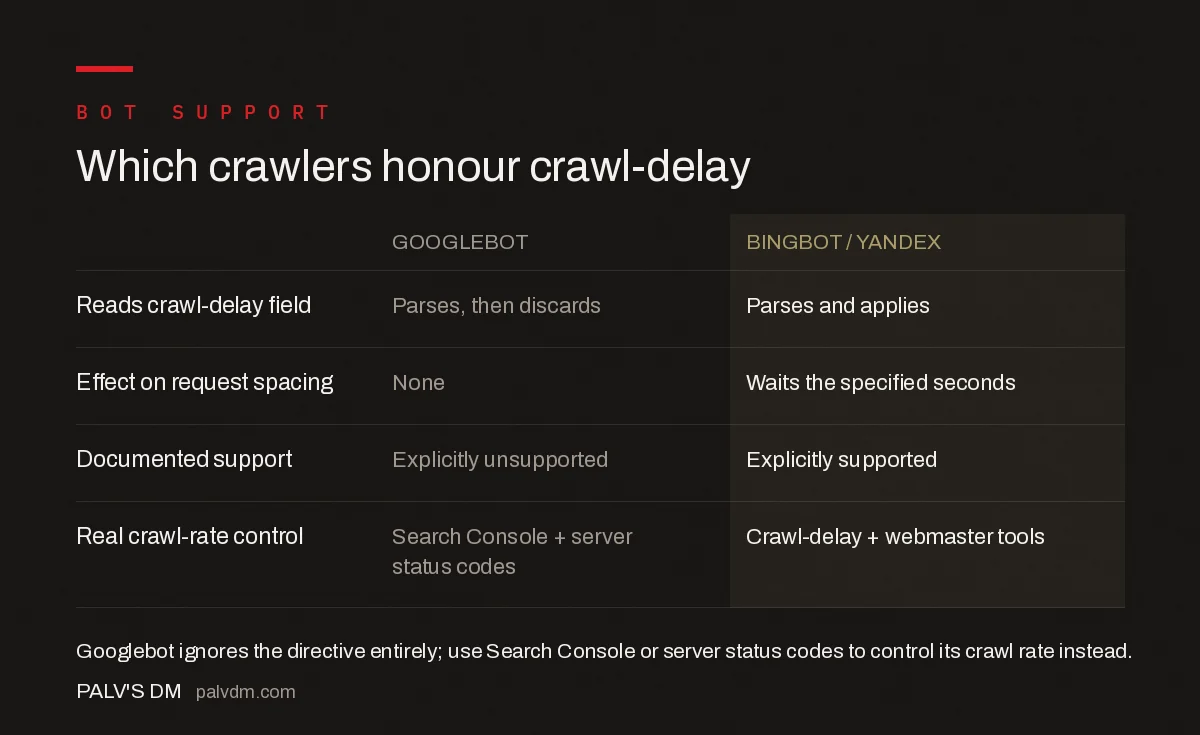
Which crawlers honour crawl-delay
| Googlebot | Bingbot / Yandex | |
|---|---|---|
| Reads crawl-delay field | Parses, then discards | Parses and applies |
| Effect on request spacing | None | Waits the specified seconds |
| Documented support | Explicitly unsupported | Explicitly supported |
| Real crawl-rate control | Search Console + server status codes | Crawl-delay + webmaster tools |
Confusing crawl-delay with real crawl control tends to coexist with other robots.txt misunderstandings, particularly around pattern matching. If a site is using wildcards and pattern matching in robots.txt to try to manage bot behaviour broadly, it’s worth checking those rules are actually doing what’s intended, since wildcard mistakes are just as often silently ignored or silently over-applied as crawl-delay is.
What does a crawl-delay directive actually look like in a robots.txt file?
The syntax is simple, which is part of why it spreads by copy-paste without anyone checking whether it works for the bot it’s aimed at:
User-agent: Bingbot
Crawl-delay: 10

User-agent: Googlebot
Crawl-delay: 10
Bingbot reads the second line under its own block and waits ten seconds between requests. The identical line under the Googlebot block is parsed without error and then discarded, because Google’s robots.txt parser recognises the field name but has no supported behaviour attached to it. Nothing in the server logs or in Search Console will flag this as broken; it simply never changes Googlebot’s request timing.
Some site owners assume a wildcard block, User-agent: * followed by Crawl-delay: 10, covers Googlebot by inheritance. It doesn’t change the outcome. Google still applies its own algorithmic crawl rate to that user-agent group and ignores the directive regardless of which block it sits in.
Why did Google drop support for crawl-delay while other engines kept it?
Crawl-delay was never part of the original 1994 robots exclusion standard; it was added later by individual search engines as an ad hoc extension, which is why support has always varied. Google’s public position, reiterated across its robots.txt documentation, is that a fixed delay value doesn’t reflect real server conditions: a site under light load on a fast server can usually handle more concurrent requests than a fixed ten-second gap allows, while a struggling server needs a response faster than a static robots.txt edit can provide.
Instead, Google’s crawlers adjust their rate dynamically based on how the server responds in real time, slowing down automatically when they see increased latency or a rise in error responses, and speeding up when the server keeps returning fast, healthy responses. That’s a fundamentally different model from a fixed delay, and it’s the reason Google considers the Search Console crawl-rate controls and server status codes sufficient, without needing a robots.txt-level override.
What happens if crawl-delay is misread as a crawl budget fix?
Sites that discover Googlebot is hitting them harder than expected sometimes add a crawl-delay line as a first response, see no change, and escalate to blocking sections of the site with disallow rules instead, which is a much blunter and riskier fix. That escalation often produces exactly the outcome it was trying to avoid: pages that should be indexed get crawled, currently not indexed, or worse, never crawled at all and stuck as discovered, currently not indexed, because the disallow rule cut off access to pages that needed it.
The better sequence is to diagnose first: check server logs for which bot is generating the load, confirm whether it’s actually Googlebot or a third-party scraper spoofing the user-agent, and only then choose between Search Console settings, targeted crawl-delay for bots that honour it, or a genuine disallow rule for traffic that shouldn’t be there at all.
Frequently asked questions
Does Googlebot respect the crawl-delay directive?
No. Google’s robots.txt documentation explicitly lists crawl-delay as an unsupported field, and Googlebot ignores it completely regardless of the value set. Google determines crawl rate algorithmically based on server response times and errors, not on a fixed value in robots.txt.
How do I actually slow down Googlebot’s crawl rate?
Use the crawl rate settings inside Google Search Console, or, for genuine emergencies, return 500, 503, or 429 HTTP status codes so Google’s systems automatically back off. Google’s own guidance recommends this over any robots.txt directive, since crawl-delay has no effect on Googlebot.
Which search engine bots do honour crawl-delay?
Bing, Yandex, and several smaller or older crawlers support the crawl-delay field and will space out requests according to the value given, typically in seconds between hits. Coverage varies by bot and can change, so treat it as a hint rather than a guarantee even for engines that claim support.
Will setting crawl-delay for Googlebot cause an error?
No, an unsupported field like crawl-delay doesn’t break robots.txt or cause a parsing error for Googlebot. It’s simply read and discarded, leaving every other rule in the file, like disallow and allow directives, fully in effect.
Should I still add crawl-delay to robots.txt for other bots?
It’s reasonable if a specific non-Google crawler is creating real server load, since Bing and some others do respect it. Scope the directive to that bot’s user-agent line rather than the wildcard group, so it doesn’t create a false impression that it’s throttling Google as well.
Sources
- How to write and submit a robots.txt file — Google Search Central
- Reduce Googlebot crawl rate — Google Search Central
- Technical SEO: The Complete Working Guide
Want this done on your site?
Every PalV’s DM engagement starts with a free audit of your actual website — a 12-point
crawl covering what is blocking indexation, on-page gaps against your primary keywords, speed
findings, and the three to five fixes worth making first. Delivered in two working days. No
payment details, and the findings are yours whether you hire us or not.


