
Why Your Page Isn’t Indexed: A Decision Tree
A working decision tree for why a page won't index in Google: the six Search Console statuses, what causes each, and the specific fix for each one.
A page isn’t indexed for one of six reasons: Google hasn’t crawled it yet, it crawled the page and judged it not worth indexing, it’s blocked by robots.txt or a noindex tag, it’s a near-duplicate of another URL, it returns a soft 404, or a redirect or canonical points Google somewhere else. The URL Inspection tool in Search Console names which of the six applies to any given URL, and each one has a specific, different fix — there’s no single “resubmit and hope” answer that works across all of them.
Most guides treat “not indexed” as one problem. It isn’t. Treating a crawl-budget issue like a content-quality issue, or a robots.txt block like a duplicate-content issue, wastes weeks. The decision tree below starts with the one signal that actually tells you which branch you’re on.
Where do you start diagnosing a page that won’t index?
Open Search Console, use the URL Inspection tool, and paste in the exact URL. Ignore the domain-level “Pages” report for the first pass — it aggregates hundreds of URLs into buckets and hides the one status that matters for your specific page. The Inspection tool returns a single coverage status, and that status is the root of the decision tree.
If the tool has never seen the URL at all (“URL is unknown to Google”), the problem is discovery: no internal link points to it, it isn’t in the sitemap, and nothing external links to it either. Add it to the XML sitemap and link to it from at least one already-indexed page before doing anything else.
What does each Search Console indexing status actually mean?
Six statuses cover almost every non-indexed URL. Google’s own documentation on discovered, currently not indexed causes and fixes covers the most common one in more depth; the table below is the fast-reference version.
| Status | What it means | Typical cause |
|---|---|---|
| Discovered, currently not indexed | Google knows the URL exists, hasn’t crawled it yet | Crawl budget, low priority, weak internal linking |
| Crawled, currently not indexed | Google crawled it, chose not to index it | Thin, duplicate, or low-value content |
| Excluded by ‘noindex’ tag | A meta robots or header tag says don’t index | Often left on by accident after staging or a CMS default |
| Blocked by robots.txt | Crawler is disallowed from fetching the URL | Overly broad disallow rule |
| Duplicate without user-selected canonical | Google picked a different canonical than the page implies | Conflicting signals: sitemap, internal links, canonical tag disagree |
| Soft 404 | Page returns 200 but reads as an error or empty page to Google | Thin content, “no results” pages, near-empty templates |
How do you fix a “discovered, currently not indexed” page?
This status means Google made a scheduling decision, not a quality judgment — yet. Google prioritises crawling based on a mix of site-wide crawl budget, the page’s apparent importance from internal links, and how often that section of the site tends to change. Three fixes move the needle:
- Link to the page from at least two or three already-indexed pages with relevant anchor text, not just the sitemap.
- Check server response times for that template — a crawler that’s timing out or getting throttled on a site backs off automatically.
- Reduce the number of low-value URLs competing for the same crawl budget: filtered/faceted variants, tag archives, and thin paginated pages all eat into it.
If the site is large (tens of thousands of URLs) and this status is widespread, it’s a crawl-budget problem at the site level, not a page level. That needs a log-file analysis to see what Googlebot is actually spending its time on, not a per-URL fix.
How do you fix a “crawled, currently not indexed” page?
This is the harder one, because Google looked at the page and decided against it. The most common causes, in rough order of frequency: the content closely overlaps with another indexed page on the same site or elsewhere, the page is genuinely thin relative to what already ranks for the topic, or the page sits in a section Google has learned to trust less over time because of prior quality issues nearby.
The fix isn’t “add more words.” It’s adding information the existing top-ranking pages for that query don’t already cover — a comparison, original data, a specific use case — and consolidating or removing near-duplicate pages elsewhere on the site that are quietly competing with it.
What does the robots.txt and noindex path look like?
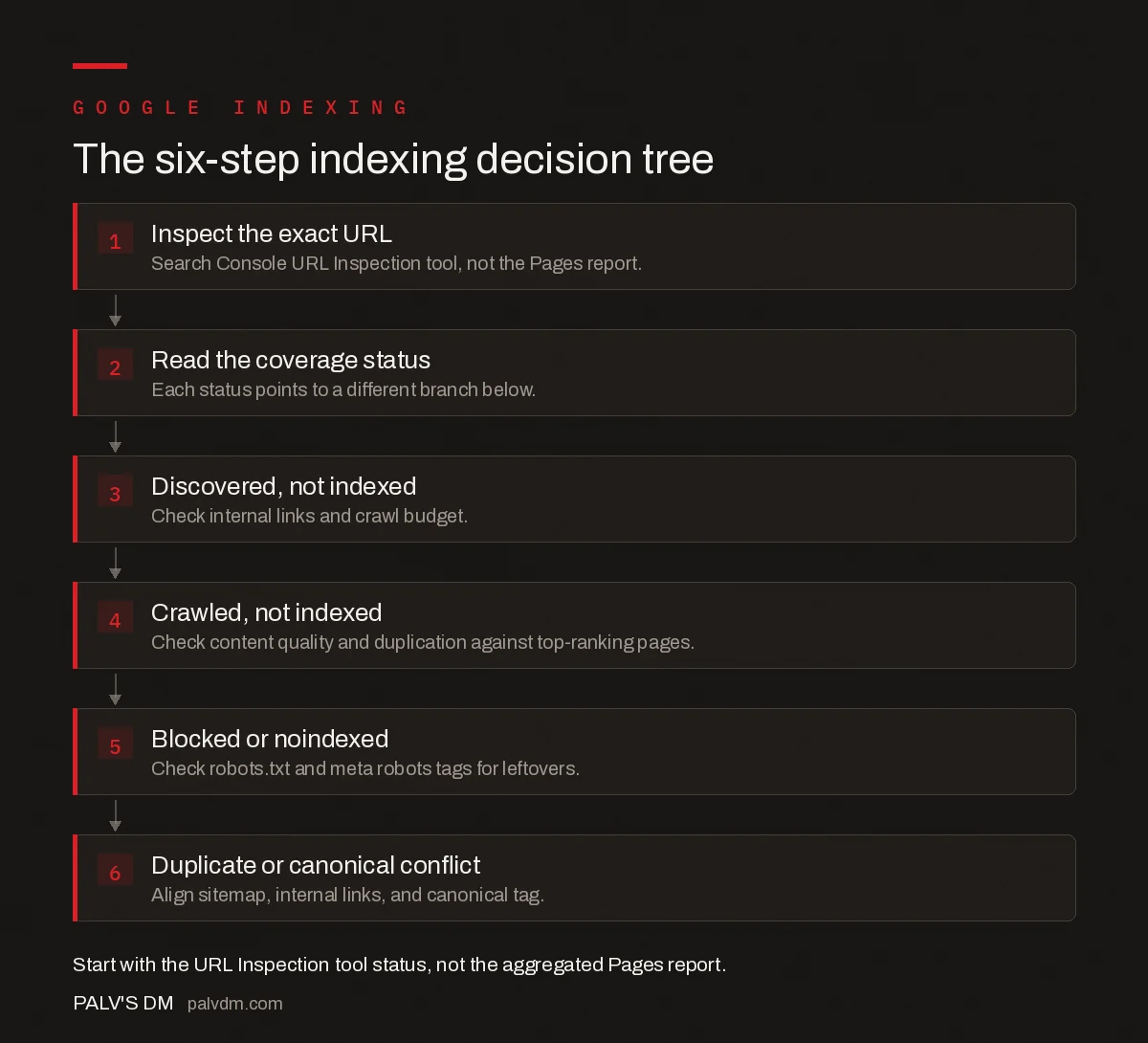
The six-step indexing decision tree
- Inspect the exact URL. Search Console URL Inspection tool, not the Pages report.
- Read the coverage status. Each status points to a different branch below.
- Discovered, not indexed. Check internal links and crawl budget.
- Crawled, not indexed. Check content quality and duplication against top-ranking pages.
- Blocked or noindexed. Check robots.txt and meta robots tags for leftovers.
- Duplicate or canonical conflict. Align sitemap, internal links, and canonical tag.
Robots.txt blocks and stray noindex tags are the fastest to find and the most embarrassing to have missed. Check the live robots.txt file directly at yourdomain.com/robots.txt for a Disallow rule matching the URL’s path, and view the page’s rendered HTML source for a meta name="robots" content="noindex" tag. Both are common leftovers from a staging environment that never got cleaned up before launch — the same failure pattern covered in keeping dev environments out of Google. It’s also worth checking that noindex and nofollow directives haven’t been mixed up in a plugin setting, since the two do genuinely different jobs.
What if the canonical tag is pointing away from the page?
A page can be fully crawlable, contain unique content, and still not index because its own canonical tag — or a conflicting one elsewhere — tells Google to index a different URL instead. This is the “duplicate without user-selected canonical” status, and it usually traces back to the same root cause covered in our piece on canonical tag rules most sites get wrong: the sitemap, internal links, and the tag itself don’t agree on which URL is authoritative.
Fix the conflict by making all three signals point the same direction. If the page genuinely should be its own indexed URL, remove any canonical pointing elsewhere and confirm internal links use that same URL consistently, including trailing slash and casing.
When is a page correctly excluded and not actually a problem?
Not every “not indexed” status needs fixing. Thank-you pages, internal search result pages, duplicate print versions, and paginated component pages are often correctly excluded by design. Before spending time on a fix, ask whether the page should rank for anything at all. If the honest answer is no, a deliberate noindex tag is the correct end state, not a bug.
Frequently asked questions
How long should I wait before worrying a page isn’t indexed?
Give a new page on an established site 1-2 weeks before treating non-indexing as a problem. On a brand-new domain with little crawl history, 4-6 weeks is normal. If the URL Inspection tool still shows “Discovered, currently not indexed” after that window, treat it as a genuine issue rather than a timing one.
Does requesting indexing in Search Console actually help?
It queues a priority crawl, which can speed up discovery, but it does not override Google’s quality assessment. Requesting indexing on a thin or duplicate page just gets it crawled and rejected faster. Fix the underlying cause first, then request indexing.
What’s the difference between “Discovered” and “Crawled, currently not indexed”?
“Discovered, currently not indexed” means Google knows the URL exists but hasn’t crawled it yet, usually a crawl-budget or scheduling issue. “Crawled, currently not indexed” means Google visited the page and decided against indexing it, usually a quality, duplication, or thin-content issue. They need different fixes.
Can a sitemap force Google to index a page?
No. A sitemap tells Google a URL exists and hints at priority, but it has no power to force indexing. It helps discovery, particularly on large or poorly linked sites, but the page still has to pass Google’s crawl and quality checks independently.
Why would a page with unique content still not get indexed?
Uniqueness alone doesn’t guarantee indexing. Google also weighs whether the page adds enough value relative to what’s already indexed, whether it’s reachable through a reasonable number of clicks from the homepage, and whether the rest of the site signals it’s worth crawling deeply. Low-value unique content is still low-value.
Sources
- Index Coverage Report — Google Search Central
- Crawl Budget Management for Large Sites — Google Search Central
- Technical SEO: The Complete Working Guide
Want this done on your site?
Every PalV’s DM engagement starts with a free audit of your actual website — a 12-point
crawl covering what is blocking indexation, on-page gaps against your primary keywords, speed
findings, and the three to five fixes worth making first. Delivered in two working days. No
payment details, and the findings are yours whether you hire us or not.


