
Staging Site Leaks: Keeping Dev Environments Out of Google
A staging site that gets indexed usually relied on one protection method instead of layering several. The five layers that actually keep dev environments out of Google.
A staging site gets indexed when it relies on a single protection method that fails silently — usually a robots.txt rule that stops compliant crawlers but does nothing once a link to the environment gets shared or crawled from an external source. The fix is not a stronger version of the one method already in place; it’s stacking four or five independent layers so that no single failure exposes the whole environment.
This matters more than it looks like it should. An indexed staging site creates duplicate content competing with production pages, leaks unreleased features or pricing, and burns crawl budget Google should be spending on the real site. Cleaning it up after the fact is slower and less reliable than preventing it in the first place.
What causes a staging site to get indexed in the first place?
Three patterns account for most cases. First, a robots.txt file gets added to staging but never actually deployed correctly — a common mistake on subdomains where the file needs to exist at the subdomain’s own root, not inherited from the production domain. Second, someone shares a staging URL in a public place: a Slack channel later indexed by a search-connected app, a GitHub issue, a client email forwarded into a mailing list archive. Third, a developer copies the production site to staging including its sitemap.xml, which then gets discovered and crawled independently of any robots.txt block.
| Method | Blocks crawling | Blocks indexing | Blocks direct access |
|---|---|---|---|
| HTTP Basic Authentication | Yes | Yes (indirectly) | Yes |
| robots.txt Disallow | Yes, for compliant bots | No — blocked URLs can still appear bare in results | No |
| Noindex meta tag / header | No | Yes, once crawled | No |
| IP allowlist / VPN | Yes | Yes (indirectly) | Yes |
The “No” cells are the reason a single layer fails. robots.txt stops the crawl but not the indexing of a linked URL; noindex prevents indexing but only works on pages Google is actually allowed to crawl. Combining them closes both gaps at once.
Step 1: Put the environment behind HTTP Basic Authentication
This is the single most effective layer because it blocks access outright rather than politely requesting exclusion. No credentials, no page load — for a human visitor or a crawler. Most hosting platforms and reverse proxies (Nginx, Apache, Cloudflare Access) support this without touching application code. Set it up before the first deploy to staging, not after a leak is discovered.
Step 2: Block crawling with robots.txt
Add a robots.txt file at the staging environment’s own root with User-agent: * and Disallow: /. This is a courtesy request that well-behaved crawlers respect, but it should never be the only layer — it does nothing against a crawler that ignores it, and it does not prevent indexing if Google discovers the URL through an external link, since disallowed pages can still appear in results as a bare URL with no snippet.
Step 3: Add a sitewide noindex directive
Set X-Robots-Tag: noindex as an HTTP header sitewide, applied at the server or reverse-proxy level rather than per-page, so no new page can accidentally ship without it. This is the layer that actually prevents indexing, as opposed to robots.txt, which only prevents crawling. Note the interaction: if robots.txt blocks the page entirely, Google may never crawl it to see the noindex header, which is why layering matters more than picking one.
Step 4: Restrict access by IP or VPN where practical
For agencies and teams with a stable office or VPN IP range, an IP allowlist at the firewall or CDN level removes the staging environment from the public internet entirely — the strongest layer available, and the one that makes the other three redundant in the best case rather than critical in the worst case. It’s not always practical for distributed teams or client review access, which is why it’s listed as an addition, not a replacement.
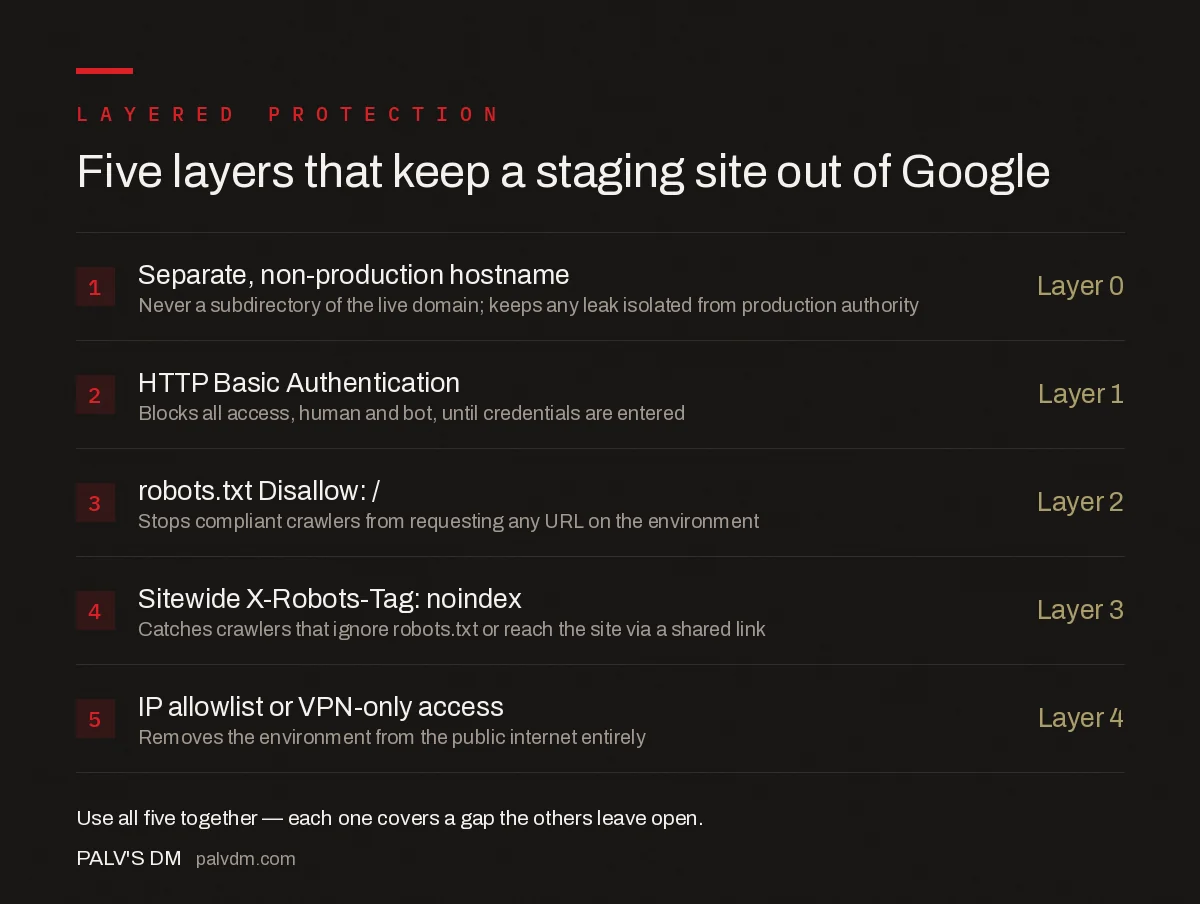
Five layers that keep a staging site out of Google
- Separate, non-production hostname — Layer 0. Never a subdirectory of the live domain; keeps any leak isolated from production authority.
- HTTP Basic Authentication — Layer 1. Blocks all access, human and bot, until credentials are entered.
- robots.txt Disallow: / — Layer 2. Stops compliant crawlers from requesting any URL on the environment.
- Sitewide X-Robots-Tag: noindex — Layer 3. Catches crawlers that ignore robots.txt or reach the site via a shared link.
- IP allowlist or VPN-only access — Layer 4. Removes the environment from the public internet entirely.
What do you do if a staging site is already indexed?
First, remove the robots.txt block temporarily so Google can crawl the pages and see the noindex header — a blocked page can’t act on a directive it never sees. Add the sitewide noindex, confirm it in a live HTTP request with curl or your browser’s network tab, then use the Removals tool in Search Console for a temporary six-month suppression while the crawl catches up. Once coverage reports show the pages dropped, restore the robots.txt block and keep noindex in place permanently as a second layer.
What common mistakes leave staging sites exposed?
- Copying the production sitemap.xml to staging. This hands crawlers a direct list of every URL to check, defeating the purpose of relying on discovery being slow.
- Predictable subdomain naming. staging.example.com, dev.example.com, and test.example.com are guessed and crawled by security scanners and some SEO tools even without a public link.
- Reusing production analytics or search console properties. This causes staging traffic to pollute production reporting and, in some setups, verifies staging as a property Google actively watches.
- Forgetting the block after a migration to new hosting. Authentication and header rules configured at the old host don’t automatically carry over; verify all four layers again after any infrastructure change.
- Client demo links shared without expiry. A password-free preview link sent for client review often stays live and discoverable long after the review is done.
How do agencies handle this across multiple client staging environments?
Teams running staging sites for several clients tend to standardise rather than configure each one individually, because individual configuration is exactly where a layer gets forgotten. A shared reverse-proxy template that automatically applies HTTP Basic Authentication and the sitewide noindex header to any subdomain matching a *.staging.agencydomain.com pattern removes the step where a developer has to remember to add protection manually on a new project. Cloudflare Access, or an equivalent identity-aware proxy, adds a fifth layer on top of the four covered above by requiring an authenticated login tied to a real identity rather than a shared password, which also solves the problem of credentials leaking into a shared document or chat thread.
Whichever approach is used, the environment should fail the same way every time a new project spins up — protected by default, with an explicit step required to make anything public, rather than public by default with protection added as an afterthought.
Frequently asked questions
Why did my staging site get indexed if I had a robots.txt disallow rule?
robots.txt only stops compliant crawlers from requesting pages; it does not stop a URL from being indexed if Google finds it linked elsewhere, and it does nothing for crawlers or scrapers that ignore it. A robots.txt rule alone is a single point of failure, not full protection.
Is password protection alone enough to keep a staging site private?
It’s the strongest single layer because it blocks access entirely rather than just requesting exclusion, but tools and QR-code links sometimes bypass basic auth prompts, and staff occasionally share credentials in ways that leak the URL. Pair it with robots.txt and noindex as backups.
How do I remove an already-indexed staging site from Google?
Add a noindex tag or X-Robots-Tag header first so Google has a reason to drop the pages on its next crawl, then use the Removals tool in Search Console for a temporary block while the noindex takes effect. Removing robots.txt blocking during this period matters, since noindex only works on pages Google is allowed to crawl.
Does staging site content hurt my production site’s rankings if it gets indexed?
It can create duplicate content competing with the production URLs, dilute the keyword targeting you intended for the live pages, and occasionally outrank the real page temporarily if the staging domain has stronger technical signals. It rarely causes a penalty, but it wastes crawl budget and confuses reporting.
Should staging sites live on a subdomain or a separate domain?
A separate domain or an unrelated subdomain is safer than a predictable pattern like staging.yourdomain.com, since predictable subdomains are easier to guess and crawl. Whichever you choose, never use a subdirectory of the production domain — a leak there is indexed directly alongside real content.
Sources
- Robots Meta Tags Specifications — Google Search Central
- Technical SEO: The Complete Working Guide
- Infinite Scroll and Load-More: Making Them Crawlable
- Meta Refresh and JavaScript Redirects: Why Google Dislikes Them
- Discovered, Currently Not Indexed: Causes and Fixes
Want this done on your site?
Every PalV’s DM engagement starts with a free audit of your actual website — a 12-point
crawl covering what is blocking indexation, on-page gaps against your primary keywords, speed
findings, and the three to five fixes worth making first. Delivered in two working days. No
payment details, and the findings are yours whether you hire us or not.


