
Soft 404s: Why Google Ignores Pages That Return 200
A soft 404 returns 200 but reads like an error page. How Google detects it, why it wastes crawl budget, and the correct fix for each cause.
A soft 404 is a page that reads like an error message, an empty search result, or a stub with almost no content, but the server still answers with an HTTP 200 OK status code instead of a 404 or 410. Google’s crawlers read the page, recognise the pattern, and file it as a soft 404 in Search Console regardless of what the header said. The fix is never just rewriting the copy — it means deciding, URL by URL, whether that page deserves to exist, redirect, or return a real error code, and then making the server header agree with that decision.
This shows up constantly on ecommerce sites with out-of-stock products, on sites that migrated content and left old URLs live with a generic “nothing here” message, and on search results pages that return zero matches but still render a full template with header, footer, and navigation. The page looks harmless to a visitor. To a crawler, it looks like thousands of near-identical near-empty pages worth deprioritising.
What is a soft 404 error?
A soft 404 is a URL where the HTTP status code says the page loaded successfully (200 OK) but the actual content on the page says otherwise — “Sorry, we couldn’t find that,” “0 results,” or a page with a title, a header, and almost nothing else in the body. Google’s own documentation on soft 404 errors defines it exactly this way: a success status code on a page that functions as an error page.
The distinction that trips people up is that this is a content classification, not a status code check. You can have a page returning a perfectly correct 200, with well-formed HTML, that still gets flagged as a soft 404 because the visible text and template match the pattern Google associates with missing content.
How does Google detect a soft 404 if the header says 200?
Google’s crawlers render the page and evaluate the content the way a user would experience it, not just the response header. Signals that commonly trigger a soft 404 classification include very short body text relative to the template around it, phrases associated with missing content (“not found,” “no longer available,” “0 items”), a page that is nearly identical to other pages already flagged, and a page consisting mostly of navigation, header, and footer with no unique content block in between.
Because this is a content judgment, two pages with the same status code can get different treatment. A thin category page with three products might survive; the same template with zero products, same header and footer, tends to get flagged. This is also why fixing the wording alone sometimes fails — if the underlying template still renders as a mostly-empty shell, Google can keep classifying it the same way on the next crawl.
What actually causes soft 404s?
Most soft 404s trace back to one of a small number of patterns:
- Out-of-stock or discontinued products left live with a generic “this item is unavailable” message and no path to a substitute.
- Search results pages with zero matches that still render the full page template — this is especially common on faceted navigation and internal site search.
- Deleted content redirected to the homepage or a generic category page instead of returning a proper 404 or a redirect to a genuinely relevant replacement — Google treats a mass redirect-to-homepage pattern as a soft 404 signal in its own right.
- Expired listings — job boards, event pages, and classifieds where the listing period ends but the URL stays live with placeholder text.
- Broken template rendering, where a CMS bug or a failed database call leaves a page technically loading but visually empty.
- Parked or placeholder pages created ahead of content that was never finished, common after a site migration where a content team creates the URL shell before writing the copy.
Sites that don’t manage URL parameters and session IDs carefully often generate an especially large volume of these — every parameter combination that returns zero results is a fresh soft 404 candidate, multiplied across every facet on the site.
Soft 404 vs a true 404 vs a 410: which one should the page return?
The right response code depends on whether the content is coming back, whether a replacement exists, and how fast you want Google to drop the URL from its index.
| Situation | Correct response | Why |
|---|---|---|
| Content moved to a new permanent URL | 301 redirect | Passes ranking signals to the new page and tells Google not to keep checking the old one |
| Content gone, no replacement, might return later | 404 Not Found | Standard signal that the URL is currently unavailable without asserting it’s gone for good |
| Content deliberately and permanently retired | 410 Gone | A stronger signal than 404; Google tends to drop 410s from the index faster |
| Zero search results or empty facet combination | 200, but with noindex, or 404 depending on the case | A genuinely empty results page can stay 200 for usability, but should carry a noindex if it has no unique value |
| Out-of-stock product with likely restock | 200, keep live | Removing and re-adding the URL loses accumulated ranking signal; show availability status instead |
The table above is the decision most soft 404 cleanups get wrong: teams default to “redirect everything to the homepage,” which trades one soft 404 pattern for another, since Google treats an irrelevant mass-redirect destination the same way it treats a page with no content.
How do you decide what to do with a specific soft 404?
Work through each flagged URL in order rather than applying one blanket fix across the whole list.
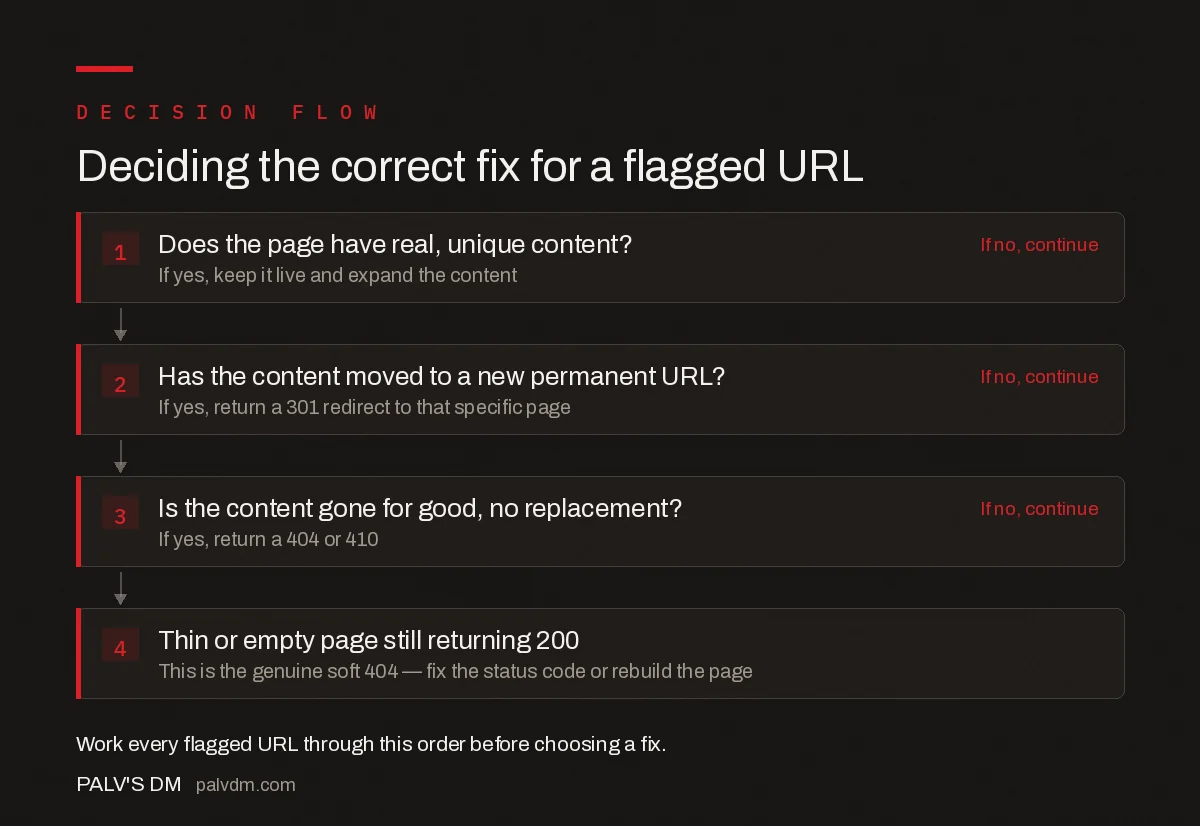
Deciding the correct fix for a flagged URL
- Does the page have real, unique content?. If yes, keep it live and expand the content. If no, continue
- Has the content moved to a new permanent URL?. If yes, return a 301 redirect to that specific page. If no, continue
- Is the content gone for good, no replacement?. If yes, return a 404 or 410. If no, continue
- Thin or empty page still returning 200. This is the genuine soft 404 — fix the status code or rebuild the page.
How do you find soft 404s across a whole site?
Search Console’s Pages report lists every URL Google has classified as a soft 404 under Indexing, but it only shows what Google has already crawled and judged — it will not surface new soft 404s the moment they appear. For a full picture, run a crawl with Screaming Frog or a similar crawler configured to flag pages with unusually low word counts relative to the site average, combined with a check for status-code-200 pages that contain phrases like “not found” or “no results.” Cross-reference that list against crawl budget reports for larger sites — soft 404s are one of the most common reasons crawl budget gets spent on pages that will never rank, leaving genuinely new content waiting longer to be discovered.
Understanding the full range of HTTP status codes every SEO should recognise makes this audit faster, since distinguishing a soft 404 from a legitimately thin-but-valid page comes down to knowing exactly what each status code is supposed to signal.
Frequently asked questions
What exactly is a soft 404 error?
A soft 404 is a URL that returns an HTTP 200 OK status code even though the page shown is an error message, an empty results page, or has little to no real content. Google’s crawlers read the content, decide it behaves like a missing page, and classify it as a soft 404 in Search Console even though the server never sent a 404 header.
How does Google detect a soft 404 if the status code says 200?
Google’s algorithms compare the page’s content and template against known patterns for error pages and thin pages, including phrases like “no results found,” near-empty body text, and pages that closely resemble other soft 404s on the same site. It is a content-based judgment, not a header check, which is why fixing only the visible copy sometimes does not resolve it.
Do soft 404s hurt my whole site’s rankings?
A handful of soft 404s rarely move rankings on their own, but at scale they waste crawl budget that could go to real pages and they train Google to treat your status codes as unreliable, which slows how quickly genuine new or updated pages get crawled and indexed.
Should I fix a soft 404 with a redirect or a real 404?
Use a 301 redirect only if a genuinely relevant replacement page exists for that URL. If nothing on your site adequately replaces the content, return a proper 404 or 410 status instead of redirecting to the homepage or a loosely related category page, which Google also flags as a soft 404 pattern.
Why does Search Console still show soft 404s after I fixed the page?
Search Console’s soft 404 report reflects the last time Google crawled the URL, not its current state. After a fix, use the URL Inspection tool to request indexing on a sample of affected URLs, then allow one to two crawl cycles before expecting the report to clear.
Sources
- How to Fix Soft 404 Errors — Google Search Central
- HTTP Status Codes, Network and DNS Errors — Google Search Central
- Technical SEO: The Complete Working Guide
Want this done on your site?
Every PalV’s DM engagement starts with a free audit of your actual website — a 12-point
crawl covering what is blocking indexation, on-page gaps against your primary keywords, speed
findings, and the three to five fixes worth making first. Delivered in two working days. No
payment details, and the findings are yours whether you hire us or not.


