
Squarespace vs WordPress for Small Business: An Honest Comparison
Squarespace vs WordPress compared on real cost, SEO control, and Indian payment support, so you pick the right one before you build, not after.
WordPress is the better choice for most small businesses planning to grow content, run ecommerce, or accept Indian payment methods; Squarespace is the better choice for a simple portfolio or brochure site where nobody wants to touch a settings panel. Both are capable platforms. The decision usually comes down to how much control you’ll need in eighteen months, not how the homepage looks on day one.
Most comparisons of these two treat it as a taste test: pick whichever dashboard feels nicer. That misses the part that actually matters for a business, which is what happens after launch, when you need a payment gateway your customers can actually use, or a redirect that doesn’t cost a support ticket.
Which one should you actually pick?
If your site is a single-page portfolio, a personal brand page, or a small studio with no ecommerce and no plans to publish content regularly, Squarespace is genuinely fine. It’s fast to launch, the templates look sharp out of the box, and you’ll never think about a server. For a photographer, consultant, or single-location business that just needs an attractive digital business card, that’s a reasonable trade.
For nearly everyone else, especially an Indian small business that expects to sell online, run a blog for SEO, or grow past a five-page site, WordPress is the stronger long-term bet. The setup takes more effort up front. What you get back is a site you actually own, with no ceiling on what you can build into it later.
What does each platform actually cost?
Squarespace bundles hosting, SSL, and templates into one monthly fee, and current published plans run from roughly $16 to $99 a month billed annually, depending on the tier and whether you need ecommerce features. There’s no separate hosting bill and no plugin shopping list, which is the appeal.
WordPress the software is free. What you pay for is hosting, typically $5 to $30 a month for a small business site on a decent host, plus a theme (often free or a one-time cost) and any premium plugins you choose to add. Over three years the totals can land close to each other or WordPress can come out meaningfully cheaper, depending entirely on how many premium plugins get added. The real cost difference isn’t the sticker price, it’s that Squarespace’s fee buys convenience while WordPress’s lower floor buys flexibility you pay for with your own time or a developer’s.
Squarespace vs WordPress at a glance
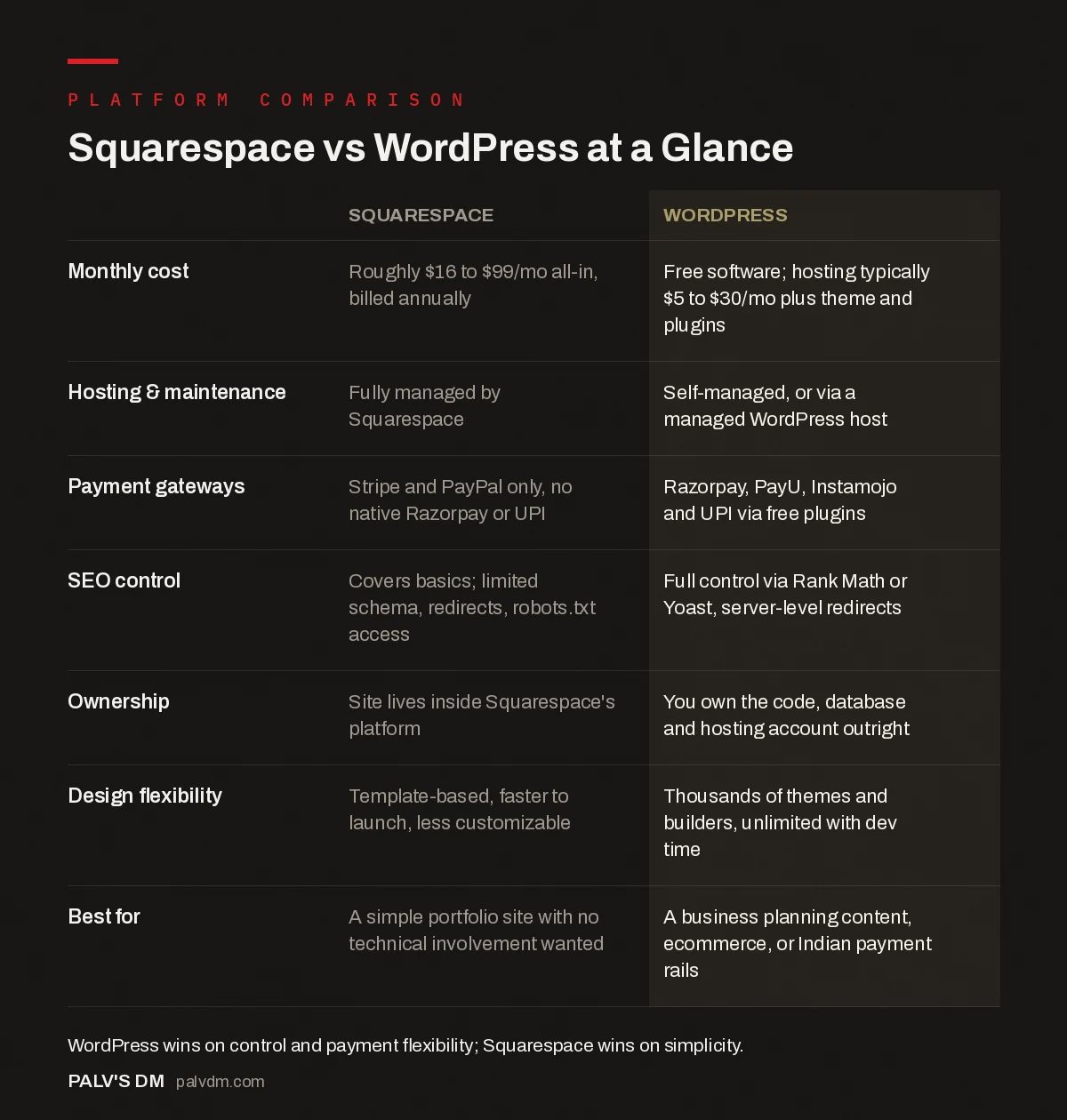
Squarespace vs WordPress at a Glance
| Squarespace | WordPress | |
|---|---|---|
| Monthly cost | Roughly $16 to $99/mo all-in, billed annually | Free software; hosting typically $5 to $30/mo plus theme and plugins |
| Hosting & maintenance | Fully managed by Squarespace | Self-managed, or via a managed WordPress host |
| Payment gateways | Stripe and PayPal only, no native Razorpay or UPI | Razorpay, PayU, Instamojo and UPI via free plugins |
| SEO control | Covers basics; limited schema, redirects, robots.txt access | Full control via Rank Math or Yoast, server-level redirects |
| Ownership | Site lives inside Squarespace’s platform | You own the code, database and hosting account outright |
| Design flexibility | Template-based, faster to launch, less customizable | Thousands of themes and builders, unlimited with dev time |
| Best for | A simple portfolio site with no technical involvement wanted | A business planning content, ecommerce, or Indian payment rails |
Can Squarespace actually handle payments for an Indian business?
This is the detail that ends the conversation for a lot of Indian small businesses, and it doesn’t get enough attention in the generic comparisons written for a US audience. Squarespace’s built-in commerce only connects to Stripe and PayPal. It has no native integration with Razorpay, PayU, or Instamojo, and no support for UPI at checkout. Since UPI accounts for close to half of ecommerce payments in India, a platform that can’t take it natively is ruling out a large share of how your own customers actually want to pay.
You can bolt on a workaround through an automation tool or a hosted payment link, but that’s an extra moving part on top of a platform you chose specifically to avoid extra moving parts. WordPress with WooCommerce plugs into Razorpay, PayU, Instamojo, and UPI directly, usually through a free official plugin. If payments are part of the plan at all, this alone tends to settle the decision.
Which is better for SEO?
Squarespace covers the fundamentals: clean URLs, basic meta fields, an XML sitemap. For a local business chasing long-tail, low-competition keywords, that’s genuinely enough. Where it runs out of road is anything technical: you can’t edit robots.txt directly, schema markup options are limited to what Squarespace has built in, and server-level redirects aren’t something you control.
WordPress hands you all of it. Rank Math or Yoast give full control over meta data, canonical tags, and structured data, and nothing about the platform stops you from doing proper technical SEO as the site grows. If organic search is meant to be a real growth channel rather than a nice-to-have, WordPress removes ceilings that Squarespace quietly keeps in place.
What happens if you want to switch later?
This is the one-way door people don’t think about until they’re standing in front of it. A Squarespace site lives entirely inside Squarespace’s platform. There’s no database export, no theme file, no plugin folder to copy. Leaving means rebuilding the site from scratch on whatever you move to, content included.
A WordPress site is portable by design. The database, the media library, the theme, all of it can move to a new host in a weekend with the right migration plugin. I’ve done both kinds of migration for clients, and the Squarespace-to-anything move is always a full rebuild project, never a transfer. That’s worth weighing honestly against how confident you are that you’ll never want to leave.
What about template quality and design?
Squarespace templates genuinely look better than the average WordPress theme straight out of the box, and that’s worth admitting rather than glossing over. The design team behind those templates is good at what it does, and a photographer or design studio can launch something polished in an afternoon without touching CSS. WordPress can match or exceed that ceiling, but it takes a better theme, a proper page builder, or a developer, none of which are automatic the way Squarespace’s defaults are.
Where that trade-off flips is customization. A Squarespace template has edges you eventually hit: a layout block that doesn’t quite work the way you need, a feature the platform simply doesn’t offer. WordPress has no such ceiling. If you can describe it, a developer can build it, whether that’s a custom booking flow, a membership area, or a directory of locations. Squarespace’s polish comes with a boundary. WordPress’s flexibility comes with more decisions to make along the way.
Which is easier to run day to day?
Squarespace, without question, if “easier” means fewer decisions and no maintenance window. Updates happen automatically, security is Squarespace’s problem, and the editor is genuinely intuitive for someone who has never built a website. That ease is real and it’s not nothing for a solo business owner with no time to learn a CMS.
WordPress asks more of you or whoever manages the site: plugin updates, a backup routine, occasional troubleshooting when two plugins don’t play nicely. None of it is hard, but it’s ongoing in a way Squarespace simply isn’t. A managed WordPress host or a maintenance retainer closes most of that gap for a monthly fee, which is worth factoring into the cost comparison above rather than treating WordPress maintenance as free.
Frequently asked questions
Is Squarespace or WordPress better for SEO?
WordPress offers deeper technical SEO control: custom schema, server-level redirects, and full plugin access via Rank Math or Yoast. Squarespace covers the basics well enough for local and long-tail keyword targeting but limits access to more advanced technical settings.
Can I accept UPI or Razorpay payments on Squarespace?
Not natively. Squarespace’s commerce tools connect only to Stripe and PayPal. Indian payment methods like UPI, Razorpay, and PayU require a workaround through an automation tool or hosted payment link, which WordPress with WooCommerce supports directly.
How much does Squarespace really cost compared to WordPress?
Squarespace plans run roughly $16 to $99 a month, all-in, billed annually. WordPress software is free, but hosting typically runs $5 to $30 a month plus any premium plugins or theme costs, so the real-world total depends heavily on what you add.
Can I move my site from Squarespace to WordPress later?
Not as a direct migration. Squarespace doesn’t offer a database or theme export, so moving to WordPress means rebuilding the site, content and all. A WordPress site, by contrast, can move between hosts without a rebuild.
Which is easier for a non-technical business owner?
Squarespace, in day-to-day terms. Updates and security are handled automatically, and the editor has a gentler learning curve. WordPress requires ongoing plugin updates and occasional troubleshooting, though a managed host or maintenance retainer covers most of that.
Does Squarespace support Indian businesses well?
It works fine for a simple, content-light site, but the lack of native Razorpay, PayU, or UPI support is a real limitation for any business planning to sell online in India, where UPI makes up close to half of ecommerce payment volume.
Sources
- Squarespace vs. WordPress 2026 Comparison, Forbes Advisor
- Squarespace vs WordPress, official Squarespace comparison
- Razorpay on website builders and Indian payment support
- WordPress SEO: The Complete Configuration Guide
- Wix vs WordPress: A Decision Framework, Not a Sales Pitch
- Webflow vs WordPress for a Content-Heavy Site
- Website Redesign Without Losing Your SEO
Want this done on your site?
Every PalV’s DM engagement starts with a free audit of your actual website — a 12-point
crawl covering what is blocking indexation, on-page gaps against your primary keywords, speed
findings, and the three to five fixes worth making first. Delivered in two working days. No
payment details, and the findings are yours whether you hire us or not.
Get your free SEO audit
See Web Development plans and prices


