
Wix vs WordPress: A Decision Framework, Not a Sales Pitch
Wix vs WordPress compared honestly: real pricing, SEO control, ownership and migration costs, so you can pick based on your business, not a sales page.
Pick Wix if you need a simple site live this week and have no interest in ever touching the back end. Pick WordPress if you want a site that scales, that you fully own, and that supports serious SEO work as your business grows. That’s the honest split, and neither answer is wrong for the business it fits.
Most “Wix vs WordPress” posts are written by whichever side pays the affiliate commission. We build almost exclusively on WordPress, so you can weigh that bias accordingly, but the framework below is built on what actually breaks for clients later, not on which platform is easier to sell.
Which one should you actually pick?
If you’re a solo consultant or a very small local business that needs five pages, a contact form, and nothing else for the next few years, Wix will get you there faster and with less risk of you breaking something. The all-in-one pricing is genuinely simpler to budget for, and you won’t need to think about hosting, updates, or backups at all, because Wix handles all of it.
If you’re planning to publish content regularly, run any kind of SEO strategy beyond the basics, add custom functionality later, or simply don’t want your entire business tied to one company’s platform decisions, WordPress is the better foundation. The learning curve is real. So is the ceiling you get in exchange for climbing it.
How does the pricing actually compare?
Wix’s pricing looks simple because it’s bundled: hosting, templates, support and SSL all come in one monthly fee. WordPress looks cheaper at first glance because the software itself costs nothing, but you’re assembling the rest yourself: hosting, a theme, and whichever plugins your site needs.
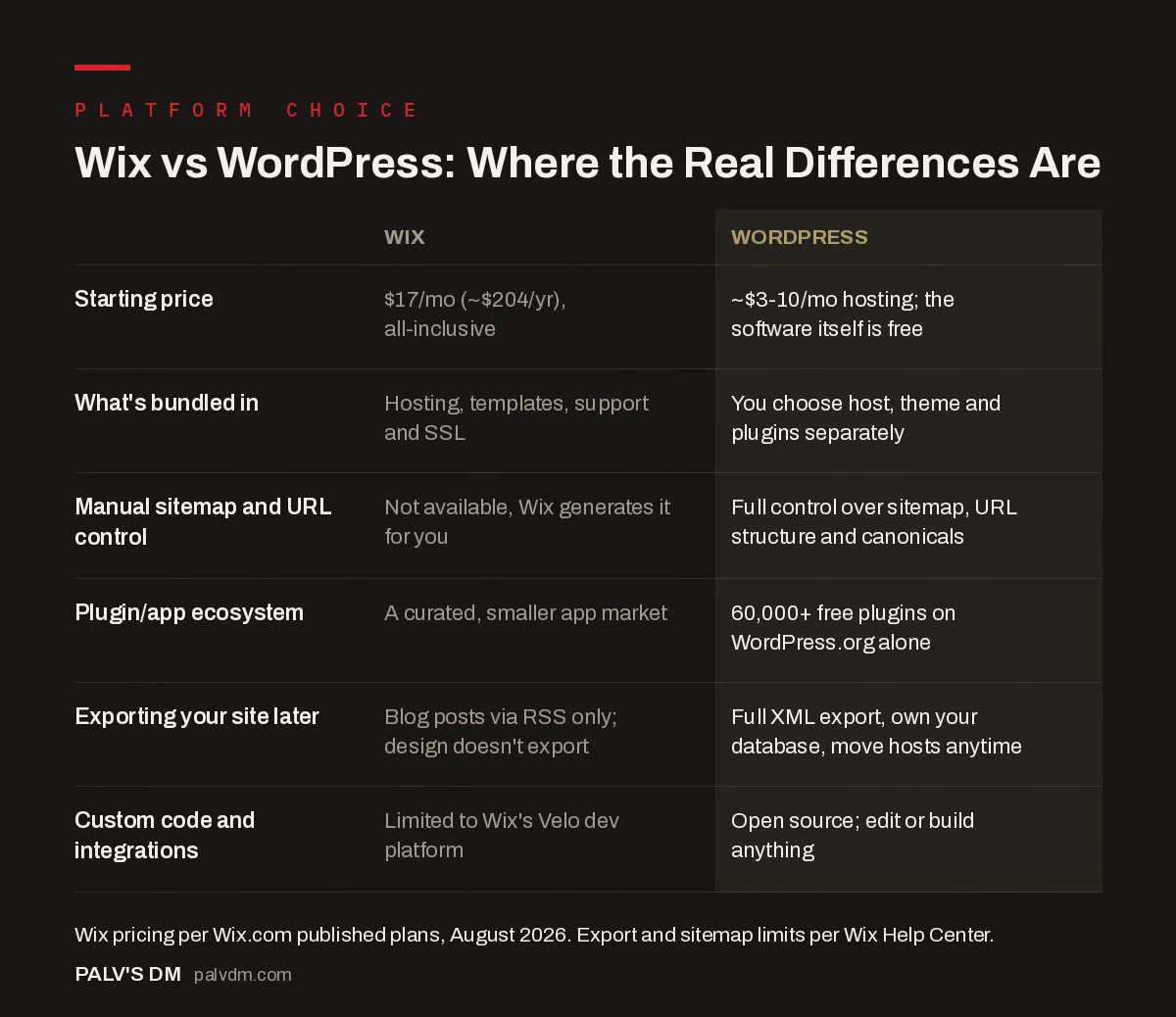
Wix vs WordPress: Where the Real Differences Are
| Wix | WordPress | |
|---|---|---|
| Starting price | $17/mo (~$204/yr), all-inclusive | ~$3-10/mo hosting; the software itself is free |
| What’s bundled in | Hosting, templates, support and SSL | You choose host, theme and plugins separately |
| Manual sitemap and URL control | Not available, Wix generates it for you | Full control over sitemap, URL structure and canonicals |
| Plugin/app ecosystem | A curated, smaller app market | 60,000+ free plugins on WordPress.org alone |
| Exporting your site later | Blog posts via RSS only; design doesn’t export | Full XML export, own your database, move hosts anytime |
| Custom code and integrations | Limited to Wix’s Velo dev platform | Open source; edit or build anything |
Neither structure is a trick. Wix is paying for convenience and bundling. WordPress is paying for flexibility and control, usually at a lower baseline cost once you’re past a very small site, though a heavily plugin-dependent WordPress build can absolutely end up costing more than Wix’s mid-tier plan if you’re not careful about what you install.
Which platform gives you more control over SEO?
WordPress, by a wide margin, once you’re past the basics. Wix has closed most of the gap that used to exist: it generates clean-enough markup, supports canonical tags, and lets you edit titles and meta descriptions per page. What it still doesn’t give you is manual control over your XML sitemap, which Wix generates and manages entirely on its own, and URL structure flexibility is more limited than WordPress’s fully open permalink system.
For a five-page brochure site, that gap rarely matters. For a site built around a content strategy, growing category structures, or technical SEO work like faceted navigation or programmatic pages, it matters constantly. If SEO is core to how you plan to grow, our WordPress SEO configuration guide shows what that control actually looks like in practice.
What happens if you want to leave the platform later?
This is where the two platforms diverge hardest, and it’s the part sales pages gloss over. Wix is a closed system. There’s no official one-click export of your full site: blog content moves out through an RSS feed, but static pages, your visual design, installed apps, and your SEO metadata don’t transfer automatically. Moving off Wix means rebuilding, not migrating, and most agencies quote one to three weeks of work depending on site size.
WordPress exports its full content database natively, and because it’s self-hosted, you can move it to any host, at any time, without asking anyone’s permission. That portability is easy to dismiss when you’re picking a platform for the first time and hard to appreciate the value of until the day you actually need it.
Is Wix ever the right call for a business site?
Yes, honestly. If you’re testing a business idea, running a short-term campaign site, or you are never going to touch the back end yourself and have no budget for ongoing WordPress maintenance, Wix removes an entire category of risk: hacked plugins, botched updates, forgotten backups. That’s real value, not a consolation prize.
Where it stops being the right call is the moment content, SEO, or custom functionality become part of the growth plan rather than an afterthought. We’ve taken over more Wix-to-WordPress migrations from businesses that outgrew the platform than the reverse, and the pattern is consistent: the site that felt perfectly adequate at launch starts feeling like a cage two or three years in, right around the point switching costs the most.
What do we actually recommend, and why?
For a business planning to be around and growing in three years, WordPress. The clients who end up regretting a Wix build almost never regret it in year one. They regret it in year three, once they’ve outgrown the templates and discovered there’s no way to just “hire a developer” and extend the platform the way you can with WordPress. You’re not just picking a website builder. You’re picking how much of your business’s digital infrastructure you actually own.
How do the two compare on speed and technical performance?
Wix has closed a lot of ground here too. Pages load off a managed CDN, and the platform handles image compression and caching without you touching a setting. For a template-based site with a handful of pages, that’s genuinely fine, and it removes a whole category of mistakes that plague badly-configured WordPress sites.
WordPress’s ceiling is still higher, but you have to earn it. A default WordPress install with a bloated page-builder theme and a dozen unnecessary plugins will often load slower than an equivalent Wix site. A lean WordPress build, on quality hosting, with caching configured properly, will usually beat Wix on Core Web Vitals, especially on pages with heavier content or e-commerce functionality. The platform doesn’t guarantee the outcome either way. Configuration does.
What about design flexibility and templates?
Wix templates look polished out of the box and are genuinely easy to customize within their intended structure using the drag-and-drop editor. The trade-off shows up when you want something the template wasn’t designed to do: repositioning elements outside the grid, building a layout no template anticipated, or matching a very specific brand system pixel for pixel. Wix’s Editor X / Studio product narrows that gap for more advanced users, but it’s still working within Wix’s rules.
WordPress, especially without a heavy page builder, has no such ceiling. That flexibility is also why WordPress sites vary so wildly in quality: nothing stops a poorly built WordPress site from looking worse than a decent Wix template. The platform gives you room to build something better. It doesn’t build it for you.
What if you’re planning to sell products online?
This shifts the calculation a little. Wix eCommerce is a reasonable option for a small catalog, a handful of products, and a business owner who wants to manage everything themselves without hiring anyone. It’s genuinely easier to set up than WooCommerce on a fresh WordPress install.
Once the catalog grows past a few dozen products, or you need specific payment gateways, tax rules for multiple regions, or inventory syncing with something else you run, WooCommerce’s flexibility starts winning. It’s free, it’s the most widely used e-commerce plugin on WordPress by a large margin, and its extension ecosystem covers almost anything a growing store needs. The setup cost is higher. So is what it can eventually do.
Frequently asked questions
Is WordPress really free?
The WordPress software itself is free and open source. Running a site still costs money for hosting, typically a few dollars a month on shared hosting and more for managed WordPress hosting, plus optionally a premium theme or specific plugins. It’s cheaper than Wix at almost every tier, but it isn’t zero.
Can I switch from Wix to WordPress later without losing my SEO rankings?
Yes, if the migration is done carefully: recreating your URL structure, setting up 301 redirects from every old Wix URL to its WordPress equivalent, and rebuilding your metadata and schema, none of which transfers automatically. Done properly, ranking loss is minimal and usually temporary.
Which platform is better for a blog-heavy or content-driven site?
WordPress. It was built as a blogging platform first, and its category, tag, and content architecture tools are more mature and more flexible than Wix’s blogging feature, which is still a secondary product bolted onto a website builder.
Do I need a developer to run a WordPress site?
Not for a standard business site with a good theme and a handful of well-chosen plugins. You’ll want technical help (in-house or an agency) for custom functionality, security hardening, and performance work, the same way a Wix site benefits from a designer even though it doesn’t strictly require one.
Is Wix better for a very simple one-page site?
Often, yes. For a landing page with no growth plans and no content strategy, Wix’s speed to launch and zero-maintenance model can genuinely beat WordPress on practicality, even though WordPress could technically do the same job.
Sources
- Wix Premium Plans and Pricing, Wix.com
- WordPress Plugin Directory, WordPress.org
- WordPress SEO: The Complete Configuration Guide
- Webflow vs WordPress for a Content-Heavy Site
- Squarespace vs WordPress for Small Business
- How Much Should a Business Website Cost in India?
Want this done on your site?
Every PalV’s DM engagement starts with a free audit of your actual website — a 12-point
crawl covering what is blocking indexation, on-page gaps against your primary keywords, speed
findings, and the three to five fixes worth making first. Delivered in two working days. No
payment details, and the findings are yours whether you hire us or not.
Get your free SEO audit
See Web Development plans and prices


