
How to Run a Technical SEO Audit With Screaming Frog
How to configure and run a Screaming Frog crawl for a technical SEO audit: the six-step process, key checks, free vs paid, and how to prioritise the fix list.
A technical SEO audit with Screaming Frog is a full-site crawl, configured to browse the way Googlebot does, that surfaces broken links, duplicate or missing metadata, indexability blocks, redirect chains, and structural problems in one pass. Set the crawl scope, connect Search Console and Analytics for enriched data, run the crawl, then work through the results in order of what stops a page from being indexed, followed by what stops it from ranking well once it is. The tool finds the problems in minutes; the audit is the triage that turns a spreadsheet of a few thousand rows into a fix list a developer can actually action.
Most sites that haven’t been crawled in a year turn up the same handful of issues: redirect chains nobody noticed, a batch of pages accidentally left noindexed after a staging migration, and title tags duplicated across a whole category. None of these show up by browsing the site manually. They show up in a crawl.
What does a Screaming Frog technical SEO audit actually check?
Screaming Frog SEO Spider crawls a site the way a search engine bot does — following internal and external links, downloading each page’s HTML, and recording what it finds in structured tabs. A single crawl covers response codes and redirect chains, page titles and meta descriptions (missing, duplicate, or too long), heading structure, image alt text, canonical tags, indexability signals like noindex and robots.txt blocks, internal link structure and orphan pages, structured data, and XML sitemap validity. Connect the Google PageSpeed Insights API and it adds Core Web Vitals data per URL as well.
None of these checks are exotic. What the crawl adds over manual review is scale and consistency — the same rule applied to every URL on the site, not just the ten pages someone happened to click through.
How do you configure Screaming Frog before the first crawl?
Three settings decide whether the crawl gives you a clean picture or a confusing one. Set the crawl mode to Spider for a full site crawl or List for auditing a specific set of URLs from a CSV or Search Console export. Set the user-agent to Googlebot (Smartphone) under Configuration, since most sites are indexed on mobile-first crawling and rendering behaviour can differ by user-agent. Then decide on JavaScript rendering — leave it off for a server-rendered CMS to crawl faster and see closer to what a first-pass crawl sees, and turn it on only if the site’s primary content or navigation is built client-side.
Exclude non-content paths before you start: admin areas, cart and checkout flows, internal search result pages, and any staging subdomain that shouldn’t be crawled at all. A crawl that spends its budget on 4,000 filtered product URLs instead of the 200 pages that actually matter for rankings wastes time and buries the real findings.
Free vs paid Screaming Frog: which one does the audit need?
The free version is a real audit tool, not a stripped-down demo, but it caps out fast on anything beyond a small site.
| Capability | Free version | Paid licence |
|---|---|---|
| Crawl limit | 500 URLs | Unlimited |
| Google Search Console / Analytics API | Not available | Included |
| JavaScript rendering | Not available | Included |
| Custom extraction (XPath / CSS / regex) | Not available | Included |
| Scheduled crawls and change detection | Not available | Included |
For a small brochure site, the free version handles a full audit end to end. For anything above 500 URLs, or where the audit needs to cross-reference Search Console impressions and clicks against crawl data — which is where orphan pages and cannibalisation usually surface — the paid licence pays for itself on the first project.
What are the six steps of a Screaming Frog technical SEO audit?
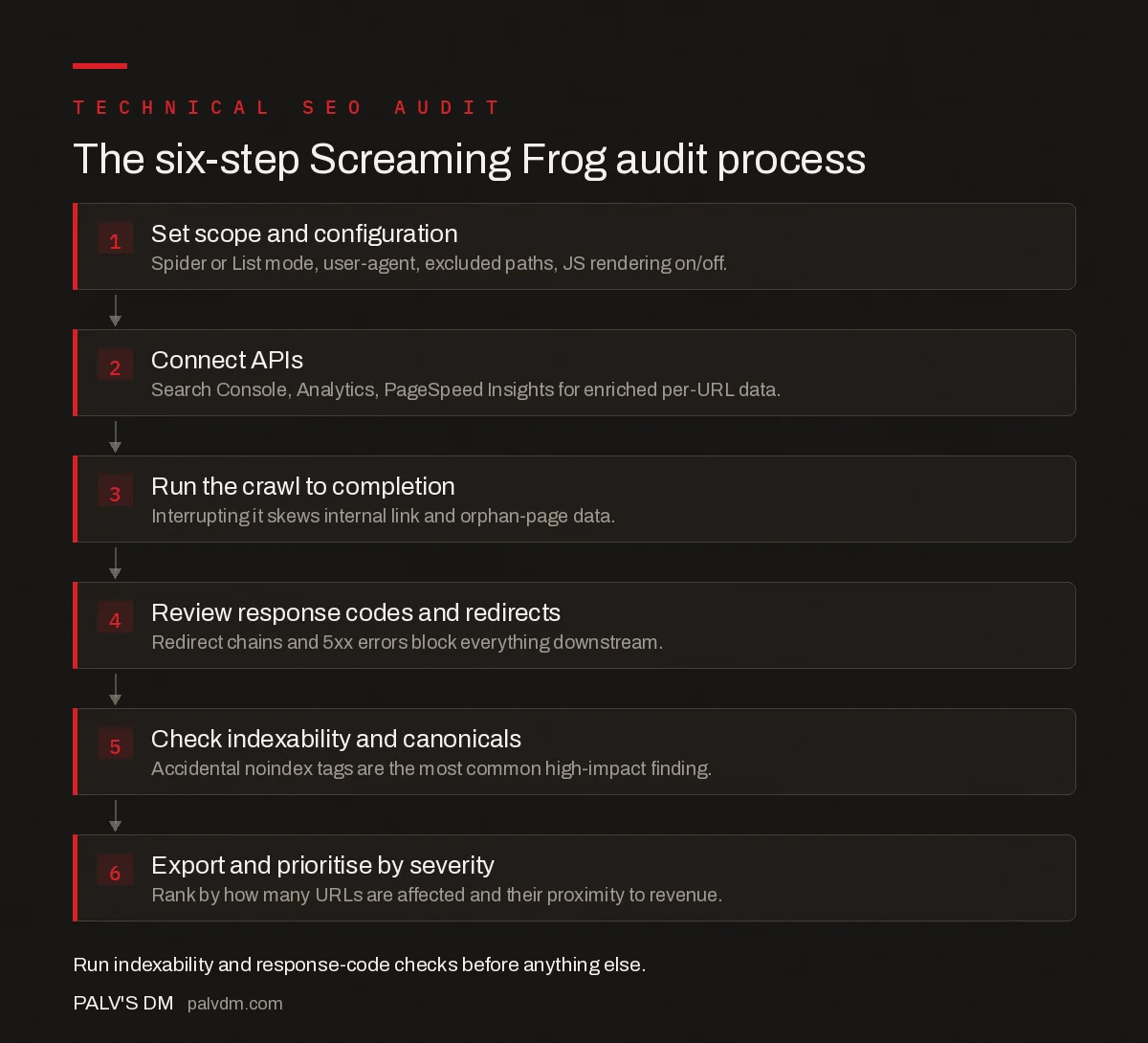
The six-step Screaming Frog audit process
- Set scope and configuration. Spider or List mode, user-agent, excluded paths, JS rendering on/off.
- Connect APIs. Search Console, Analytics, PageSpeed Insights for enriched per-URL data.
- Run the crawl to completion. Interrupting it skews internal link and orphan-page data.
- Review response codes and redirects. Redirect chains and 5xx errors block everything downstream.
- Check indexability and canonicals. Accidental noindex tags are the most common high-impact finding.
- Export and prioritise by severity. Rank by how many URLs are affected and their proximity to revenue.
What issues does a Screaming Frog crawl commonly surface first?
On a site that hasn’t been audited in a while, a handful of issue types tend to dominate the findings regardless of industry. Broken internal links accumulate as pages get deleted or moved without redirects being set up. Duplicate title tags cluster around templated pages — category or tag archives that all inherited the same default title. Missing alt text is nearly universal on older image libraries. And orphan pages — content with no internal links pointing to it — show up wherever a site has run multiple redesigns, since old navigation structures get replaced but the pages themselves stay live. A related but separate issue worth checking in the same pass is why Google sometimes ignores pages that return a 200 status code instead of treating them as genuinely missing, which a crawl alone won’t flag without cross-referencing indexing data.
Redirect chains deserve a specific mention because Screaming Frog is one of the few tools that surfaces the full chain, not just the final destination. A URL that redirects three times before landing on its target wastes crawl budget and, on a large site, can eventually get dropped from the index entirely if Googlebot gives up following it.
How do you turn a Screaming Frog export into a fix list?
The crawl produces data; the audit is what you do with it. Group findings by root cause rather than by tab — a batch of duplicate titles, a batch of missing alt text, and a batch of 404s are each one ticket for a developer, not a hundred individual line items. Cross-check anything involving duplicate or near-duplicate content against what actually causes duplicate content problems, since not every match the crawl flags is a real issue worth fixing. And before closing out the response-code review, confirm the team understands which HTTP status codes actually matter for SEO — a 302 used where a 301 belongs is a common, easy-to-miss finding that changes how link equity passes through a redirect.
For ongoing sites, schedule the crawl to run monthly and compare exports. A jump in 404s or a sudden spike in noindexed pages between two crawls is usually the first sign of a deployment gone wrong, and catching it in a scheduled diff beats catching it in a traffic drop three weeks later.
Frequently asked questions
Is the free version of Screaming Frog enough for a technical SEO audit?
For a site under 500 URLs, yes — the free version crawls, exports, and covers response codes, titles, and basic indexability. Above that limit, or if you need Google Search Console and Analytics integration, JavaScript rendering, or scheduled recrawls, the paid licence is required.
How long does a Screaming Frog crawl take?
It depends on site size, server response time, and crawl speed settings, but as a rough guide a well-configured crawl processes several URLs per second on a healthy server. A 5,000-page site typically finishes in 20 to 40 minutes; a slow server or aggressive rate-limiting can stretch that to hours.
Should Screaming Frog render JavaScript when crawling?
Only if the site relies on client-side rendering for its primary content or links. JavaScript rendering is slower and more resource-intensive, so for a standard server-rendered WordPress or similar CMS site, leave it off and crawl the raw HTML — it is faster and closer to what most of Googlebot’s first crawl pass sees.
What should I fix first from a Screaming Frog audit?
Indexability problems first — pages accidentally noindexed or blocked by robots.txt that should rank — because nothing else in the audit matters if the page can’t be indexed. After that, fix broken internal links and redirect chains, then missing or duplicate titles and meta descriptions.
Can Screaming Frog replace Google Search Console for an audit?
No. Screaming Frog shows what your site currently looks like to a crawler; Search Console shows what Google has actually indexed, how it’s performing, and any manual actions or coverage errors. A complete audit connects the two — Screaming Frog can pull Search Console data directly via its API integration.
Sources
- Googlebot crawler documentation — Google Search Central
- How to Find Orphan Pages — Screaming Frog
- Technical SEO: The Complete Working Guide
Want this done on your site?
Every PalV’s DM engagement starts with a free audit of your actual website — a 12-point
crawl covering what is blocking indexation, on-page gaps against your primary keywords, speed
findings, and the three to five fixes worth making first. Delivered in two working days. No
payment details, and the findings are yours whether you hire us or not.


