
Search Console URL Removal Tool: What It Really Does
The Search Console Removals tool hides a URL from Google Search for about six months, it does not delete the page from the index. What it actually does, and which tool to use instead for a permanent removal.

The Search Console URL Removal Tool does not delete a page from Google’s index — it hides the URL from search results for about six months and clears the cached copy, then the page is eligible to reappear unless a permanent fix (noindex, 404, or 410) was applied during that window. Treating it as a permanent deletion tool is the single most common misunderstanding about it, and the mistake that leaves the same URL resurfacing in Search six months after someone thought the problem was solved.
The tool is fast — most requests process within a day — which is exactly why it gets misused. Speed makes it feel like a fix. It’s a pause button, not an off switch.
What does the URL Removal Tool actually do?
Inside Search Console, the Removals report has three separate tools, and confusing them is the second most common mistake:
| Tool | Who can use it | What it does |
|---|---|---|
| Temporary Removals | Verified site owners only | Hides a URL from Search for ~6 months, clears cache |
| Outdated Content | Anyone, for any site | Refreshes a stale snippet/cache when the live page has already changed |
| SafeSearch filtering | Anyone, reviewed by Google | Flags a page as adult content for SafeSearch filtering |
Most people searching “URL removal tool” mean the first one, Temporary Removals, and that’s the focus here. Within that tool, there are two distinct request types: removing the URL from Search entirely for six months, or leaving the URL indexed but clearing only the cached snapshot Google stores of it.
Why does the removal only last six months?
Google treats a temporary removal as exactly that — temporary. The six-month window exists to give a site owner time to implement a durable fix: delete the page and serve a 404, or add a noindex tag if the page needs to stay live for users but shouldn’t rank. If nothing changes on the page or its indexing signals within that window, Google has no reason not to index it again once the removal expires, because from Google’s side, the page still exists, is still reachable, and doesn’t say “don’t index me” anywhere in its own markup.
This is the part that trips people up during an incident response. A leaked internal document, an accidentally public staging page, or a pricing error gets removed via the tool, the team moves on, and six months later it’s back in results — because the removal expired and nothing about the page’s actual indexing signals ever changed.
When is the temporary removal tool the right call?
- An urgent, sensitive exposure. Personal data, an unreleased product page, or a staging URL got indexed and needs to disappear from Search today, not after a crawl-and-recrawl cycle.
- Buying time for a real fix. Using it as a bridge while a proper noindex tag or redirect is deployed and confirmed live.
- Clearing a stale cache only. The page is fine and should stay indexed, but Google’s cached snapshot shows old pricing or an old headline — the “clear cache only” option handles this without touching the URL’s ranking.
It’s the wrong call for routine content pruning, seasonal pages you’ll reuse next year, or anything you expect to want indexed again within six months — for those, a scheduled noindex/index toggle or a proper content calendar handles it more predictably.
What’s the permanent alternative to the removal tool?
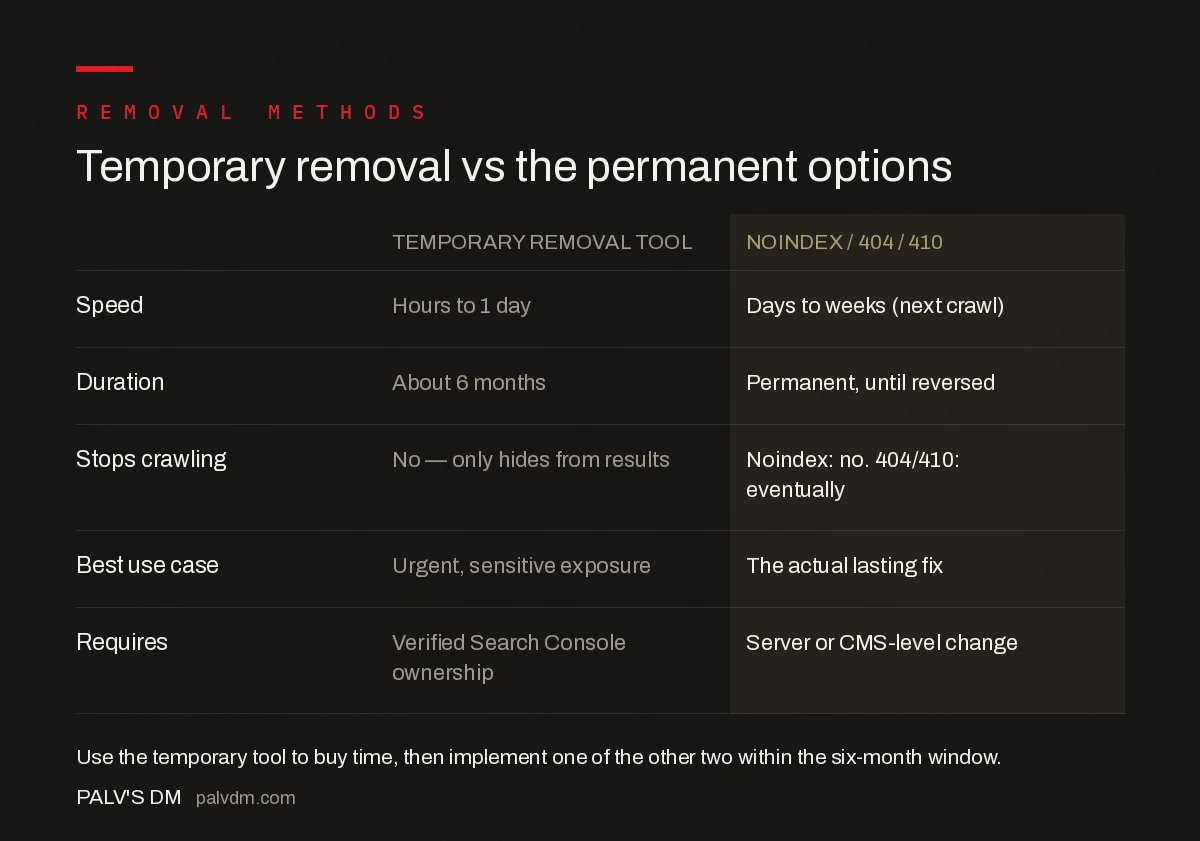
Temporary removal vs the permanent options
| Method | Speed | Duration | Best for |
|---|---|---|---|
| Temporary Removal Tool | Hours to 1 day | ~6 months | Urgent, sensitive exposures |
| Noindex meta tag | Days to weeks (next crawl) | Until removed | Page stays live for users, shouldn’t rank |
| 404 / 410 status | Days to weeks (next crawl) | Permanent | Page should no longer exist at all |
410 (Gone) generally clears a URL from the index somewhat faster than a 404 (Not Found) in Google’s own testing, because it’s an explicit signal rather than an ambiguous one, though both work eventually. For a full comparison of when to use each removal method, our guide on 404 vs 410 vs redirect vs noindex walks through the decision for four different scenarios.
Does the removal tool affect crawling as well as indexing?
No, and this is a distinction worth being precise about. The Removals tool changes what shows up in Search results; it does not stop Googlebot from crawling the URL. If a page needs to be excluded from crawling entirely — not just hidden from results — that’s a robots.txt disallow rule or crawl-rate setting, a different mechanism covered in which bots actually honour a crawl-delay directive. Combining a temporary removal with a robots.txt block on the same URL is redundant for the removal itself but can be useful if the goal is also to stop Google re-crawling and re-evaluating the page during the six-month window.
It’s also worth checking whether a URL keeps showing up because it was never actually indexed in the way you think — a page stuck in discovered, currently not indexed status doesn’t need the removal tool at all, since it was never in the index to begin with.
What happens if you submit a removal request for a URL you don’t fully control?
Search Console requires verified ownership of the property before the Temporary Removals tool becomes available for any URL on it. That’s a deliberate guardrail — without it, anyone could suppress a competitor’s pages from Search. If the content in question lives on a site you don’t own, the correct route is the public Outdated Content tool, which submits a re-crawl request rather than a removal, and only works when the live page has genuinely already changed from what’s showing in the search snippet.
What’s the actual workflow for handling an urgent exposure?
Treat a temporary removal as step one of a two-step process, not the whole process. First, in Search Console, open Removals, choose “New Request,” enter the exact URL, and select either “Remove this URL only” or “Clear this URL’s cache only” depending on whether the page needs to disappear entirely or just show current content. Google typically actions the request within a day. Second — and this is the step teams skip — fix the underlying page before the six-month clock runs out: delete it and confirm it returns a real 404 or 410 (not a 200 with a “page not found” message on it, which Google still treats as live), or add a noindex tag and confirm it’s rendering in the live HTML, not just in a staging template.
A quick way to confirm the permanent fix actually took: run the URL through Search Console’s URL Inspection tool a few days after deploying the change. If it still reports “URL is on Google” or shows a canonical pointing elsewhere, the noindex or 404 hasn’t been picked up yet, and the temporary removal is still doing all the work on its own.
Frequently asked questions
Does the URL Removal Tool delete a page from Google forever?
No. A temporary removal hides the URL from Google Search results for about six months and clears the cached snapshot, but it does not remove the URL from Google’s index. After six months, the page can reappear unless you’ve also blocked or removed it permanently in that window.
What should I use instead for a permanent removal?
For a permanent removal, delete the page and let it return a 404 or 410 status, or keep it live and add a noindex meta tag if it needs to stay reachable. Use the temporary removal tool only to buy time immediately, then implement one of these two as the lasting fix within the six-month window.
Can I use the Removals tool to take down someone else’s page?
Only if you verify ownership of that site in Search Console, which you generally can’t do for a page you don’t control. For content on a site you don’t own, Google provides a separate public Outdated Content tool that lets anyone report search results showing information no longer present on the live page.
Does removing a URL from Search Console stop other search engines from showing it?
No. The Removals tool only affects Google Search. Bing, Yandex, and other search engines have separate removal request tools, and none of them communicate with each other. A URL hidden from Google can still appear in results on any other search engine until you submit a separate request there.
How fast does a removal request take effect?
Temporary removal requests are typically processed within a day, sometimes faster, which is what makes the tool useful for urgent situations like an exposed staging URL or a page with sensitive data. That speed is also why it should never be treated as the permanent fix — it buys time, it doesn’t replace one.
Sources
- Removals and SafeSearch Reports Tool — Google Search Console Help
- New Removals Report in Search Console — Google Search Central Blog
- Technical SEO: The Complete Working Guide
- Page Removal: 404 vs 410 vs Redirect vs noindex
- Discovered, Currently Not Indexed: Causes and Fixes
- Crawl-delay: Which Bots Honour It
Want this done on your site?
Every PalV’s DM engagement starts with a free audit of your actual website — a 12-point
crawl covering what is blocking indexation, on-page gaps against your primary keywords, speed
findings, and the three to five fixes worth making first. Delivered in two working days. No
payment details, and the findings are yours whether you hire us or not.


