
WordPress Custom Post Types: A Practical Guide to Scalable Content Architecture
What WordPress custom post types are, when to use one instead of a category, and how to set them up without hurting crawlability or SEO.
A custom post type is a distinct content object in WordPress, separate from posts and pages, with its own fields, templates and admin screen. You’d build one for properties, case studies, team members, products, or anything else that needs a different shape than a standard blog post. The mistake most sites make isn’t building custom post types wrong technically. It’s building one when a category would have done the job, or skipping one when the content genuinely needed its own structure.
I’ve audited sites with fourteen custom post types for what amounted to four kinds of content, and sites with zero custom post types straining to force a product catalog into blog categories. Both are avoidable with about fifteen minutes of planning before you touch code.
What actually counts as a custom post type?
WordPress ships with two built-in post types: posts and pages. Everything else, media, navigation menus, even revisions, technically runs on the post type system under the hood, but “custom post type” in practice means something you or a plugin registered on top of that: properties, portfolio items, testimonials, events, job listings, recipes.
Each one gets its own set of admin list screens, can have its own custom fields (via meta boxes or a plugin like Advanced Custom Fields), its own URL slug, and its own archive and single templates if your theme supports them. That’s the real distinction from a category: a category is a label you attach to existing posts, a custom post type is a different kind of content entirely.
When does a category stop being enough?
Run through this before building anything. If fewer than three of these are genuinely true for your content, use a category and save yourself the maintenance overhead.
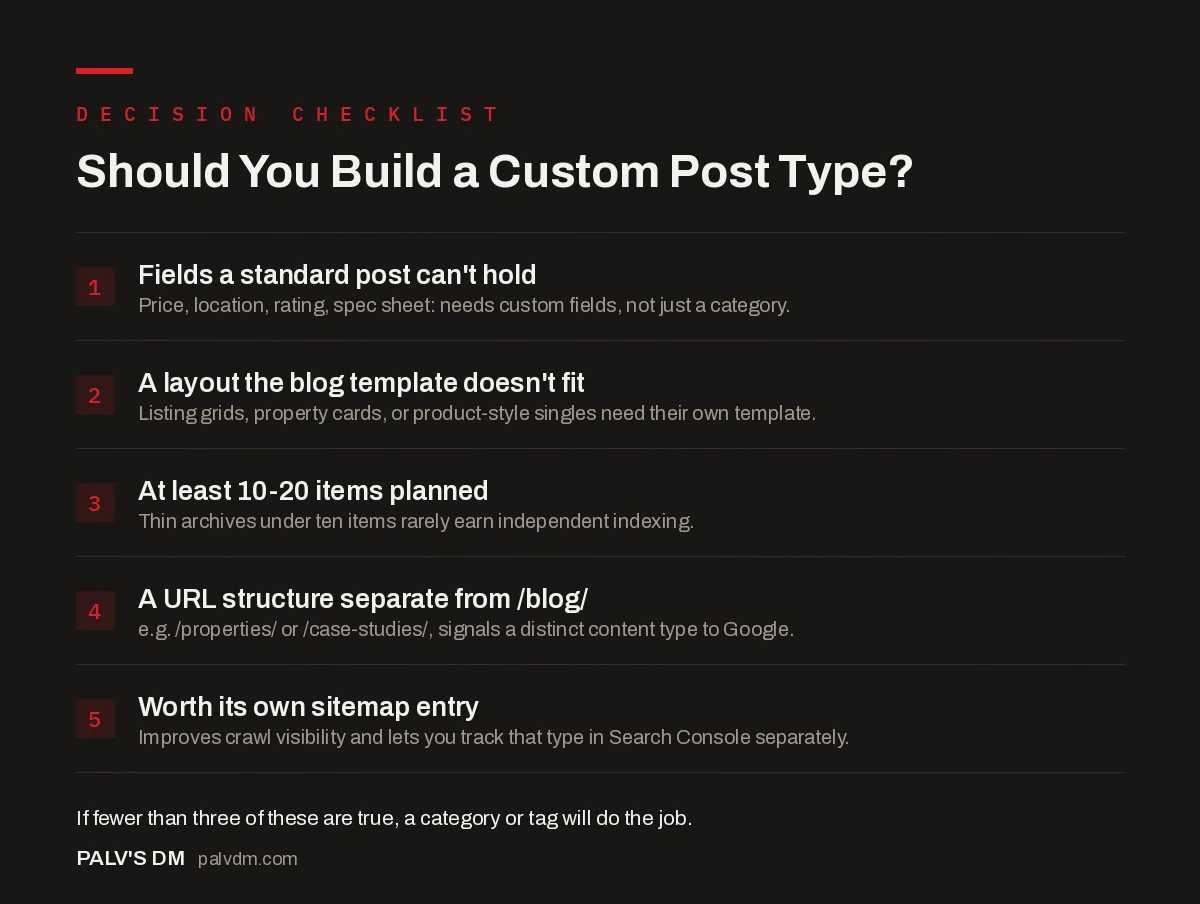
Should You Build a Custom Post Type?
- Fields a standard post can’t hold. Price, location, rating, spec sheet: needs custom fields, not just a category.
- A layout the blog template doesn’t fit. Listing grids, property cards, or product-style singles need their own template.
- At least 10-20 items planned. Thin archives under ten items rarely earn independent indexing.
- A URL structure separate from /blog/. e.g. /properties/ or /case-studies/, signals a distinct content type to Google.
- Worth its own sitemap entry. Improves crawl visibility and lets you track that type in Search Console separately.
I’ve seen agencies spin up a “Testimonials” post type with two entries in it and then wonder why Google won’t index the archive page. Thin archives under ten items are almost always better off as a repeatable block or a shortcode on an existing page, not a standalone content type competing for crawl budget with nothing to show for it.
How do you register one without breaking things?
Two paths, depending on how the site is built. For a coded theme or a custom plugin, you register the post type with register_post_type() hooked to init, specifying the slug, labels, supported features (title, editor, thumbnail, custom fields), and whether it’s public, hierarchical, and included in the REST API. Getting public, show_in_rest and rewrite right at registration saves a lot of debugging later, especially the REST API flag if you plan to use Gutenberg or headless publishing against that type.
For no-code builds, Custom Post Type UI handles registration through a settings screen, and pairs naturally with Advanced Custom Fields for the field groups. It’s the standard combination for agencies that don’t want a custom plugin for every client site.
One setting trips people up constantly: after registering a new post type, WordPress needs its rewrite rules flushed before the new URLs will resolve. Visiting Settings > Permalinks once and clicking save does this. Skip it and you’ll get 404s on pages that should exist, which usually sends whoever’s debugging it down the wrong path entirely.
Does adding a custom post type help or hurt SEO?
Neither, by default. It’s neutral. What determines the SEO outcome is configuration:
- Set the post type to public. A CPT registered with
public => falsewon’t get a front-end URL at all, and it won’t appear in search results no matter how good the content is. - Confirm it’s in your sitemap. Rank Math and Yoast both auto-include public custom post types, but check the sitemap index after setup rather than assuming.
- Give the archive real content, not just a list. An archive page that’s nothing but a grid of titles and thumbnails is thin. A short intro paragraph explaining what the archive contains gives Google (and readers) actual context.
- Keep the URL structure clean.
/properties/downtown-loft/reads better to users and crawlers than/?post_type=property&p=482. Set the rewrite slug explicitly rather than trusting the default.
For deeper coverage of how content structure affects indexing overall, our WordPress SEO configuration guide walks through sitemap and indexation settings in more detail.
Should you go headless or REST-driven with custom post types?
If you’re pulling custom post type data into a separate front end (a React app, a mobile app, a static site generator), the WordPress REST API exposes any post type registered with show_in_rest => true automatically at a predictable endpoint. That’s a legitimate reason to lean on custom post types heavily: they become a structured content API, not just an admin convenience. Our guide on the WordPress REST API for bulk publishing covers working with that data at scale, and if you’re weighing a fully decoupled setup, headless WordPress: when it’s worth the complexity is worth reading before committing.
If you’re not going headless, this matters less. A well-templated CPT on a standard WordPress front end doesn’t need the REST API exposed publicly at all, and turning it off (set show_in_rest to false) is one less surface to secure.
How do custom taxonomies fit into this?
A custom post type answers “what kind of content is this.” A custom taxonomy answers “how does it get sliced and filtered.” Properties might need a “Location” taxonomy and a “Property Type” taxonomy (villa, apartment, plot). Case studies might need “Industry” and “Service.” These are registered separately from the post type itself, with register_taxonomy(), and attached to one or more post types.
The practical benefit shows up in URLs and filtering. A taxonomy archive at /properties/location/ahmedabad/ gives you a real, indexable landing page for “Ahmedabad properties” without writing a single new post. That’s often a bigger SEO win than the post type itself, because it multiplies your indexable pages against real search intent (location plus product type) with structure you’d otherwise have to fake using tags.
Skip hierarchical taxonomies for anything that isn’t genuinely hierarchical. “Location” with country, state, city nesting makes sense as hierarchical. “Amenities” (pool, parking, gym) doesn’t; that’s a flat, non-hierarchical taxonomy closer to tags. Forcing a flat list into a hierarchy just adds admin clutter with no SEO or UX benefit.
Where do agencies actually get this wrong?
Over-fragmentation is the most common failure I see. A site with “Case Study,” “Success Story” and “Client Win” as three separate post types is really one content type with three names. Merge them into a single “Case Study” type and use a taxonomy (industry, service line, region) to slice it however you need. Taxonomies are cheap to add and remove; merging three post types after the fact means a data migration, which nobody enjoys doing on a live site.
The second common failure is skipping custom fields entirely and cramming structured data into the post body as plain text. If a property listing needs price, bedrooms, and square footage, those belong in dedicated fields you can query, sort, filter and mark up with schema, not buried in a paragraph that a template has to parse with regex.
Frequently asked questions
What’s the difference between a custom post type and a category?
A category groups existing posts. A custom post type is a separate content object with its own fields, templates and admin screen. Use a category when you’re organizing blog posts; use a CPT when the content itself needs a different shape, like a property listing with price and square footage fields.
Do custom post types hurt SEO?
Not inherently. A CPT is indexed and crawled like any other content if it’s public, has clean URLs and is included in your XML sitemap. Problems come from misconfiguration: forgetting to set “public” to true, leaving the archive noindexed by accident, or building an archive with too few items to look substantial.
Can I create custom post types without coding?
Yes. Plugins like Custom Post Type UI let you register post types and taxonomies through a settings screen with no PHP required. For anything beyond a basic setup, pairing it with Advanced Custom Fields to build the field groups is the standard no-code combination.
How many custom post types is too many?
There’s no fixed number, but most well-built business sites use somewhere between two and six beyond the defaults (post and page). If you’re past ten, or if two of your post types could plausibly be one with a taxonomy separating them, that’s usually a sign of over-fragmentation.
Do custom post types need their own sitemap?
They need their own entry in your existing XML sitemap index, not a separate sitemap file you manage by hand. Rank Math and Yoast both add public custom post types to the sitemap automatically, but it’s worth checking the sitemap index after setup to confirm the new type actually appears.
Sources
- Custom Post Types, WordPress Plugin Handbook
- register_post_type() function reference, WordPress Developer Resources
- WordPress SEO: The Complete Configuration Guide
- Headless WordPress: When It’s Worth the Complexity
- The WordPress REST API for Bulk Publishing
- Block Patterns: Reusable Layouts Without Plugin Lock-In
Want this done on your site?
Every PalV’s DM engagement starts with a free audit of your actual website — a 12-point
crawl covering what is blocking indexation, on-page gaps against your primary keywords, speed
findings, and the three to five fixes worth making first. Delivered in two working days. No
payment details, and the findings are yours whether you hire us or not.
Get your free SEO audit
See Web Development plans and prices


