
The WordPress REST API for Bulk Publishing: A Practical Walkthrough
How to publish posts in bulk through the WordPress REST API using Application Passwords, the batch endpoint, and a script that won't get you rate-limited.
Bulk publishing through the WordPress REST API means authenticating with an Application Password, then sending a POST request to /wp/v2/posts for each piece of content, either in a loop or through the built-in batch endpoint for up to 25 at a time. No plugin required. The endpoints have been part of WordPress core since version 4.7, and the authentication piece has been solved since 5.6.
Most “how to bulk publish WordPress” guides jump straight to a Zapier flow or a paid plugin. Fine if you want that, but if you’re comfortable with a script and a terminal, the API does the job directly and you control exactly what gets sent. We use this pattern for migrating client content and for publishing batches of programmatic pages. It’s not complicated. It’s just under-documented in one place.
What do you need before you write any code?
Three things: a WordPress site running 5.6 or later (basically any current install), a user account with permission to publish posts, and an Application Password generated for that account. Go to Users, your profile, scroll to Application Passwords, name it something you’ll recognise later (“bulk-publish-script”), and generate it. WordPress shows you the password once. Copy it immediately into your script’s environment variables, never into the script file itself.
You don’t need OAuth, JWT, or a third-party auth plugin for this. Application Passwords use HTTP Basic Authentication, which every HTTP library supports natively. That’s the whole reason this workflow got so much easier after WordPress 5.6 shipped it in core.
How do you actually authenticate a request?
Send your username and the Application Password as HTTP Basic Auth credentials on every request, over HTTPS only. In Python’s requests library that’s just auth=(username, app_password) passed to the call. In curl it’s -u "username:app_password". The API returns a 401 if the credentials are wrong or if the site is serving over plain HTTP without an SSL certificate, since some hosts strip the Authorization header on non-HTTPS requests.
One thing that trips people up constantly: some hosts, particularly ones running older Apache or LiteSpeed configurations, strip the Authorization header before it reaches WordPress. If every request returns 401 with credentials you’ve triple-checked, that’s almost always the cause, not a wrong password. The fix is a line in .htaccess: SetEnvIf Authorization "(.*)" HTTP_AUTHORIZATION=$1.
What does a bulk-publish workflow actually look like?
Six steps, in order, and skipping the order causes most of the failures we see in scripts people bring us to debug.
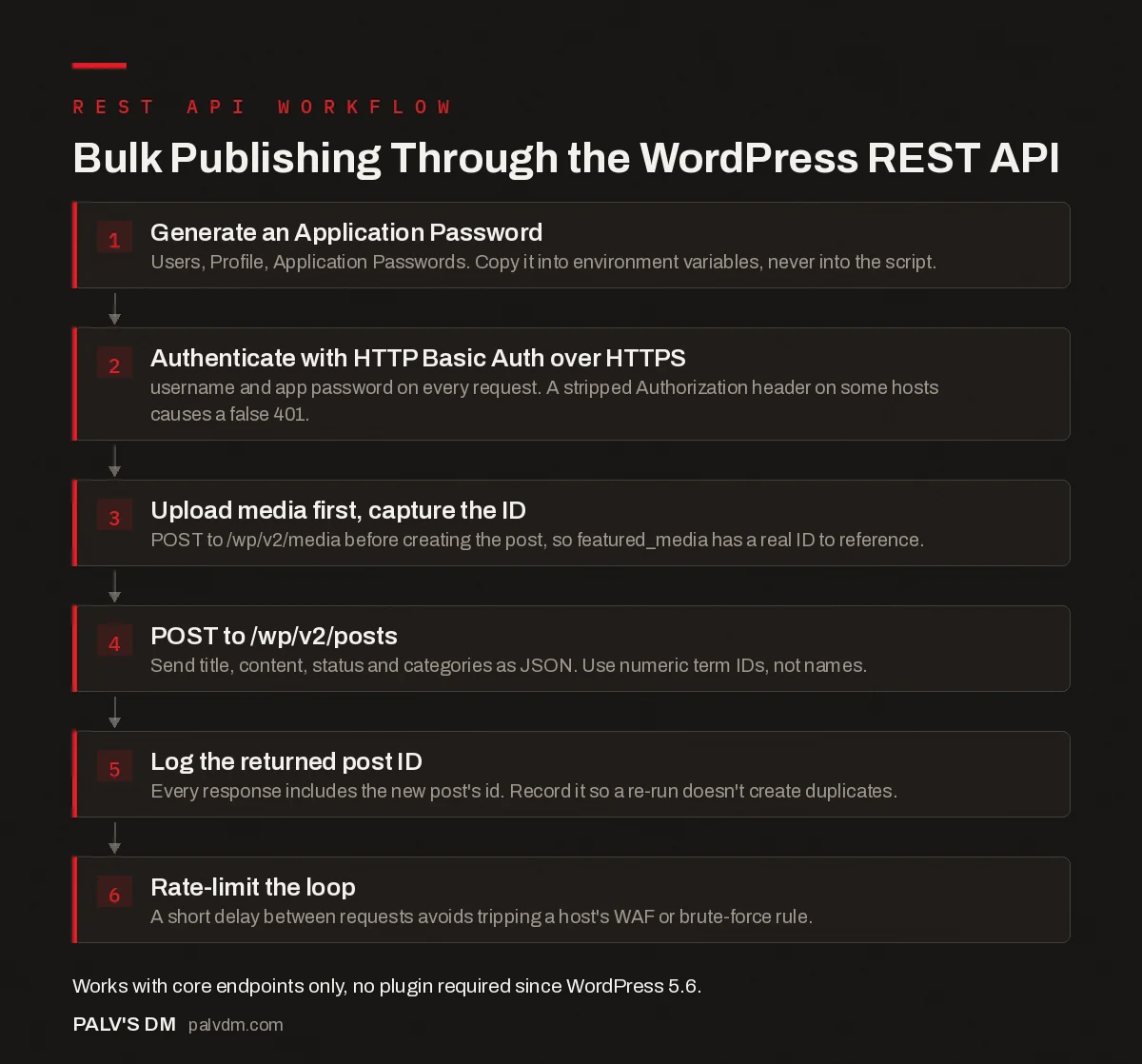
Bulk Publishing Through the WordPress REST API
- Generate an Application Password. Users, Profile, Application Passwords. Copy it into environment variables, never into the script.
- Authenticate with HTTP Basic Auth over HTTPS. username and app password on every request. A stripped Authorization header on some hosts causes a false 401.
- Upload media first, capture the ID. POST to /wp/v2/media before creating the post, so featured_media has a real ID to reference.
- POST to /wp/v2/posts. Send title, content, status and categories as JSON. Use numeric term IDs, not names.
- Log the returned post ID. Every response includes the new post’s id. Record it so a re-run doesn’t create duplicates.
- Rate-limit the loop. A short delay between requests avoids tripping a host’s WAF or brute-force rule.
The order matters because featured_media and any inline images need a media ID that only exists after the upload call returns. Publishing the post first and patching in the image afterward works too, but it means the post briefly exists without a featured image, which is a problem if anything (a cache warm, a social share) touches it in that window.
Loop individual requests, or use the batch endpoint?
For most bulk-publishing jobs, loop individual POST requests to /wp/v2/posts. It’s simpler to debug, and a single failure doesn’t take down the whole run. If one post in a loop of 200 fails on a malformed field, you log it, fix it, and re-run just that one.
The batch endpoint at /wp-json/batch/v1, added in WordPress 5.6 and extended to core content endpoints including posts in 5.9, lets you bundle up to 25 sub-requests into a single HTTP call. It’s a genuine performance win when you’re doing many small writes and want to cut round-trip overhead. The trade-off is debugging: a batch response comes back as an array of results in request order, and untangling which of 25 sub-requests failed is more work than reading one clear error from a single failed loop iteration.
Our default for anything under a few hundred posts is the simple loop with a short delay between requests. We reach for batching only when round-trip latency is the actual bottleneck, which on shared hosting it usually isn’t.
What does the request body actually need to contain?
Fewer fields than people expect. A minimal working request to /wp/v2/posts needs a title, content, and status. Everything else has a sane default.
{
  "title": "Post title here",
  "content": "<p>Full HTML body goes here.</p>",
  "status": "draft",
  "slug": "post-title-here",
  "categories": [7],
  "excerpt": "Meta description or excerpt text"
}
Send that as the JSON body of a POST request with a Content-Type: application/json header, and WordPress creates the post and returns its full object, including the new id, in the response. Grab that ID immediately. You’ll need it for the follow-up call that sets featured_media, and for your own log of what got published where. A script that doesn’t record the returned post IDs is a script you can’t cleanly re-run without creating duplicates.
Duplicate slugs are worth a specific mention. WordPress will happily append -2, -3 and so on to a slug that already exists rather than rejecting the request, which is convenient right up until you’re bulk-publishing a batch with a bug that resubmits the same ten posts twice. Check for an existing post by slug before creating a new one if your script might run more than once against the same input.
What breaks when scripts run at scale?
- Rate limiting from the host, not WordPress itself. Core doesn’t rate-limit the REST API by default, but many hosts and security plugins do. A burst of 50 requests in two seconds can trip a WAF rule meant to catch brute-force login attempts. Add a half-second delay between requests as a default, not an afterthought.
- Timeouts on large media uploads. The media endpoint accepts raw binary in the request body. A slow upload on a shared host can exceed your HTTP client’s default timeout before the server finishes processing the file. Set an explicit timeout of 60-90 seconds for media calls specifically.
- Category and tag IDs, not names. The API expects numeric term IDs for
categoriesandtags, not the term names. Fetch the term list once at the start of your script and build a name-to-ID lookup rather than guessing IDs by hand. - Draft-then-review beats publish-then-fix. Set
status: "draft"for the first run of any new script. Confirm the output looks right on a handful of posts before flipping future runs tostatus: "publish".
Is the batch endpoint safe to leave exposed?
Keep core updated if you use it. WordPress shipped a coordinated security release in mid-2026 patching an unauthenticated remote code execution vulnerability in the batch endpoint itself, affecting core versions 6.9.0 through 6.9.4 and 7.0.0 through 7.0.1, fixed in 6.9.5 and 7.0.2. The bug didn’t need a plugin or any special configuration; a crafted batch request against a default install was enough. If your bulk-publishing setup uses the batch endpoint and your core version sits in that affected range, updating is not optional maintenance, it’s the fix for a specific, already-public hole.
This is also a good argument for the simple-loop approach over batching by default: fewer moving parts on a route that’s had a serious vulnerability is a reasonable trade for slightly slower publishing.
Frequently asked questions
Do I need a plugin to use the WordPress REST API?
No. The core content endpoints, posts, pages, media, categories, have shipped in WordPress since version 4.7. Authentication for write operations uses Application Passwords, built into core since WordPress 5.6, so a fresh install can accept authenticated API requests with zero extra plugins.
What is an Application Password and how is it different from my login password?
It’s a separate, revocable credential generated under Users, Profile, Application Passwords. It authenticates API requests only and cannot be used to log into wp-admin. If a script or key leaks, you revoke that one Application Password without touching your actual account password.
How many posts can I publish in one batch request?
Twenty-five by default. WordPress’s batch framework caps requests to /wp-json/batch/v1 at 25 sub-requests unless a site raises the rest_get_max_batch_size filter. For anything larger, loop sequential POST requests to /wp/v2/posts instead.
Is the WordPress REST API safe to leave publicly accessible?
Read access to public content is safe by design. Write access is protected by authentication, but the batch endpoint specifically has had at least one critical unauthenticated vulnerability patched in 2026, so keeping core updated matters more here than on most parts of a WordPress install.
Can I set the featured image when creating a post through the API?
Yes, but in two steps. Upload the image to /wp/v2/media first and capture the returned media ID, then include that ID as featured_media in your /wp/v2/posts request, or send a follow-up POST to update an existing post.
Sources
- Posts endpoint reference, WordPress REST API Handbook
- REST API Batch Framework in WordPress 5.6, Make WordPress Core
- WordPress SEO: The Complete Configuration Guide
- Headless WordPress: When It’s Worth the Complexity
- Custom Post Types for Scalable Content Architecture
- Block Patterns: Reusable Layouts Without Plugin Lock-In
Want this done on your site?
Every PalV’s DM engagement starts with a free audit of your actual website — a 12-point
crawl covering what is blocking indexation, on-page gaps against your primary keywords, speed
findings, and the three to five fixes worth making first. Delivered in two working days. No
payment details, and the findings are yours whether you hire us or not.
Get your free SEO audit
See Web Development plans and prices


