
Website Handover Checklist: What to Get From Your Developer
A practical website handover checklist covering domain, hosting, CMS, analytics and source code access, so you never lose control of your own site.
A proper website handover gets you the domain registrar login, hosting or server access, CMS admin credentials, the database, the source code, and owner-level access to analytics and Search Console, all transferred to accounts you control, not the developer’s. Miss any one of those and you don’t fully own your website, no matter what the invoice says.
Most business owners find this out the hard way: an agency relationship ends, and it turns out the domain was never in the client’s name, or the Google Analytics property was set up under a personal Gmail address nobody at the company has ever logged into. None of that is usually malicious. It’s just what happens when handover isn’t treated as a deliverable with its own checklist.
What’s the minimum you should insist on before paying the final invoice?
Five things, non-negotiable, regardless of project size: domain control, hosting or server access, the CMS admin login, the source code if any custom development was done, and analytics/Search Console ownership. Everything else on a fuller checklist supports these five. If a developer resists handing over any one of them “for security” or “because it’s easier if we manage it,” treat that as a red flag rather than a reasonable default. Managed hosting through the agency can be a legitimate service. Managed hosting where you have no login of your own is a lock-in mechanism dressed up as a service.
Domain and registrar: what “ownership” actually means
Owning a domain means three things line up: you’re the registrant of record (check WHOIS or the registrar’s account panel), you hold the login to the registrar account itself, and you have the EPP/auth code needed to transfer it elsewhere if you ever choose to. Agencies sometimes register client domains under their own reseller account because it’s operationally simpler on their end. That’s fine as a temporary arrangement during a build. It’s not fine as a permanent state once the site is live and being paid for.
Ask directly: “Whose name is this domain registered under, and can I log into the registrar account myself right now?” If the answer involves the agency needing to “process a transfer,” that transfer should happen before final payment, not after.
Hosting, server and file access
You need either full hosting account credentials (cPanel, Plesk, or your host’s control panel) or, at minimum, an admin-level user created specifically for you if the hosting is shared infrastructure the agency manages for several clients. Get FTP/SFTP or SSH access details too if the site involves any custom code that isn’t managed entirely through the CMS. A WordPress site running only core plugins might not need this. A site with custom PHP, a headless front end, or server-level cron jobs absolutely does.
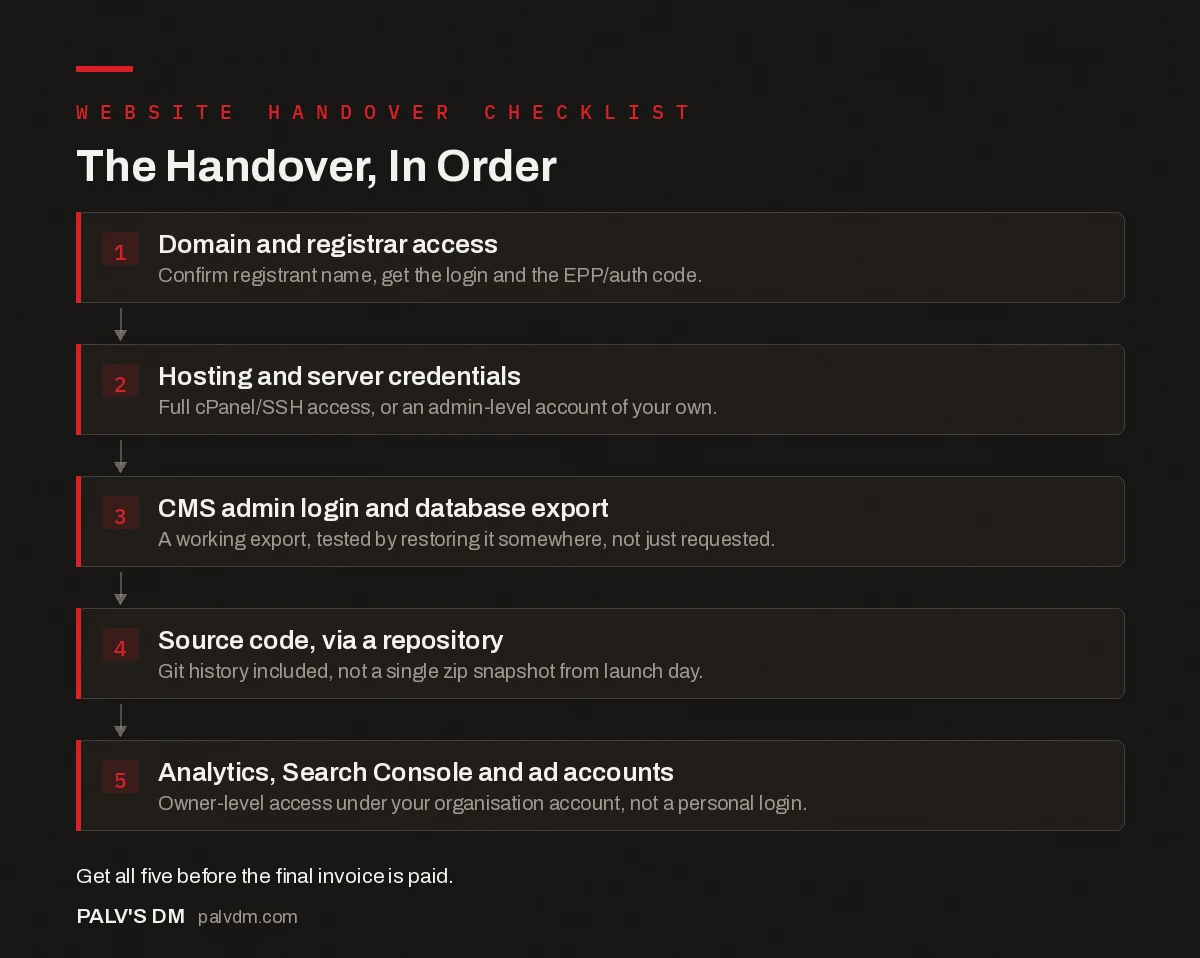
The Handover, In Order
- Domain and registrar access. Confirm registrant name, get the login and the EPP/auth code.
- Hosting and server credentials. Full cPanel/SSH access, or an admin-level account of your own.
- CMS admin login and database export. A working export, tested by restoring it somewhere, not just requested.
- Source code, via a repository. Git history included, not a single zip snapshot from launch day.
- Analytics, Search Console and ad accounts. Owner-level access under your organisation’s account, not a personal login.
What agencies withhold versus what you’re actually entitled to
There’s a gap between common agency practice and what a client relationship built on trust should look like. Here’s how the two compare on the items that cause the most disputes later.
| Asset | Common agency default | What you should insist on |
|---|---|---|
| Domain registrant | Registered under agency’s reseller account | Registered under your business name and email from day one |
| Analytics property | Owned by agency’s Google account | Owner-level access under your Google Workspace or business Gmail |
| Source code | Kept on agency servers, shared only on request | Live in a repository (GitHub, GitLab, Bitbucket) you have access to throughout |
| Hosting account | Agency’s master account, client gets CMS login only | Your own hosting account, or a dedicated admin login with full visibility |
None of the “common agency default” column is inherently dishonest. Managing all of this centrally is genuinely more efficient for an agency running fifty client sites. The problem is when that efficiency is never disclosed as a trade-off, and the client only discovers the arrangement when they try to leave.
Third-party integrations, analytics and Search Console access
Get a written list of every third-party service connected to the site: payment processors, CRM integrations, email marketing platforms, chat widgets, booking tools, anything with an API key or webhook touching your data. For each one, confirm whether the account belongs to you or the developer. Google Search Console specifically deserves its own line item: it’s free, it’s the single most reliable source of how Google actually sees your site, and if you don’t have owner-level access under your own account, you can’t add other users, can’t see manual actions, and lose that history entirely if the previous access holder becomes unreachable.
What happens if your previous agency won’t hand it over?
This happens more often over unpaid invoices and contract disputes than outright bad faith. Start with your contract: most reasonable agreements specify ownership and a handover obligation, even if it’s one sentence buried in the terms. A clear, dated written request referencing that clause resolves most standoffs without escalation. For the domain specifically, you’re not entirely dependent on the registrar’s cooperation: ICANN’s transfer policy gives registrants a path to move a domain to a new registrar, though having the current registrar’s cooperation makes it faster and avoids the standard 60-day lock that follows a registrant-of-record change. If access genuinely won’t come voluntarily, a short letter from a lawyer citing the contract usually moves faster than continued email chasing.
The pattern we see most often when a client switches to us mid-relationship isn’t a hosting login withheld out of spite. It’s a Google Analytics property nobody remembers the login for, set up four years ago by a freelancer who has since changed their email address. That one is genuinely harder to fix than a contract dispute, because there’s no one to send a letter to. If the property was ever verified through Search Console, Google’s ownership verification process can sometimes recover access; if it wasn’t, the practical answer is starting a new property and accepting the historical data gap. It’s a good argument for checking who holds analytics access annually, not just at handover.
A handover checklist you can send your developer today
- Domain registrar login and EPP/auth code, registrant confirmed as your business.
- Hosting/server credentials or a dedicated admin account with full visibility.
- CMS admin login plus a tested database export.
- Full source code in a repository, with commit history, not a single archive.
- Google Analytics owner access under your account.
- Google Search Console owner access under your account.
- SSL certificate details, including renewal date and whether it auto-renews.
- List of all third-party integrations, with account ownership noted for each.
- Documentation covering how to edit common content types and where key settings live.
- Written confirmation of the support window and what happens to access after it ends.
Send this before the project starts, not after it ends. A developer who balks at agreeing to this list up front is telling you something about how the relationship is likely to go later.
Frequently asked questions
What should be included in a website handover checklist?
At minimum: domain registrar login with the EPP/auth code, hosting or server access, CMS admin login, database credentials, source code (via a repository if one exists), Google Analytics and Search Console access at owner level, and a list of every third-party integration in use.
Who should own the domain name after a website project ends?
You should, registered under your own name and email, in an account only you control. A domain registered under the agency’s account, even one they promise to transfer later, means they can technically hold your business’s address hostage over an unpaid invoice or a dispute.
What if my previous developer won’t hand over access?
Check your contract first for what it says about ownership and handover obligations. If there’s no clear clause, a firm written request citing consumer or contract law, sent by email so there’s a paper trail, resolves most cases. For domains specifically, ICANN’s transfer policy exists precisely so a registrant can move a domain even without registrar cooperation, though it moves faster with it.
Do I need the source code, or just admin access to the CMS?
Both, if the site has any custom development beyond a stock theme. CMS admin access lets you edit content and settings, but it won’t help you if a custom plugin breaks and the only copy of its code lived on the departing developer’s laptop. Ask for the full repository, not a zip file exported once at the end.
How long should a developer keep access after handover?
As short as practical, usually a defined support window of two to four weeks for post-launch fixes, then access is revoked or downgraded to view-only. Indefinite access left open by default is how most old-agency logins end up in a site’s user list two years later, unnoticed.
Sources
- ICANN Transfer Policy
- Website Development Handoff Checklist, SmartBug Media
- WordPress SEO: The Complete Configuration Guide
- What a Clean Website Handover Package Contains
- How to Check Who Currently Owns Your Domain
- Transferring a Domain Away From an Agency
Want this done on your site?
Every PalV’s DM engagement starts with a free audit of your actual website — a 12-point
crawl covering what is blocking indexation, on-page gaps against your primary keywords, speed
findings, and the three to five fixes worth making first. Delivered in two working days. No
payment details, and the findings are yours whether you hire us or not.
Get your free SEO audit
See Web Development plans and prices


