Service Support — Web Development
How Handover and Training Works
Website handover training done right: full account access transfer, a recorded walkthrough call, written guides, and a defined post-launch support window.
A proper website handover means the client leaves with full ownership of every account the site depends on, a recorded walkthrough of how to make routine edits, a written reference guide, and a defined window of support before the project closes. Website handover training isn’t a fifteen-minute screen-share tacked on after the invoice is paid — it’s a structured step that determines whether a client can actually run their own site or stays permanently dependent on whoever built it. The difference between a good handover and a bad one shows up the first time something needs updating and the person who built the site isn’t answering the phone.
Key takeaway
- A complete handover transfers every credential — admin, hosting, domain, DNS — into accounts the client owns outright, not accounts the agency controls on their behalf.
- Training has two parts that need to exist separately: a live walkthrough call for the questions a client doesn’t know to ask yet, and a written guide they can return to later.
- A time-boxed support window after launch closes the loop, so the client isn’t left guessing whether a question is still fair game to ask.
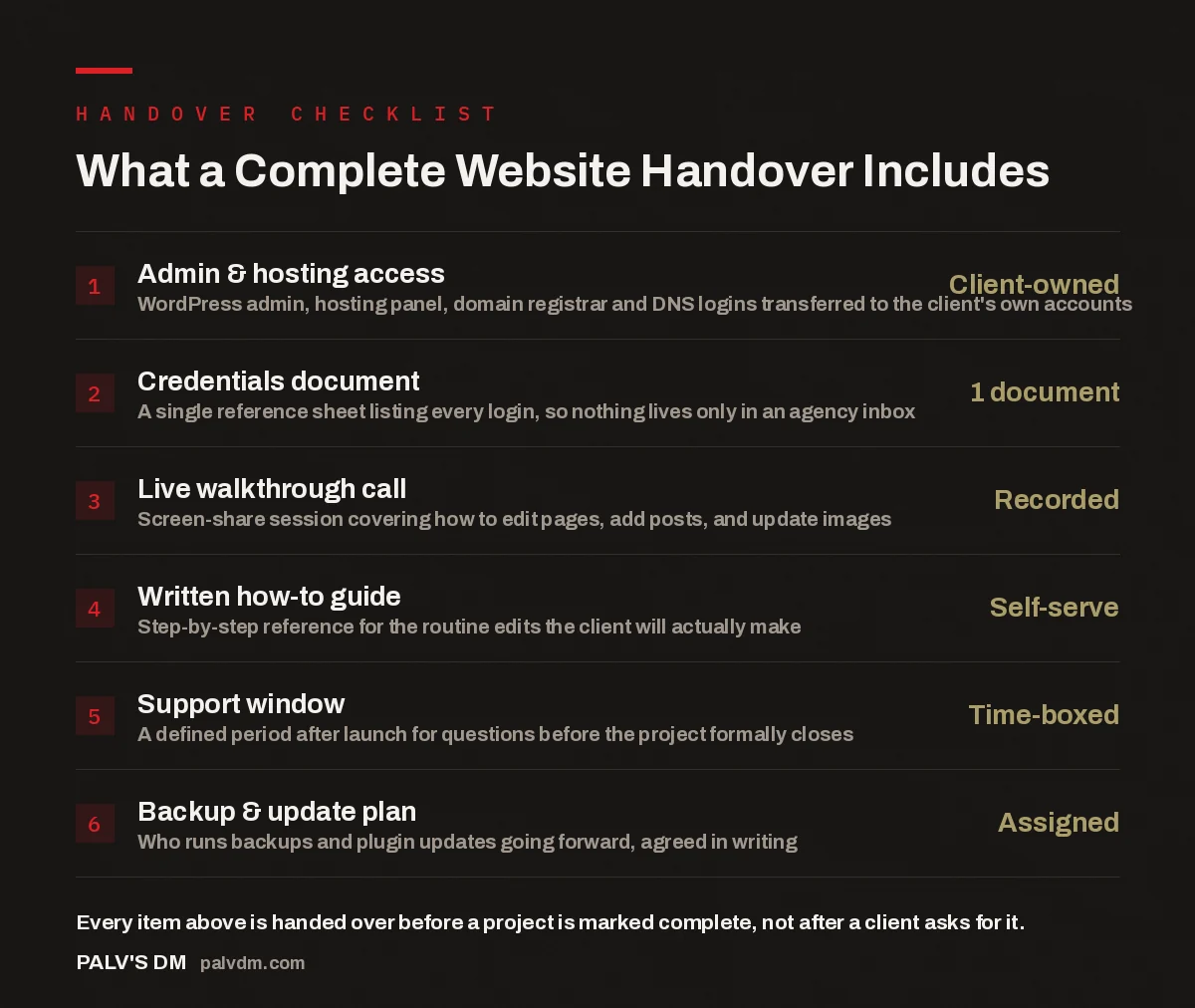
What a Complete Website Handover Includes
- Admin & hosting access — Client-owned. WordPress admin, hosting panel, domain registrar and DNS logins transferred to the client’s own accounts.
- Credentials document — 1 document. A single reference sheet listing every login, so nothing lives only in an agency inbox.
- Live walkthrough call — Recorded. Screen-share session covering how to edit pages, add posts, and update images.
- Written how-to guide — Self-serve. Step-by-step reference for the routine edits the client will actually make.
- Support window — Time-boxed. A defined period after launch for questions before the project formally closes.
- Backup & update plan — Assigned. Who runs backups and plugin updates going forward, agreed in writing.
What actually happens during a website handover?
A handover starts with access, not instruction. Before any training call happens, every account the site depends on needs to exist in the client’s name — WordPress admin, the hosting panel, the domain registrar, DNS records if they sit somewhere separate. We cover the reasoning for this in building in your accounts, not ours: if a site is technically built inside an agency’s own infrastructure and only “made available” to the client, the client doesn’t actually own the site. They own a tenancy in someone else’s system, and that arrangement only stays comfortable until the relationship changes.
Once access is confirmed, the handover moves to documentation and training proper. This is the part most build processes shortchange, because access can be transferred in an afternoon and nobody bills for the follow-through. A site that was delivered in full according to what’s included in a complete website build can still leave a client stuck if nobody ever shows them how to use it — the technical work being correct doesn’t automatically make it usable by the person who has to run it day to day.
How does the training session actually work?
Training happens as a live, recorded screen-share, not a document sent over email and never discussed. The reason it needs to be live is simple: a client reading a static guide for the first time doesn’t yet know which questions to ask. Sitting on a call and watching someone edit a page, publish a blog post, or swap a hero image surfaces the small confusions — where the “update” button actually is, what happens if you leave a draft unpublished, how image sizing works in the media library — that a written guide alone tends to skip over because they seem obvious to whoever wrote it.
The call is structured around what the client will actually do, not a tour of every feature WordPress has. For most small business sites that means: editing existing page copy, publishing and updating blog posts, adding or replacing images, updating contact details and business hours, and checking a contact form is delivering to the right inbox. Anything outside that — plugin configuration, theme file changes, server-level settings — stays with whoever manages the site technically going forward, because handing a non-technical client the keys to something they’re not equipped to safely change creates more risk than it removes.
Recording the call matters as much as running it. Clients rarely retain a full walkthrough after one viewing, especially if editing a website isn’t part of their regular job. A recording they can replay six weeks later, when they’ve forgotten the exact sequence for adding a new post, removes the need to call back and ask something that was already covered.
What documentation should you actually receive?
Two documents, not one combined file. The first is a credentials sheet — every login, every account, in one place, so a client isn’t hunting through old emails to find a hosting password eight months later. The second is a written how-to guide covering the same ground as the training call, broken into short, task-based sections: “How to publish a blog post,” “How to update the homepage image,” “How to check your contact form is working.” Task-based structure matters more than completeness here — a guide organised around what WordPress calls things internally is far less useful to a client than one organised around what they’re trying to do.
A handover that’s genuinely complete also states, in writing, who is responsible for backups and plugin updates after launch. This is the single most common gap in the process — the site gets handed over, the training call happens, and nobody ever confirms whether the client is expected to run WordPress core and plugin updates themselves or whether that stays with the development team as part of an ongoing arrangement. Left unstated, it tends to default to “nobody,” which is how sites end up several major versions behind and vulnerable to the exact security issues regular updates exist to prevent.
If a client can’t publish a blog post or swap a photo without calling us six months after launch, we didn’t finish the handover — we just finished the build. Those are two different deliverables, and treating them as one is how agencies end up fielding support calls for things they were supposed to have taught the client to do themselves.
Palash, Founder, PalV’s DM
What happens in the support window after launch?
A defined support window closes the gap between “the site is live” and “the client is confident running it alone.” This is typically a set number of weeks after launch during which questions about using the site — not new feature requests — get answered without a separate scope discussion. Setting a clear end point to this window matters for both sides: the client knows exactly how long they have to surface confusions while the training is still fresh, and the agency isn’t left fielding open-ended “quick questions” indefinitely under a project that was billed and closed months earlier.
What comes after that window depends on what the client actually needs going forward. Some clients are comfortable managing content themselves and only need someone technical on call for larger changes or an eventual redesign — in which case the handover genuinely closes the project. Others prefer an ongoing arrangement where updates, backups, and content changes stay with the team that built the site, which is a legitimate choice as long as it’s a deliberate one rather than a default nobody discussed. Either way, the metrics that actually matter once a site is live are worth tracking regardless of who’s managing day-to-day edits — see what we measure on a site 90 days after launch for what that looks like in practice.
A good handover process also connects backward to how the site was built and tested before it ever reached this stage. A launch that skipped proper QA tends to surface its problems during or right after handover, when a client clicking around for the first time finds the broken link or missing redirect that testing should have caught — our pre-launch QA checklist covers what should already be resolved before a client is handed the keys.
Key takeaway
- Ownership, training, documentation, and a time-boxed support window are the four parts of a handover that’s actually complete — missing any one of them leaves a client stuck later.
- Handover quality is easiest to judge by a single test: can the client publish a blog post and swap an image without calling anyone.
FAQ
How long does website handover and training usually take?
The live training call itself typically runs 45–90 minutes depending on how much content management the client will handle themselves. Access transfer can happen in parallel or just before. The support window that follows runs longer, usually a few weeks, so the total handover process spans longer than the call alone even though the training itself isn’t a multi-day affair.
Do I need to know how to code to manage my own website after handover?
No. A properly built site separates the parts a non-technical person edits — page content, blog posts, images, contact details — from the code and configuration that stays fixed. Training focuses on the WordPress editor and media library, not the underlying code, so no development skill is required for routine content updates.
What if I never want to manage the website myself?
That’s a valid choice, and the handover still matters even then — you still need to own the underlying accounts, even if you contract someone else to make the day-to-day edits. What changes is who attends the training call: instead of the business owner, it might be whoever will actually be managing content on their behalf.
What happens if I have a question after the support window closes?
Most agencies, including us, are still reachable after the formal support window — the difference is that further questions move outside the scope of the original project and are handled as a separate, usually smaller, engagement rather than something owed under the original invoice. Having the written guide and recorded call to refer to first often resolves the question before that’s even necessary.
Who is responsible for backups and updates after handover?
Whoever is agreed in writing during handover — there’s no universal default. Some clients keep this with the agency as an ongoing arrangement; others take it on themselves once they have hosting access. What matters is that the answer is stated explicitly before the project closes, rather than assumed by either side.