Service Support — Web Development
What We Measure on a Site 90 Days After Launch
Website performance after launch is measured in stages: Core Web Vitals, indexation, crawl behaviour, rankings, conversions, and traffic across a 90-day window.

Website performance after launch is measured across six areas over 90 days: Core Web Vitals under real traffic, indexation coverage, crawl behaviour in server logs, keyword movement against a baseline, conversion-path tracking, and organic traffic trend against seasonality. Launch day tells you the site works. It does not tell you whether the site performs — that only shows up once real users, real crawlers, and a real quarter’s data have passed through it.
Key takeaway
- The first 90 days after launch is a measurement window, not a victory lap — Core Web Vitals, indexation, and crawl behaviour need checking on a set cadence, not “whenever something looks off.”
- Rankings and traffic almost always dip briefly before they recover, and the sites that don’t recover are usually the ones nobody was watching closely enough to catch the early warning signs.
- Conversion tracking gets verified, not assumed — a form that silently stops firing an event is worse than no form at all, because nobody notices until the lead count looks strange weeks later.
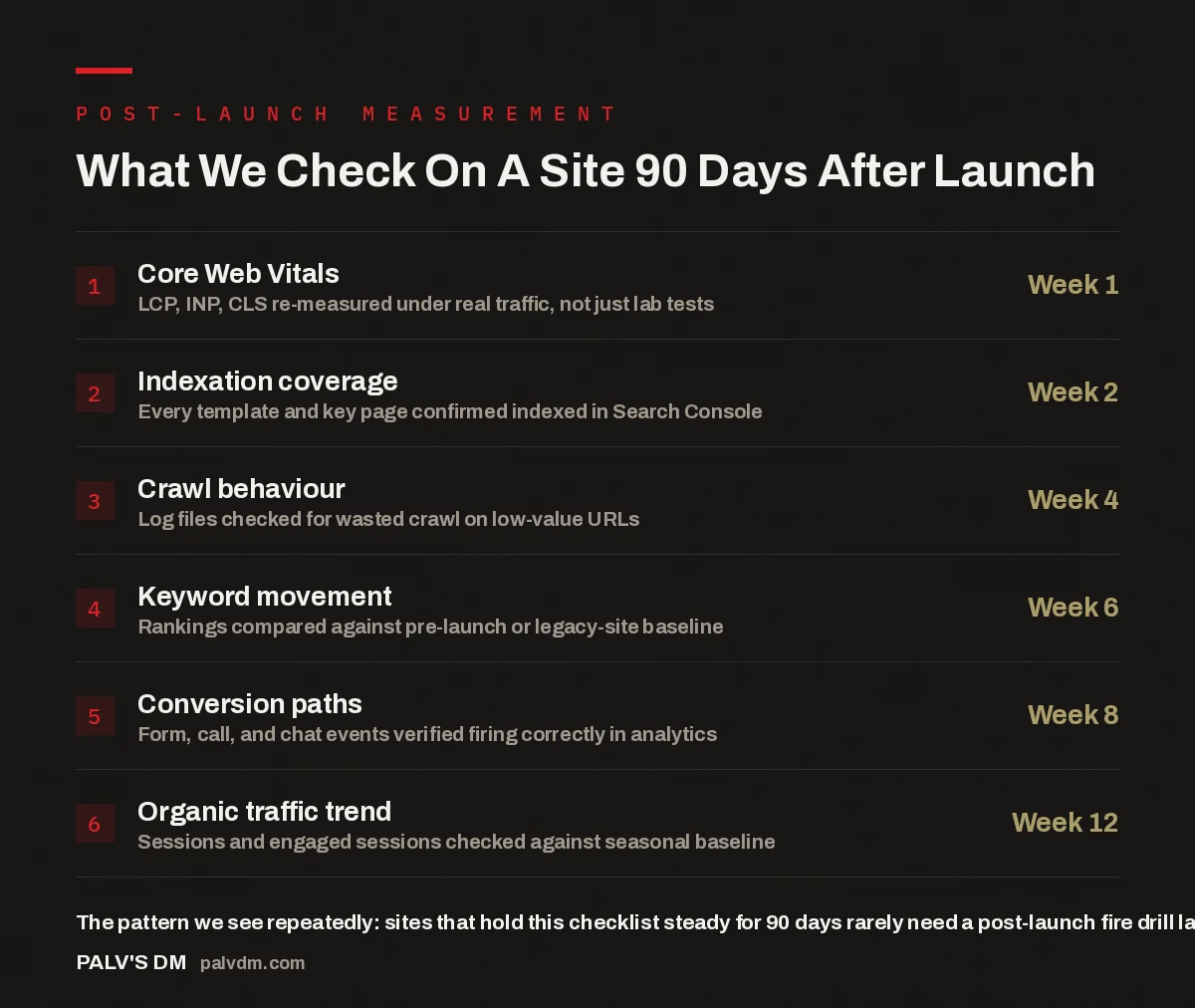
What We Check On A Site 90 Days After Launch
- Core Web Vitals — Week 1. LCP, INP, CLS re-measured under real traffic, not just lab tests.
- Indexation coverage — Week 2. Every template and key page confirmed indexed in Search Console.
- Crawl behaviour — Week 4. Log files checked for wasted crawl on low-value URLs.
- Keyword movement — Week 6. Rankings compared against pre-launch or legacy-site baseline.
- Conversion paths — Week 8. Form, call, and chat events verified firing correctly in analytics.
- Organic traffic trend — Week 12. Sessions and engaged sessions checked against seasonal baseline.
Why does website performance after launch need a formal check-in schedule?
Because most of what breaks a new site is quiet. A slow third-party script that sneaks into a plugin update, a redirect rule dropped during a final config change, a Search Console property never re-verified against the new domain — none of these throw an error message. They just sit there, quietly costing rankings or leads, until someone goes looking. A launch checklist gets you to “the site is live and functional.” A 90-day measurement schedule gets you to “the site is actually doing its job” — two different milestones with two different sets of evidence behind them.
We treat the 90 days after any launch as a structured follow-up period with fixed check-ins, not an open-ended “we’ll keep an eye on it.” Every project gets the same six-point pass at roughly the same intervals, whether it’s a full rebuild or a redesign that kept the existing structure. The intervals matter because different signals mature at different speeds — Core Web Vitals data is usable within days; keyword rankings need a few weeks of consistent crawling before they mean anything.
How do you check Core Web Vitals in the first week?
Lab data from a single test run tells you almost nothing about how a site behaves for real visitors. In week one, we pull field data — Chrome User Experience Report data where the site has enough traffic, otherwise a spread of manual tests across throttled connections and mid-range devices. The three metrics that matter are Largest Contentful Paint, Interaction to Next Paint, and Cumulative Layout Shift. If any sit outside the “good” threshold under real conditions, that’s a week-one fix, not a month-three fix, because a slow first impression compounds: it affects bounce rate, how long Google keeps crawling a session, and how a visitor judges credibility before reading a word.
The most common culprit at this stage isn’t the build itself — it’s what got added after sign-off. A chat widget, a tracking pixel, a font loaded from a third-party CDN. Each seems small alone; stacked together in week one, they can quietly undo work that went into hitting specific speed targets before launch.
What does indexation coverage actually tell you at week two?
Indexation coverage is the honest answer to “does Google actually see this page.” A page can be live, styled correctly, and linked from the navigation, and still sit outside the index — a stray noindex tag carried over from staging, a canonical pointing at the wrong URL, a sitemap never submitted after the domain switch. By week two, we pull the full list of submitted URLs against indexed URLs in Search Console and reconcile the gap page by page.
Week two, deliberately, not day one — Google needs a short runway to crawl a newly launched or migrated site before “not indexed” means anything. Checking too early just produces noise: pages that are simply queued, not excluded. This is the same discipline behind the QA pass we run before a site goes live — the pre-launch checklist catches structural issues before they ship, and the week-two check confirms those fixes actually held once the site met a live crawler.
Why check crawl behaviour in server logs, not just Search Console?
Search Console shows you what Google decided to tell you. Server logs show what actually happened. By week four, there’s usually enough crawl history to pull raw log files and see exactly which URLs Googlebot is hitting, how often, and where it’s wasting time — faceted filter combinations on a category page, old parameter-based URLs still being requested, or a redirect chain burning crawl budget on a hop that should have been a single 301.
This matters more on larger sites, where crawl budget is genuinely finite, but even a modest site benefits from confirming the pages worth ranking are the pages actually getting crawled. It’s a direct extension of the technical SEO work baked in before launch — the pre-launch work sets the intended crawl paths, and the week-four log check confirms Googlebot is actually following them.
When do rankings and traffic actually start to move?
Rarely on a straight line, and rarely immediately. The pattern that shows up repeatedly on new launches and migrations is a short dip somewhere in the first few weeks — a natural consequence of Google re-evaluating a changed or new set of URLs — followed by recovery and, if the underlying work is sound, improvement past the old baseline. We check keyword movement at week six because that’s roughly when the dip-and-recover pattern has played out enough to distinguish expected turbulence from an actual regression.
The comparison always needs a real baseline, not a guess. For a rebuild or migration, that’s the legacy site’s rankings and traffic before cutover. For a new site with no prior history, the baseline is the target keyword list the site was built to compete for, tracked from day one. Traffic gets the same treatment at week twelve, checked against seasonal patterns where they exist rather than a flat month-over-month line — a dip in a naturally slower quarter isn’t the same signal as a dip in a category that should be flat or growing.
A launch that isn’t measured for 90 days afterward is just a guess with good design. The build can be flawless and you’d still have no idea, because nobody checked.
Palash, Founder, PalV’s DM
How do you confirm conversion tracking is actually working?
By testing it, not by trusting it. Every form, phone-number click, and chat interaction should fire an event into analytics, and the only way to know is to submit a real test, watch it land in the dashboard, and confirm the destination — a CRM, an inbox, a spreadsheet — actually received it. We run this check around week eight, late enough for launch-week configuration issues to surface, early enough to fix a broken path before it costs a month of missed leads.
This step is easily skipped because everything looks fine on the surface — the form submits, the confirmation message shows. Whether the business actually received that lead is a separate question, and it’s the one most often missed after a handover, which is why we treat it as its own checkpoint rather than folding it into general QA. It’s covered in more detail in how handover and training works.
What happens if the 90-day numbers don’t look right?
Each checkpoint exists so a problem gets caught at its own stage, not three stages later when it’s harder to untangle. A Core Web Vitals miss in week one is a performance task. An indexation gap in week two is a technical task — a canonical, sitemap, or noindex tag. A crawl inefficiency in week four gets fixed at the server level. A ranking dip that hasn’t recovered by week six gets a deeper look at whether it’s normal turbulence or an actual regression. A broken conversion path in week eight gets fixed immediately — every day it stays broken is lost pipeline. And a traffic trend still off at week twelve, once seasonality is accounted for, is the point where we revisit the earlier five checkpoints to find the actual cause.
A staged approach beats a single “check everything at day 90” review because most of these issues are cheap to fix early and expensive to fix late. A missing conversion event caught in week eight is a quick conversation about tracking. The same gap found in month four is that conversation, plus an uncomfortable one about how many leads went uncounted.
Key takeaway
- A launch is the start of the measurement period, not the end of the project — website performance after launch is only knowable once real data has had time to accumulate.
- Each of the six checkpoints has a reason for its timing — checking too early produces noise, checking too late turns a cheap fix into an expensive one.
Talk to us about a website built with post-launch measurement included
FAQ: Measuring website performance after launch
How soon after launch should Core Web Vitals be checked?
Within the first week. Field data on a brand-new URL takes time to populate, so early checks often lean on manual, throttled-connection testing alongside whatever real-user data has started coming in, rather than waiting for a full month of Chrome UX Report history.
Is a temporary ranking drop after launch normal?
A short dip is a pattern that shows up repeatedly on new launches and migrations, as Google re-evaluates the changed or new URLs. What matters is whether it recovers within a handful of weeks. A dip that keeps getting deeper, rather than flattening and turning around, is the signal worth investigating.
What’s the difference between indexation and crawl behaviour checks?
Indexation coverage answers whether Google has added a page to its index at all. Crawl behaviour, checked through server logs, answers how Googlebot is spending its time across the whole site — including on pages that shouldn’t be getting crawled in the first place. Both matter, but they surface different problems.
Why check conversion tracking separately from general QA?
Because a form or click event can look completely functional to a visitor — it submits, it shows a confirmation — while silently failing to notify anyone on the business end. That failure mode doesn’t show up in a visual QA pass; it only shows up when someone submits a real test and confirms the lead actually landed somewhere.
What if traffic still looks off at the 90-day mark?
That’s the point of running five earlier checkpoints first — by week twelve, most root causes have already been ruled in or out. If traffic is still off after seasonality is accounted for, the investigation goes back through Core Web Vitals, indexation, crawl behaviour, and rankings to find what didn’t resolve.
Short version: website performance after launch isn’t visible on day one — it builds up across a 90-day window through six staged checks: Core Web Vitals in week one, indexation in week two, crawl behaviour in week four, keyword movement in week six, conversion tracking in week eight, and traffic against seasonality in week twelve. Skipping the schedule doesn’t mean nothing goes wrong; it just means nobody finds out until it’s expensive.