
Shared vs VPS vs Managed Hosting: Choosing Honestly
Shared vs VPS vs managed WordPress hosting compared honestly: what each gives you, who outgrows shared hosting, and when managed is worth it.

Shared hosting is the cheapest and least isolated option, VPS gives you dedicated server resources without full management, and managed WordPress hosting bundles WordPress-specific optimisation, security and support on top of infrastructure you never have to touch. If you’re stuck choosing, the honest answer depends less on your budget and more on how much server administration you’re willing to do yourself.
Most people pick a hosting tier based on price alone, and it usually goes wrong in one of two directions. Either they overpay for managed features a five-page site never needs, or they land on cheap shared hosting and outgrow it within a year, discovering the hard way that “unlimited” resources on a shared plan were never really unlimited.
What’s actually different between the three?
Here’s the side-by-side on what each tier gives you, stripped of the marketing language hosting companies use to make every tier sound like the obvious choice.
| Shared Hosting | VPS Hosting | Managed WordPress Hosting | |
|---|---|---|---|
| Resource isolation | None, shared CPU/RAM with other accounts | Dedicated CPU cores and RAM, isolated from other tenants | Usually isolated, on infrastructure tuned for WordPress specifically |
| Technical skill needed | Minimal | Moderate to high on unmanaged plans | Minimal, the host handles server-level work |
| Core updates and security | You manage it, or a plugin does | You manage it unless the plan is “managed VPS” | Handled by the host, often tested on staging first |
| Performance under traffic spikes | Can degrade fast, other accounts compete for resources | Stable, resources are dedicated to you | Stable, plus server-level caching tuned for WordPress |
| Best for | Low-traffic sites, testing, tight budgets | Medium-traffic sites, developers wanting control | Business sites where uptime and speed directly affect revenue |
When does shared hosting actually make sense?
Shared hosting earns its reputation as the budget option because that’s exactly what it’s built for. You’re renting a slice of a server that dozens or hundreds of other accounts share. On a good host with sensible resource limits, that’s fine for a low-traffic site: a portfolio, a site still in early testing, a personal blog. The problem shows up when one of the other accounts on that server gets a traffic spike, a bot attack, or a badly written plugin eating CPU, and it drags your site down with it. You have no way to isolate yourself from a neighbour’s problem on shared infrastructure.
Where shared hosting stops making sense: any site taking payments, any site where downtime costs you leads, and any site that’s already showing slow response times during normal (not peak) traffic. That’s the signal to move, not “when I have more money.”
The pattern I see most often with client sites still on entry-level shared plans: everything looks fine for months, then a festival sale or a press mention sends traffic up for a few hours, and the site slows to a crawl or times out entirely at the exact moment it matters most. Shared hosting’s PHP worker limits are usually the bottleneck, not bandwidth, and most owners never find out those limits exist until they hit them live.
What do you actually get with VPS that shared doesn’t offer?
A VPS partitions a physical server into virtual machines, and each one gets its own dedicated slice: fixed CPU cores, fixed RAM, fixed storage. Another account on the same physical box having a bad day doesn’t touch your resources. That isolation is the entire value proposition.
The trade-off is responsibility. On an unmanaged VPS, you (or a developer you hire) are responsible for server-level updates, firewall configuration, and the kind of Linux administration that has nothing to do with WordPress specifically. Managed VPS plans remove that burden for a higher monthly cost, and for most business owners without a technical team, managed VPS or managed WordPress hosting is the more realistic path than raw VPS access.
Is managed WordPress hosting worth paying more for?
For a business site, I’d say yes more often than not. You’re not just paying for server space. You’re paying for a PHP-FPM stack tuned for WordPress specifically, automatic core updates that get tested before rolling out, malware scanning built around WordPress’s known attack patterns, and support staff who can actually diagnose a plugin conflict instead of just restarting Apache and hoping.
The honest caveat: if your site is genuinely low-stakes, a personal project with no revenue tied to uptime, the premium doesn’t buy you much you’d notice. Match the hosting tier to what happens when the site goes down for two hours. If that’s a real problem for your business, managed hosting is the tier built to prevent it.
Can you migrate between tiers without drama?
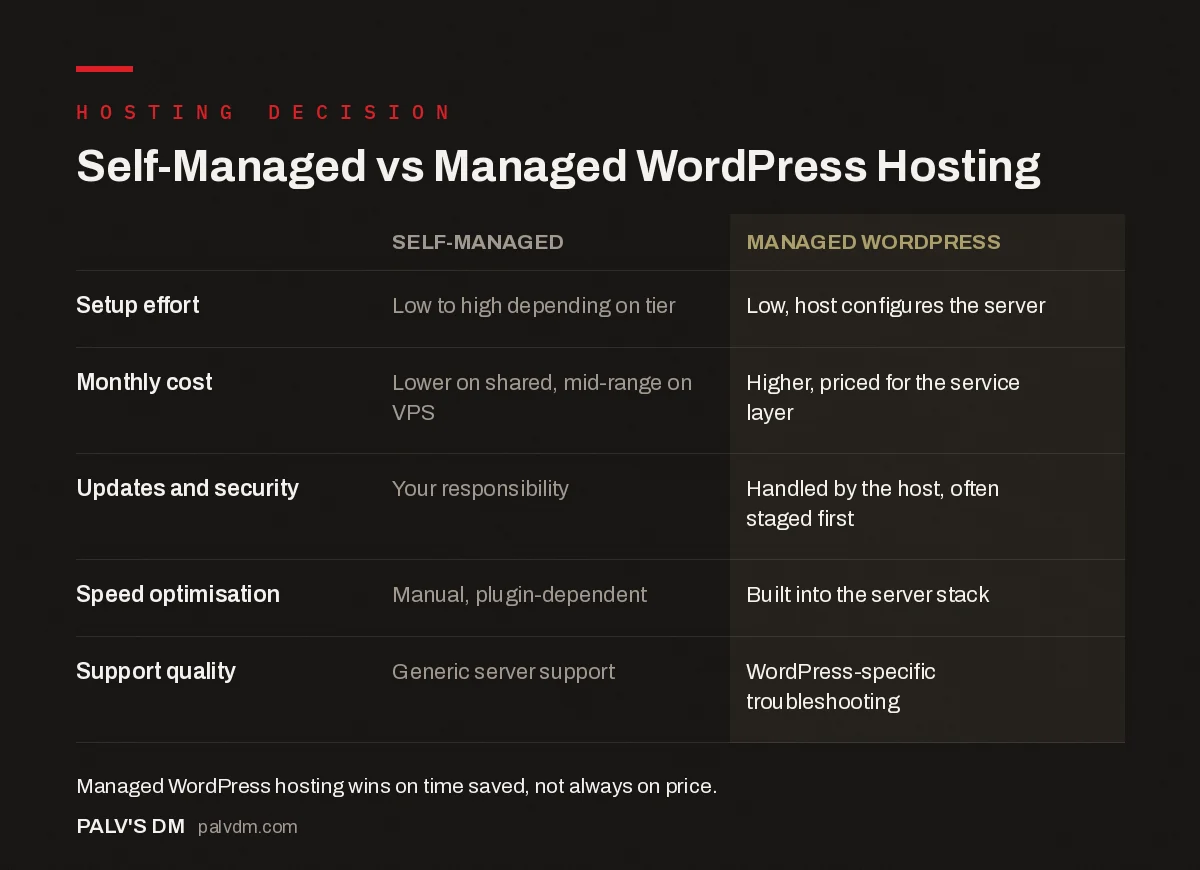
Self-Managed vs Managed WordPress Hosting
| Self-Managed | Managed WordPress | |
|---|---|---|
| Setup effort | Low to high depending on tier | Low, host configures the server |
| Monthly cost | Lower on shared, mid-range on VPS | Higher, priced for the service layer |
| Updates and security | Your responsibility | Handled by the host, often staged first |
| Speed optimisation | Manual, plugin-dependent | Built into the server stack |
| Support quality | Generic server support | WordPress-specific troubleshooting |
Yes, and it’s less painful than people expect. Moving from shared to VPS, or from either into managed WordPress hosting, means copying files and the database to the new environment and repointing DNS once everything checks out. Most hosts offer a migration service, free or paid, and a competent developer can usually complete the move with under an hour of actual downtime if it’s scheduled outside peak traffic. The mistake is waiting until the current hosting is visibly failing before starting the move. Migrate on your schedule, not during an outage.
Does the data centre’s location actually matter?
For an Indian business targeting Indian customers, yes, and it gets overlooked constantly. A site hosted in a US data centre adds real round-trip latency for a visitor in Mumbai or Ahmedabad, on top of whatever else is slowing the page down. That latency shows up directly in Core Web Vitals, particularly Largest Contentful Paint, and Google measures that from the visitor’s location, not from wherever your server happens to sit.
Most quality hosts, at every tier from shared to managed, now offer a Mumbai or Singapore region. If yours doesn’t, or charges a premium for it that erases the savings you thought you were getting on a cheap shared plan, that’s a real cost, not a rounding error. Check the data centre location before comparing prices, not after.
A content delivery network narrows this gap regardless of hosting tier, caching static assets closer to the visitor. But a CDN masks server response time for cached content. It does nothing for the initial server response on dynamic pages, form submissions, or anything that has to hit the origin server directly. Don’t treat a CDN as a substitute for choosing a sensibly located host.
What should actually drive the decision?
- Revenue impact of downtime. If two hours offline costs you real money or leads, shared hosting is the wrong tier regardless of price.
- Who’s available to manage the server. No in-house technical resource points you toward managed hosting, not raw VPS.
- Current traffic pattern. Consistent slow response times during normal (not peak) hours on shared hosting is the clearest signal to upgrade.
- How many sites you’re running. Agencies managing several client sites often find a VPS with proper resource allocation cheaper per site than stacking separate shared plans.
- Where your visitors actually are. A data centre on the wrong continent can undo whatever performance gain you paid extra for.
Frequently asked questions
What is the difference between shared hosting and VPS hosting?
Shared hosting puts many sites on one server sharing the same CPU, RAM and PHP workers, so heavy traffic on another account can slow yours down. VPS hosting partitions a physical server into isolated virtual machines, each with its own dedicated CPU cores, RAM and storage, so other tenants can’t touch your performance.
Is managed WordPress hosting worth the extra cost?
For most business sites, yes. You’re paying for a WordPress-tuned server stack, automatic core updates tested on staging first, WordPress-specific security hardening and support that actually understands WordPress, not generic server issues. If your time is worth more than the price difference, managed hosting usually pays for itself.
Can I upgrade from shared hosting to VPS later?
Yes, and most sites do exactly that as traffic grows. Migration involves moving files and the database to the new environment and repointing DNS, which most hosts or a developer can handle in a few hours with minimal downtime if planned during low-traffic hours.
Does VPS hosting require server management skills?
An unmanaged VPS does, since you’re responsible for server updates, security patches and configuration yourself. A managed VPS removes that burden for a higher price, which is usually the better choice unless you or someone on your team is comfortable with command-line server administration.
Which hosting type is best for a small business website?
A brochure site with modest traffic and no team member who wants to touch server settings does best on managed WordPress hosting or quality shared hosting from a WordPress-focused provider. VPS makes sense once traffic grows enough that shared hosting’s shared resources start causing slowdowns during peak hours.
Sources
- Managed WordPress Hosting vs Shared Hosting, OVHcloud
- Shared Hosting vs WordPress Hosting, Bluehost
- WordPress SEO: The Complete Configuration Guide
- WordPress Hosting in India: What to Look For
- WordPress Staging Environments: Why Every Site Needs One
- Choosing a WordPress Theme That Won’t Sabotage Core Web Vitals
Want this done on your site?
Every PalV’s DM engagement starts with a free audit of your actual website — a 12-point
crawl covering what is blocking indexation, on-page gaps against your primary keywords, speed
findings, and the three to five fixes worth making first. Delivered in two working days. No
payment details, and the findings are yours whether you hire us or not.
Get your free SEO audit
See Web Development plans and prices


