
Google Penalties: How to Tell If You Actually Have One
Only two things at Google are real penalties: manual actions and algorithmic spam enforcement. Here is how to check which one you have, in order.
Only two mechanisms at Google are genuinely penalties: a manual action, applied by a human reviewer and always announced as a notice in Search Console, and algorithmic spam enforcement, which acts on a violation of Google’s published spam policies and never notifies you at all. Everything else that feels like punishment — a core update reassessment, a competitor overtaking you, a botched deployment on your own site — is not a penalty. It has no reconsideration process and will not respond to penalty-style remedies. The first check takes thirty seconds: open Search Console, go to Security & Manual Actions, and see whether a notice is sitting there.
“Penalty” is not really Google’s word. Google’s documentation talks about manual actions and about spam policy violations, and it is careful not to describe ranking changes as punishment. The looseness of the popular term is the actual problem, because it sends site owners hunting for a rule they broke when in most traffic drops no rule was broken.
What actually counts as a Google penalty?
Three different things get called a penalty, and only two of them are one.
| Mechanism | Is it a penalty? | Are you told? | Route out |
|---|---|---|---|
| Manual action | Yes, explicitly | Yes — Search Console notice naming the problem | Fix it, then file a reconsideration request |
| Algorithmic spam enforcement | Yes, in effect | No — announced globally, never site by site | Remove the violating practice, wait for recrawl and reassessment |
| Core update movement | No | Announced globally as an update, never site-specific | Improve substantially; changes usually land with the next core update |
The distinction is not academic. A reconsideration request filed after a core update does nothing, because there is no human decision to appeal. Disavowing healthy links after a core update does nothing either, and can remove signals that were helping. The full comparison of core updates, spam updates and manual actions sets out where each response belongs.
How do you check whether you have a manual action?
Open Google Search Console, select the property, and go to Security & Manual Actions → Manual actions. If Google has taken manual action against the site, a notice appears there. It names the specific problem and states whether the action is site-wide or affects only certain URLs. If the section reports no issues detected, you do not have a manual action. There is no hidden version and no delay.
The action types Google lists include unnatural links to your site, unnatural links from your site, thin content with little or no added value, pure spam, cloaking and sneaky redirects, user-generated spam, and site reputation abuse. Each notice links to Google’s documentation on that specific violation, which is the only description of your problem you will get. Read it literally and fix exactly what it names before requesting reconsideration — a rejected request costs weeks. Manual action versus algorithmic suppression covers the two paths in detail.
What does algorithmic spam enforcement look like?
Algorithmic spam enforcement is Google’s systems detecting a published policy violation and demoting the affected pages or site without any notification. Google announces spam updates globally on its Search Status Dashboard, but never tells an individual site it was caught by one.
The policies are specific and published: cloaking, doorway pages, hacked content, hidden text and keyword stuffing, link spam, scraped content, sneaky redirects, thin affiliate pages, user-generated spam, plus the three added in March 2024 — expired domain abuse, scaled content abuse and site reputation abuse. If a spam update coincided with your drop, the honest question is whether anything on your site matches one of those descriptions.
Spam rollouts vary enormously in length. The August 2025 spam update ran nearly four weeks. The March 2026 spam update started on 24 March and finished on 25 March, under 24 hours. The June 2026 spam update ran 24 to 26 June, roughly two days. Google announced no new spam policies with either 2026 update, which points to enforcement of existing rules rather than a change in what counts as spam.
Why is a core update not a penalty?
A core update is a broad reassessment of how Google’s ranking systems judge relevance and quality across the whole index. Google describes each one in the same terms: “a regular update designed to better surface relevant, satisfying content for searchers from all types of sites.” Nothing is aimed at your domain, and losing positions can happen purely because competing pages were reassessed upward.
Both 2026 core updates ran twelve days — 27 March to 8 April, and 21 May to 2 June. If your drop began on one of those dates, you are looking at a reassessment, not enforcement. Why core updates are not penalties explains why the distinction changes the work, and what a core update actually is covers the mechanics.
How do you tell a penalty from an ordinary ranking drop?
- Check Security & Manual Actions first. A notice ends the diagnosis immediately. No notice rules out the most feared case.
- Date the drop precisely. Use Search Console’s daily view, not a monthly rollup, and find the first day the decline appears.
- Check that date against Google’s Search Status Dashboard. Only Google’s dashboard confirms an update was running. Volatility trackers show that results moved, not that Google moved them — see confirmed versus unconfirmed updates.
- Look at the shape. Manual actions and spam enforcement tend to produce sharp, deep drops on the offending pages or the whole site at once. Core update movement is usually patterned — a content type, a template, a query cluster losing while the rest holds.
- Audit yourself against the spam policies honestly. Bought links, pages published at volume to fill keyword gaps, a subfolder rented to a third party. If one applies, you have your answer regardless of the dates.
- Rule out your own site last, and expect to find it. Deployments, robots.txt edits, plugin changes and migrations cause more drops than algorithms do. Was it an update or was it you walks the sequence, and the twelve traffic-drop diagnoses order them by how often each turns out to be the cause.
How long does each one take to recover?
Manual action recovery is the most predictable of the three. Fix exactly what the notice names, document what you changed, file a reconsideration request, and a person reviews it — typically within a few weeks. It is the only case with a defined process and a defined end.
Algorithmic spam recovery has no notification either way. After the violating practice is removed, Google’s systems have to recrawl the affected pages and reassess them, and demotions do not lift the moment you delete a page. Plan in months.
Core update recovery generally waits for the next core update. Google states plainly that no specific actions guarantee recovery, that a drop does not necessarily mean something is wrong, and that the largest changes tend to arrive with a subsequent core update rather than between them. The 30-day recovery plan sets a sequence that respects that timeline instead of fighting it.
What not to do while you are diagnosing
- Do not file a reconsideration request without a manual action. There is nothing to reconsider and no one reads it.
- Do not run a blanket disavow. Disavowing links is appropriate for a manual action naming unnatural links, or where you knowingly bought links. As a reflex after a ranking drop it is at best useless.
- Do not delete pages in a panic. Removing genuinely thin content is legitimate work; deleting pages that slipped three positions destroys your ability to attribute anything later.
- Do not change everything at once. If you rewrite content, alter internal links and change templates in the same week, you will never know which one mattered.
Most sites that believe they have a penalty do not have one. Thirty seconds in Search Console settles the question that people spend weeks speculating about.
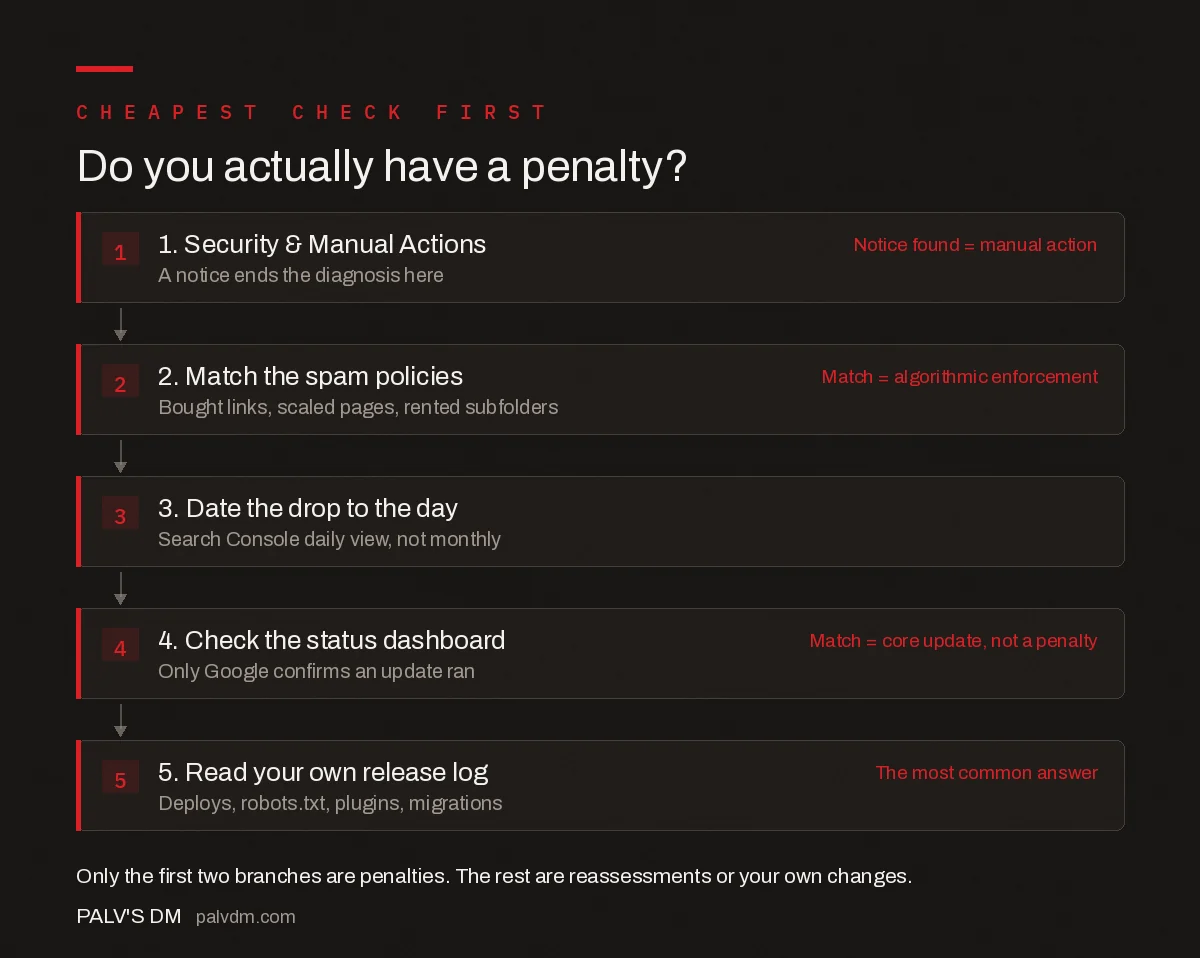
Do you actually have a penalty?
- 1. Security & Manual Actions. A notice ends the diagnosis here. Notice found = manual action
- 2. Match the spam policies. Bought links, scaled pages, rented subfolders. Match = algorithmic enforcement
- 3. Date the drop to the day. Search Console daily view, not monthly.
- 4. Check the status dashboard. Only Google confirms an update ran. Match = core update, not a penalty
- 5. Read your own release log. Deploys, robots.txt, plugins, migrations. The most common answer
Frequently asked questions
How do I know if my site has a Google penalty?
Open Google Search Console and go to Security and Manual Actions. If a manual action exists, a notice appears there naming the violation and whether it applies site-wide or to specific URLs. If that section is empty, you have no manual action. The only other true penalty is algorithmic spam enforcement, which is never notified and must be diagnosed by auditing your site against Google’s published spam policies.
Is a Google core update a penalty?
No. A core update is a broad reassessment of how Google’s ranking systems evaluate content across the whole index, not enforcement against a violation. Nothing is flagged against your site and there is no reconsideration process. A site can lose several positions without doing anything wrong, simply because competing pages were reassessed upward during the rollout.
How long does it take to recover from a Google penalty?
Manual action recovery is the most predictable: fix exactly what the notice names, file a reconsideration request, and a human reviewer typically responds within a few weeks. Algorithmic spam recovery has no notification and requires Google to recrawl and reassess after the violating practice is removed, which usually takes months rather than days.
Should I disavow links after a ranking drop?
Generally no. Disavowing links is the right tool when you have a manual action naming unnatural links, or when you knowingly acquired links that break Google’s link spam policies. After an ordinary ranking drop there is no link violation to undo, and disavowing legitimate links can remove signals that were helping the site.
What are the most common Google manual action types?
The Manual Actions report in Search Console lists types including unnatural links to your site, unnatural links from your site, thin content with little or no added value, pure spam, cloaking and sneaky redirects, user-generated spam, and site reputation abuse. Each notice links to Google’s documentation for that specific violation, which is the only description of the problem you receive.
Can Google penalise a site without telling you?
Yes, through algorithmic spam enforcement. Google announces spam updates globally on its Search Status Dashboard but never tells an individual site it was affected. Only manual actions, applied by a human reviewer, produce a direct notice in Search Console. That is why the practical diagnosis starts with the Manual Actions report and then moves to an honest audit against the published spam policies.
Sources
- Manual Actions report — Search Console Help
- Spam policies for Google web search
- Google core updates and your website — Search Central
- Google Search Status Dashboard
Want this done on your site?
Every PalV’s DM engagement starts with a free audit of your actual website — a 12-point
crawl covering what is blocking indexation, on-page gaps against your primary keywords, speed
findings, and the three to five fixes worth making first. Delivered in two working days. No
payment details, and the findings are yours whether you hire us or not.


