
How Search Engines Work: Crawling, Indexing and Ranking Explained
Search engines work in three stages: crawling, indexing and serving. What happens at each, where pages fail, and what that means for your site.
Search engines work in three stages: crawling, indexing and serving. Crawling is downloading pages found on the web; indexing is analysing and storing what those pages contain; serving is matching a person’s query against the index and ordering the results. Google documents these three stages by name, and states plainly that “Google doesn’t accept payment to crawl a site more frequently, or rank it higher” and that “ranking is done programmatically”. A page must clear all three stages to appear in search results, and a page can fail at any one of them for entirely different reasons.
That last point is what makes the three-stage model practically useful rather than trivia. “We do not rank for this term” and “this page has never been crawled” look identical in a traffic report and require completely different fixes. Knowing which stage a page died at is most of the diagnosis.
Stage one: how does a search engine crawl the web?
Crawling is the process of discovering URLs and downloading their content. Google’s crawler, Googlebot, works from a list of known URLs, requests each page, and downloads the text, images and video it finds.
Discovery happens in two main ways. Googlebot follows links from pages it already knows about, and it reads URLs submitted in an XML sitemap. A page with no internal links pointing to it and no sitemap entry may simply never be discovered — it is not being rejected, it is invisible. That is why internal linking and a properly maintained sitemap are technical prerequisites rather than optimisations.
Crawling can also be prevented deliberately or accidentally. A robots.txt directive can disallow a path, a server can return errors, or a page can be so slow that the crawler gives up. Google describes crawl rate as a function of two things: what your server can handle without degrading, and how much demand Google has for your content. On large sites this becomes a real constraint, which is what crawl budget actually refers to — and on sites under a few thousand URLs it is almost never the problem people think it is. Misconfigured robots.txt rules block far more pages than crawl capacity ever does.
Stage two: what happens during indexing?
Indexing is where a downloaded page becomes something a search engine can retrieve. Google analyses the text, the images and video files, and the page’s layout and tags, then works out what the page is about.
One step in indexing surprises people: canonicalisation. When several pages have similar or identical content, Google groups them and selects one as the canonical — the version it will show in results. Your rel="canonical" tag is a signal in that decision, not a command. Google can and does choose differently.
Indexing also includes rendering. Modern pages assemble much of their content with JavaScript, and Google runs the page in a browser to see the finished result. If content only appears after a script that fails, times out, or depends on a user action, the indexed version of your page may contain far less than what you see. JavaScript and SEO covers how to check what Google actually stored.
Crucially, Google states directly that it does not guarantee content will be crawled, indexed or served. Indexing is a decision, not an entitlement. Pages get crawled and then left out because they duplicate another page, carry a noindex directive, or are judged to add too little to be worth storing — which is exactly what the “Crawled — currently not indexed” status in Search Console is telling you.
Stage three: how does a search engine decide what to rank?
Serving is the stage most people mean when they say “SEO”. When someone searches, the engine matches the query against its index and orders the results it considers most relevant and useful.
Google is explicit that this ordering is programmatic and cannot be bought: “Google doesn’t accept payment to rank pages higher.” It is also explicit that context shapes results, so the same query can return different results depending on the searcher’s location, language and device. Two people searching the same words are frequently not seeing the same page.
The systems doing the ordering weigh hundreds of signals, and Google has never published a ranked list of them. What Google does publish is guidance on what those systems are trying to reward: content that demonstrates experience, expertise, authoritativeness and trustworthiness, and that provides substantial value compared with other pages already in the results. What we actually know about Google’s ranking factors separates the documented from the folklore, and what E-E-A-T asks for covers the quality framework in detail.
Why does a page get crawled but not indexed?
Because crawling and indexing are separate decisions, and passing the first does not commit a search engine to the second. This is the single most common confusion in technical SEO, and Search Console reports the two states separately for exactly that reason.
The usual causes, in rough order of frequency:
- The page duplicates another page. Google grouped it with a near-identical URL and chose the other one as canonical. Common on ecommerce filters, paginated archives and tag pages.
- The page carries a noindex directive. Often left over from a staging environment or applied site-wide by a plugin setting nobody remembers changing.
- The page is judged too thin to store. A page that restates what is already indexed elsewhere gives Google no reason to keep a copy.
- The page was discovered but never fetched. Search Console reports this as “Discovered — currently not indexed”, which is a different problem with a different fix — see the Search Console page indexing report.
If a page is not indexed, no amount of on-page optimisation will help it rank, because it is not in the pool being ranked. Why a page is not indexed and how to get pages indexed faster deal with the fixes in order.
Does mobile change how crawling works?
Yes, and it changed the default. Google indexes with a mobile user agent under mobile-first indexing, which means the mobile version of a page is the version that gets indexed and ranked.
The practical consequence is that content hidden, truncated or omitted from the mobile rendering of a page is content Google may not index at all, even if it is fully present on desktop. Sites that serve a stripped-down mobile experience effectively publish a stripped-down page to the index. Mobile-first indexing covers what to check.
Where do AI search engines fit into this?
Generative engines add a retrieval and synthesis layer on top of a similar pipeline rather than replacing it. They still need to fetch pages, store a representation of what those pages say, and select sources when composing an answer.
Two differences matter for site owners. First, the crawlers are different: AI systems use their own user agents, and a robots.txt that permits Googlebot does not automatically permit them. Second, the unit of selection is smaller. Where Google’s serving stage returns a ranked list of pages, a generative engine assembles an answer from passages and cites the sources it drew on — so a self-contained, clearly attributed section can be cited even when the page as a whole is not the top result. How SEO works for AI search and the question of how AI engines choose what to cite cover the mechanics.
What does the three-stage model mean for your site?
- Diagnose by stage, not by symptom. Before asking why a page does not rank, confirm it is indexed. Before asking why it is not indexed, confirm it was crawled. Search Console’s page indexing report answers both in about a minute.
- Fix crawling problems first. They are cheap, binary and block everything downstream. A blocked path or a broken sitemap wastes every hour spent on content behind it.
- Do not treat indexing as automatic. Google says explicitly that it cannot guarantee content will be crawled, indexed or served. Publishing is not the same as being in the index.
- Assume nothing about ranking can be purchased. Google states that it does not accept payment for crawling, indexing or ranking. Anyone offering a paid shortcut into the organic results is describing something that does not exist.
- Build for the serving stage last. Relevance, expertise and genuine added value only matter for pages that made it through the first two stages. The technical SEO guide works through the sequence properly.
One last framing that saves arguments. Crawling, indexing and serving are three gates, and each one has a different owner inside most organisations: crawling is usually a server and configuration question, indexing is usually a duplication and quality question, and serving is an editorial question. A team that treats all three as “SEO work” tends to send every problem to the same person, who can only fix one of them.
The short version: a search engine is a pipeline, not a judge. Most pages that “do not rank” never reached the stage where ranking happens, and finding out which stage they stopped at costs a few minutes and changes what you should do next.
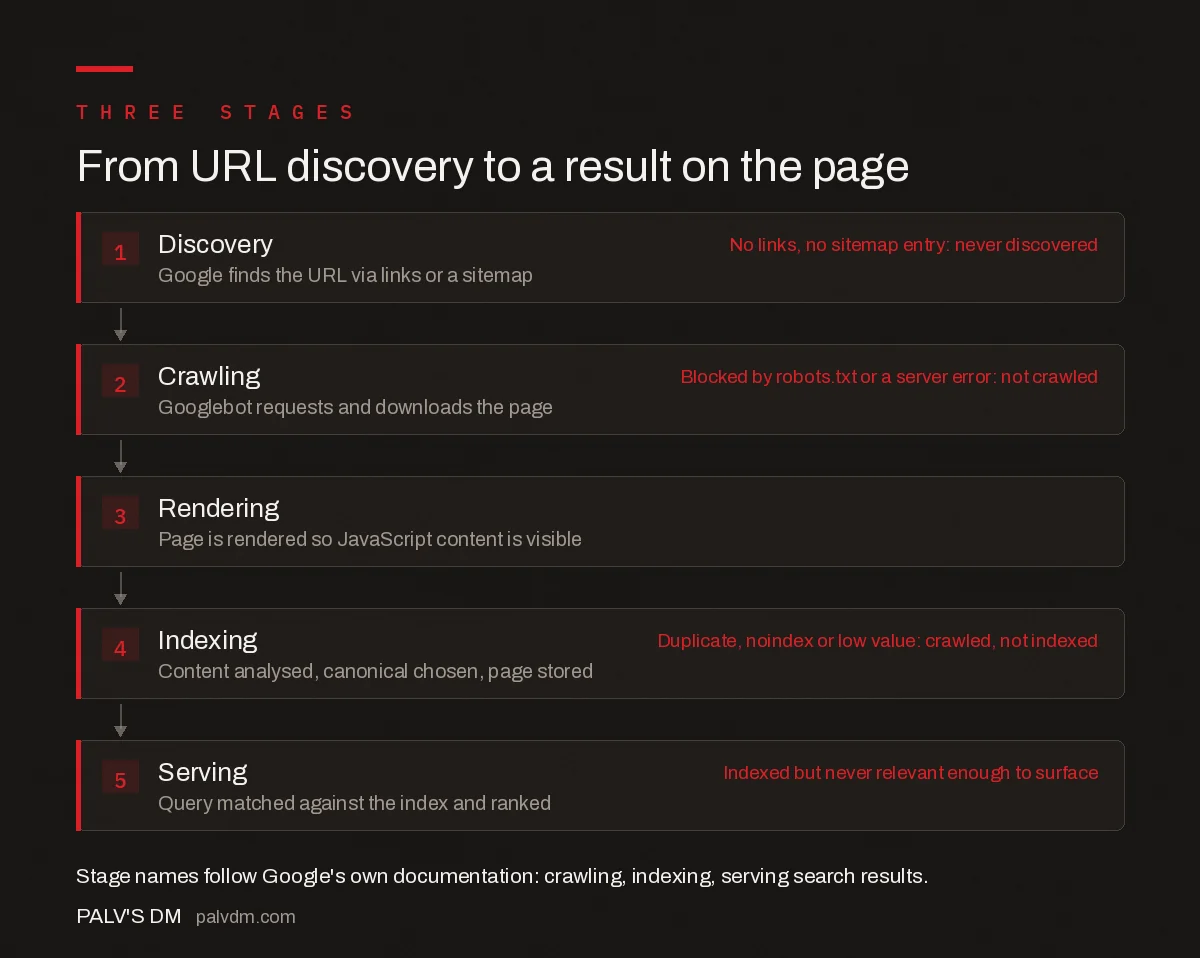
From URL discovery to a result on the page
- Discovery. Google finds the URL via links or a sitemap. No links, no sitemap entry: never discovered
- Crawling. Googlebot requests and downloads the page. Blocked by robots.txt or a server error: not crawled
- Rendering. Page is rendered so JavaScript content is visible.
- Indexing. Content analysed, canonical chosen, page stored. Duplicate, noindex or low value: crawled, not indexed
- Serving. Query matched against the index and ranked. Indexed but never relevant enough to surface
Frequently asked questions
How do search engines work?
Search engines work in three stages. Crawling discovers URLs and downloads their content using an automated crawler such as Googlebot. Indexing analyses that content, selects a canonical version among duplicates, and stores the page in a large database. Serving matches a person’s query against the index and orders the results. A page must pass all three stages to appear in search results.
What is the difference between crawling and indexing?
Crawling is a search engine downloading a page. Indexing is deciding to analyse and store it so it can be returned for queries. They are separate decisions, which is why a page can be crawled and still never indexed, usually because it duplicates another page, carries a noindex directive, or adds too little to be worth storing.
How does Google decide which pages to rank first?
Google matches a query against its index and orders results programmatically using hundreds of signals, weighted by context such as the searcher’s location, language and device. Google has never published a ranked list of those signals. It does publish guidance on what the systems reward: content showing genuine experience and expertise that adds substantial value beyond pages already ranking.
Can you pay Google to rank higher in organic results?
No. Google’s documentation states directly that it does not accept payment to crawl a site more frequently or to rank it higher, and that ranking is done programmatically. Google Ads places paid results in labelled advertising slots, separately from the organic listings. Any service offering paid placement in organic results is describing something that does not exist.
Why is my page crawled but not indexed?
Google crawled the page and decided not to store it. The common causes are duplication, where Google grouped the URL with a similar page and chose the other as canonical; a noindex directive, often left over from staging or applied by a plugin; or a judgement that the page adds too little beyond what is already indexed. Search Console reports this status explicitly.
Does Google index the mobile or desktop version of my site?
The mobile version. Under mobile-first indexing Google crawls and indexes with a mobile user agent, so the mobile rendering of a page is what gets stored and ranked. Content that is hidden, truncated or omitted on mobile may not be indexed at all, even when it is fully present in the desktop version of the same page.
Sources
- In-depth guide to how Google Search works — Search Central
- Overview of Google crawlers and fetchers — Search Central
- Large site owner's guide to managing your crawl budget — Search Central
- Creating helpful, reliable, people-first content — Search Central
Want this done on your site?
Every PalV’s DM engagement starts with a free audit of your actual website — a 12-point
crawl covering what is blocking indexation, on-page gaps against your primary keywords, speed
findings, and the three to five fixes worth making first. Delivered in two working days. No
payment details, and the findings are yours whether you hire us or not.


