The Workbooks Behind Our SEO Delivery
See the SEO process documentation behind every account: the six live workbooks — keyword, technical, content, change, link and reporting — you get from day one.

SEO process documentation, in our shop, means six working files: a keyword and priority workbook, a technical audit log, a content production tracker, a change log, a link and outreach log, and a monthly reporting workbook. These aren’t decorative — every task a strategist, writer or developer does on your account traces back to one of them, and you can ask to see any one at any point in the engagement. If an agency can’t show you the paper trail behind a ranking claim, there usually isn’t one.
Key takeaway
- Our SEO process documentation runs on six live workbooks, not a single master deck — a keyword workbook, technical audit log, content tracker, change log, link log and reporting workbook.
- Each workbook exists because a specific failure mode kept showing up on accounts we inherited: lost keyword rationale, undocumented site changes, orphaned content briefs, and reports nobody could trace back to source data.
- You get access to all six from day one, and you keep them if you ever leave — that’s the actual test of whether an agency’s documentation is real or theatre.
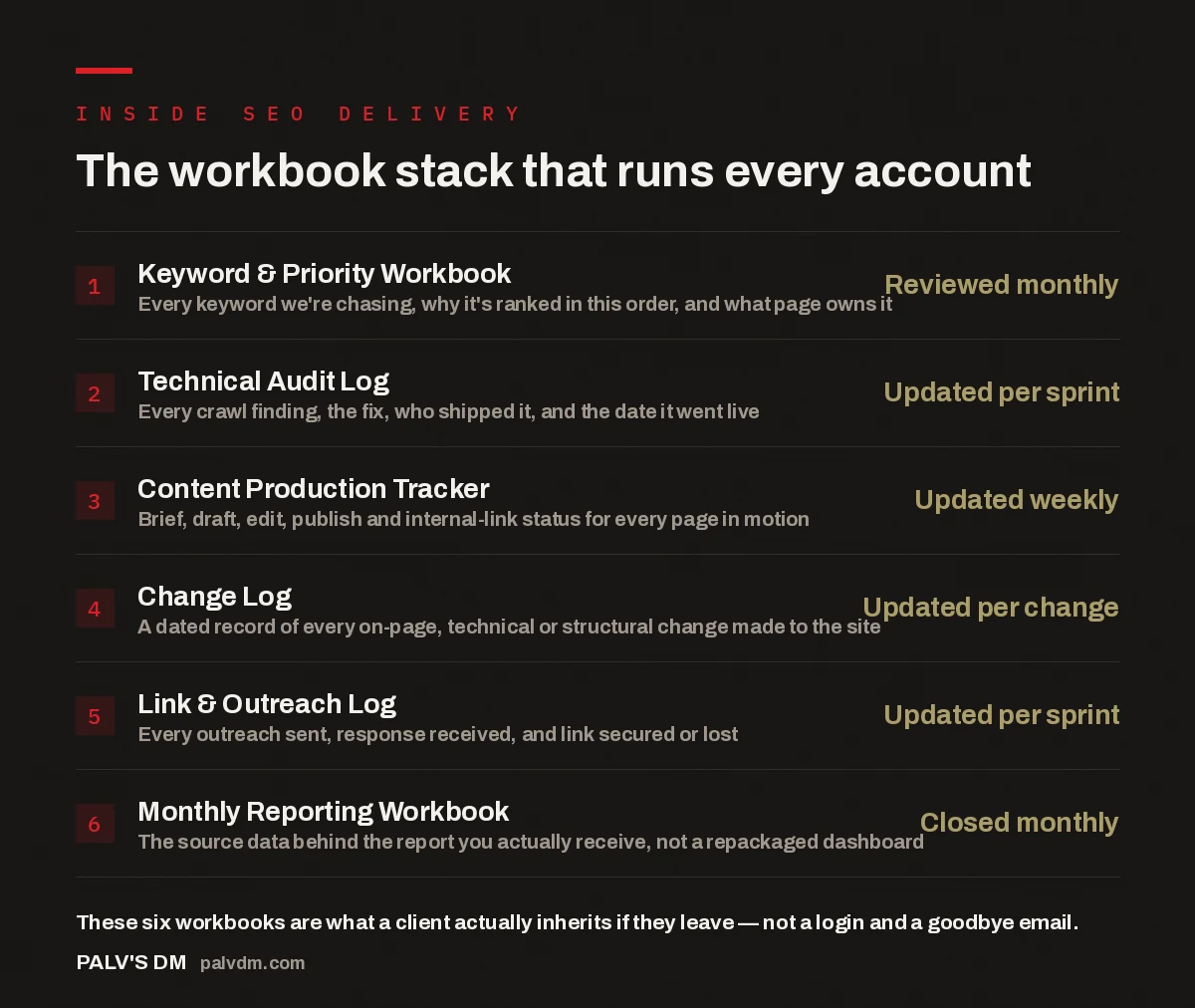
The workbook stack that runs every account
- Keyword & Priority Workbook — Reviewed monthly. Every keyword we’re chasing, why it’s ranked in this order, and what page owns it.
- Technical Audit Log — Updated per sprint. Every crawl finding, the fix, who shipped it, and the date it went live.
- Content Production Tracker — Updated weekly. Brief, draft, edit, publish and internal-link status for every page in motion.
- Change Log — Updated per change. A dated record of every on-page, technical or structural change made to the site.
- Link & Outreach Log — Updated per sprint. Every outreach sent, response received, and link secured or lost.
- Monthly Reporting Workbook — Closed monthly. The source data behind the report you actually receive, not a repackaged dashboard.
Why does SEO delivery need documentation at all?
SEO work is slow and cumulative. A page optimised in month two might not show movement until month five, and by then three other things have changed on the site — a template update, a new competitor, an algorithm shift noticed in the SERPs. Without a written record of what was done and why, nobody can tell whether the eventual movement came from the work or from something unrelated. Documentation is what lets you separate cause from coincidence months later, which is the opposite of what most agencies want, since ambiguity is easier to sell than a clear trail.
The other reason is continuity. Accounts change hands — a strategist moves teams, a client swaps contacts, a retainer pauses and resumes months later. If the reasoning for a decision only lived in someone’s head or an archived chat thread, it’s gone once that person is unavailable. A workbook doesn’t forget why a page was deprioritised; it’s the difference between an account that runs on institutional memory and one that runs on a single irreplaceable person.
What’s actually inside the keyword and priority workbook?
The keyword and priority workbook is the account’s spine. It lists every keyword in scope, the page that owns or is meant to own it, the funnel stage, and — critically — the reasoning for its place in the queue. A keyword isn’t chased just because it has volume; it’s chased because of where it sits relative to intent, competition, and what the business sells. When a client asks “why haven’t you touched this term yet,” the answer is in the workbook, not in someone’s memory of a call from months ago.
This workbook also carries the ownership map — which page is the canonical target for which keyword, so two pages never end up quietly competing for the same query. That kind of cannibalisation is easy to create by accident and hard to spot without one document showing the full keyword-to-page mapping.
How does the technical audit log prevent repeat work?
Every crawl turns up findings — broken canonical tags, orphaned pages, slow templates, duplicate title tags, whatever the site is doing that week. The log records each finding with a date, the fix applied, who applied it, and when it shipped. Without this, technical SEO turns into groundhog day: the same issue gets “found” again months later by a different auditor with no idea it was already addressed, and the client pays twice for one discovery.
The log also protects against regressions. Templates get redesigned, plugins get updated, developers push changes outside the SEO team’s visibility. When a metric drops unexpectedly, checking the log against the change log for anything landed around that date is a five-minute cross-reference instead of a multi-day diagnostic from scratch.
The workbook isn’t there to impress a client in a review call. It’s there so that six months from now, when a metric moves and nobody remembers why, the answer takes five minutes to find instead of five days.
Palash, Founder, PalV’s DM
What keeps content from disappearing into a black hole?
The content production tracker follows every page from brief through publication and past it. Most agencies can show a content calendar of what’s planned; fewer can show what happened to a brief that was written, handed to a writer, and then never published because a priority shifted. That’s the gap this tracker closes — brief, draft, edit and publish status, plus whether internal links from existing pages were added once the piece went live. A page that’s “published” but never linked from elsewhere is functionally invisible, and the tracker catches that before it becomes a wasted brief. It matters even more for clients running SEO without an in-house content team, since there’s no internal editor cross-checking whether a brief made it to a published, linked page.
Why does every site change get its own log entry?
The change log is the simplest workbook and the one clients notice fastest once it’s missing. Every meaningful change — a title tag rewrite, a schema addition, a URL structure update, a redirect rule — gets a dated entry with a short description of what changed and why. When a ranking moves, up or down, the first question is always “what changed, and when,” and the log answers that in seconds instead of a dig through CMS revision history that may not go back far enough. This is also what makes our weekly SEO sprint auditable — changes get recorded as they ship, not reconstructed weeks later from memory.
How does the link and outreach log stop wasted follow-ups?
Link building generates a lot of correspondence — outreach sent, replies received, links placed, links that fell through. The log tracks each contact so nobody sends a second cold pitch to a site that already declined, or misses a follow-up with one that showed interest. It also records which links were secured and where, becoming the source data for reporting rather than a claim taken on trust — and it records links that were lost, so a dropped link from a redesigned partner site or an expired domain shows up here first, not months later as a confusing rankings dip.
What makes the monthly reporting workbook different from a dashboard?
A dashboard shows you numbers. The monthly reporting workbook shows where those numbers came from — which keywords moved, which pages they’re tied to, and which of the other five workbooks explains the movement. This is covered in more detail in how we report on SEO work every month, but the short version: nothing in the monthly report should be a number you can’t trace to a specific action elsewhere in the stack. If a metric moved and nothing explains it, that gets flagged as unexplained rather than retrofitted into a tidy narrative.
Who actually gets access to these workbooks?
You do, from the start of the engagement, not on request and not only at offboarding. The workbooks live in a shared workspace under your account, the same way we handle every login and asset — a policy covered in why you keep every account, login and asset. On the team side, access maps to who’s actually doing the work; you can see exactly who works on your account and what each person does, and their entries in the workbooks keep that division of labour visible rather than theoretical.
This matters most when an account has a rocky history. Sites inherited from a prior agency almost never come with usable documentation — see inheriting a site with years of undocumented SEO — and the workbook stack is largely a reaction to how much time that reconstruction wastes. Building it on day one is cheaper than rebuilding it later from guesswork.
What happens to the workbooks if you leave?
You keep them. Not summaries, not a PDF export made for the occasion — the actual working files, with full history, in the same state the team used them. That’s a simple test for whether an agency’s documentation is real: ask what you’d receive if you left tomorrow. If the honest answer is “a final report and a login,” the documentation existed for internal use, not for you. If it’s “everything, as-is,” the process was built assuming you’d see all of it — which is how it should be built in the first place.
See the process on your own account
Want to see this applied to your actual site rather than in the abstract? Start with an audit — it will show you exactly what the workbook stack would flag in the first sprint.
Frequently asked questions
What is SEO process documentation, exactly?
It’s the written record of what work was done on a site, when, by whom, and why — covering keyword decisions, technical fixes, content production, site changes, link building, and reporting. It’s separate from the deliverables themselves; it’s the trail that explains how they came to be and lets anyone trace a result back to a specific action.
Do I get to see these workbooks, or are they internal only?
You get access from the start of the engagement, in the same shared workspace the team uses. There’s no separate client-facing version that’s been simplified or edited down — you see the same working files the strategists and developers are updating in real time.
How often are the workbooks updated?
It varies by workbook. The change log and technical audit log update per sprint, tied directly to work as it ships. The content production tracker updates weekly. The keyword workbook and reporting workbook are closed monthly, since priorities and reporting should reflect a full month, not a single week’s noise.
What happens to the workbooks if I pause or cancel my plan?
They stay yours. Since the workbooks live under your account rather than an internal agency file, pausing or leaving doesn’t cut off access — you keep the full history, not a snapshot from the moment you left. Picking work back up later, with us or someone else, starts from that record instead of from zero.
Why don’t more agencies document their SEO process this way?
It’s overhead that doesn’t show up in a sales pitch, and it creates accountability that’s easier to avoid. A documented process means every claim about “why rankings moved” has to hold up against a written record, a harder standard than a verbal explanation on a monthly call. Maintaining six live workbooks per account takes real discipline — it’s simpler, short-term, to skip it.
Short version: our SEO process documentation is six live workbooks — keyword and priority, technical audit, content production, change log, link and outreach, and monthly reporting — that you can access from day one and keep in full if you ever leave. They exist because undocumented SEO work is unaccountable SEO work: nobody can separate what caused a result from what merely coincided with it, and nobody can pick up where a previous person left off. It’s overhead we’ve chosen to carry so every claim we make about your site traces back to a dated, written record rather than a memory of a call.